12
EN
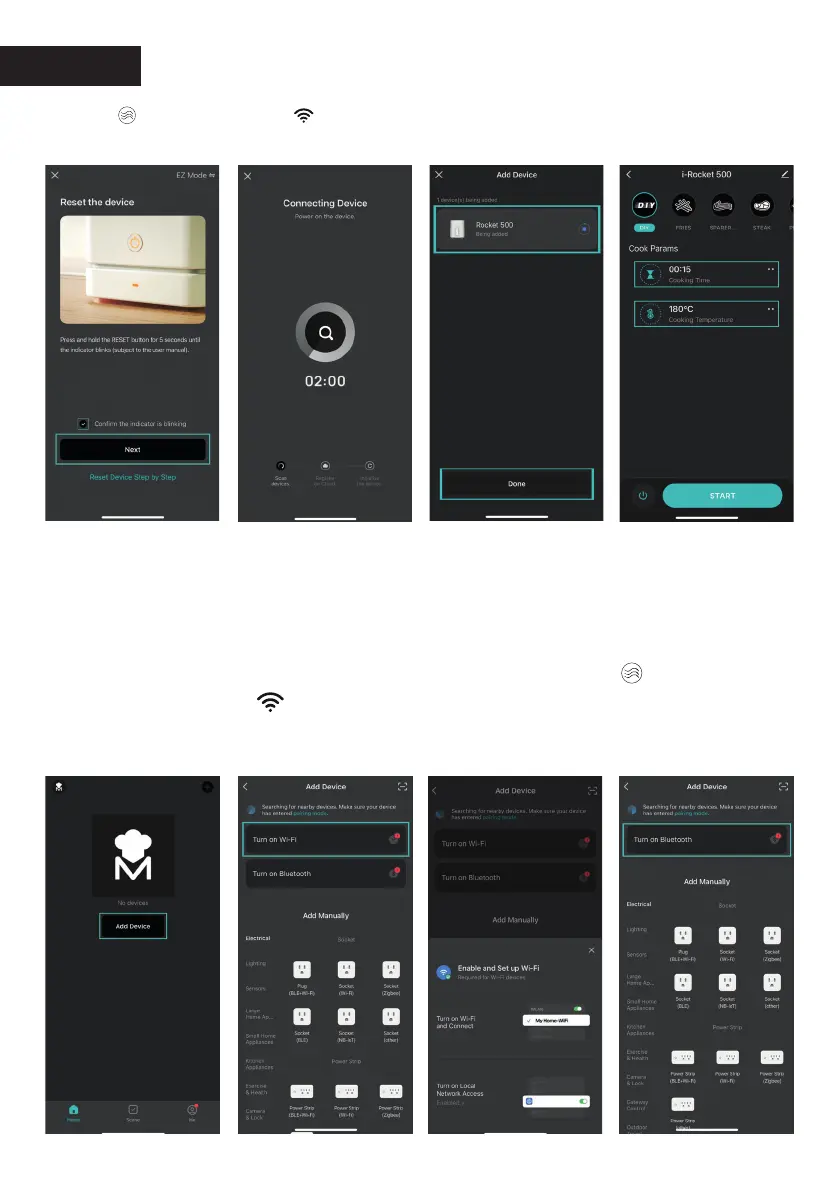
Automatic Add:
Click the central Add device button or the plus
icon in the upper right corner of the device list page. This action will
allow you to enter the interface to add a device. Connect the WIFI
and Bluetooth of the cell phone and allow the APP to use these
permissions (WIFI and Bluetooth). Press the button " " for 5S until
the WIFI indicator " " starts ashing on the display of your air fryer.
Wait for the device to be paired and once connected,
click on “Done”.
Click on: “Turn on WiFi”
Click on:
“Turn on Bluetooth”
Click on:
“Add to device”
You can set the time
and temperature of all
programs by clicking
on the icons.
Press the " " button for 5S until the " " WIFI indicator
starts ashing on the display of your air fryer. Then press
"Next".



 To Next Page