5
MDMAXLITEA
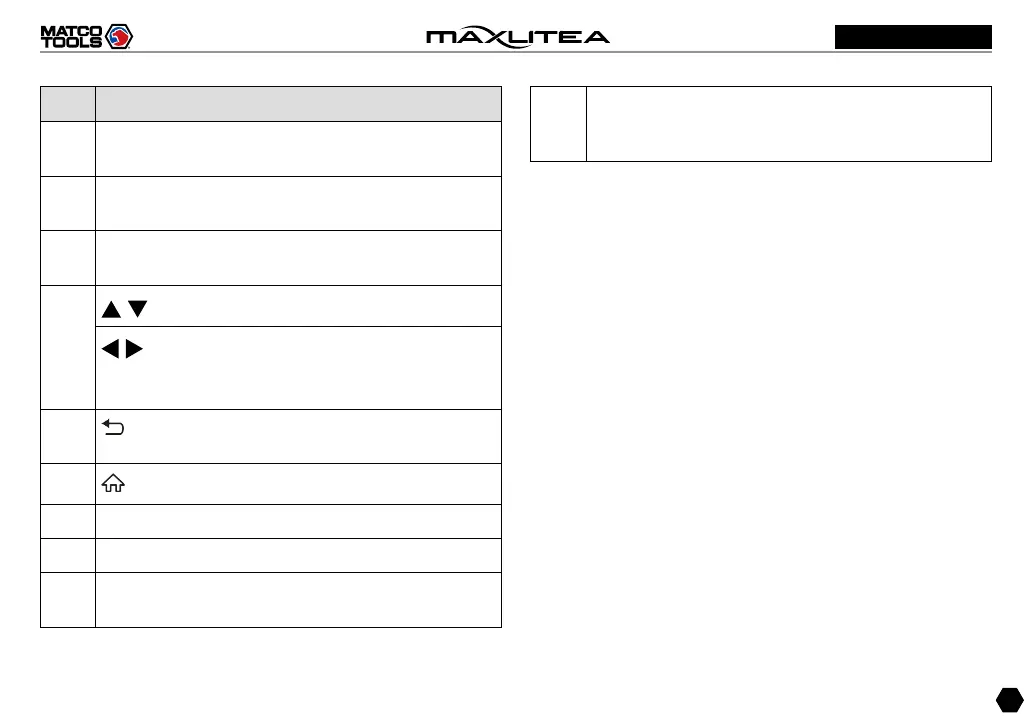
No. Name & Descriptions
1
DB-15 diagnostic connector -- To connect to vehicle's
DLC (Data Link Connector) via diagnostic cable.
2
Power/Screen Lock Button -- To turn the tablet on/off
with long press, or lock the screen with short press.
3
OK -- Confirms a selection (or action) from a menu
list.
4
/
-- Move cursor up and down for selection.
/
-- Move cursor left or right for selection; Or
turn page up and down when more than one page
is displayed.
5
BACK -- Exit the current program or return to the
previous screen.
6
HOME
-- Press to the home(Job menu) screen.
7 Audio Speaker
8 5" Capacitive Touch Screen
9
Charging LED -- Red means charging and Green
means fully charged.
10
Charging/Data I/O Port -- Connects the power
adapter to the AC outlet to charge the tablet /
Connects to a PC to exchange data.



 To Next Page