18
MDMAXLITEA
diagnostic report.
• To perform other functions, tap on “Quick access” to
directly go to the function selection screen. Choose the
desired one to start a new diagnostic session.
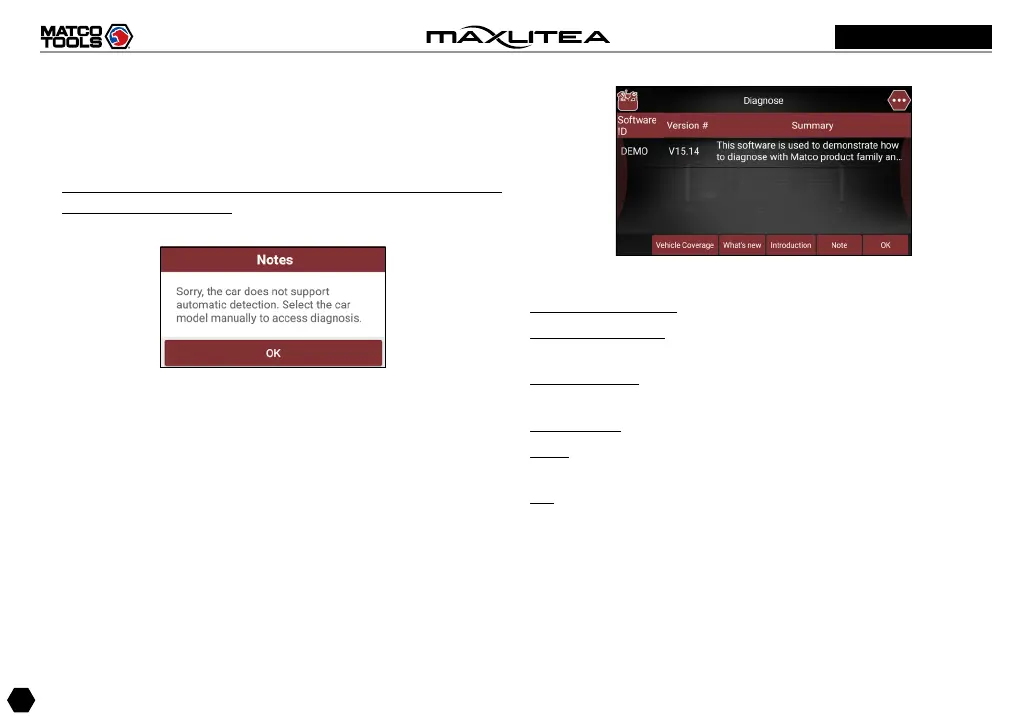
2). If the scanned or entered VIN can not be retrieved from
the server database, the following pop-up message
displays:
Fig. 5-12
In this case, select the vehicle model manually to perform
vehicle diagnosis.
5.2.2 Manual Diagnosis
Take Demo as an example to demonstrate how to diagnose a
vehicle.
1). Select diagnostic software version: Tap on the “DEMO” to
go to Step 2.
Fig. 5-13
On-screen Buttons:
Vehicle Coverage: Tap to view the vehicle models that the
current diagnostic software covers.
What’s new: Tap to view the optimized items and
enhancements.
Introduction: Tap to check the software function list.
Note: Tap to read some precautions on using the current
diagnostic software.
OK: Tap on it to go to next step.
2). Select test item: Select the desired test item to proceed.



 To Next Page