8
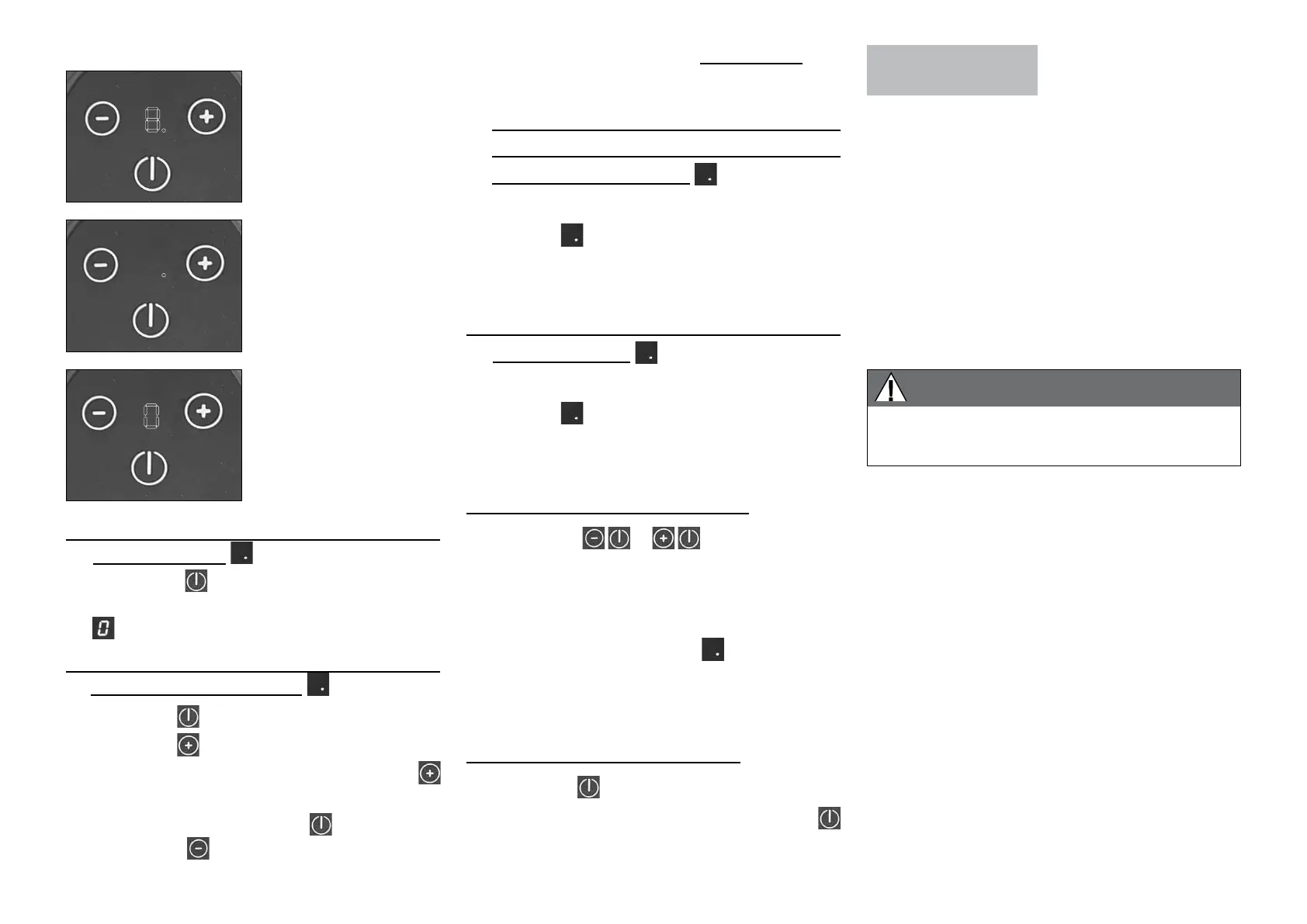
• Screen displays
A - Stand mixer plugged in and in standby mode
(dot on the screen)
.
➊ Press the button for 5 seconds to go into
active mode. A zero will appear on the screen
.
B - Switching the motor on once the mixer is in
standby mode (dot on screen
).
➊ Press the button.
➋ Press the
button.
➌ To move up to the next speed, press the
button
.
➍ To stop the motor, use the button or else
press the
button, either continuously or
repeatedly, until it goes into standby.
The screen comes on
as soon as the mixer is
connected to the mains
supply. After 4 or 5
seconds, it goes into
standby mode.
8.
Standby mode:
Dot displayed on the
screen.
8.
Active mode:
Zero (0) displayed on the
screen.
0
➎
If you do not use the mixer for 2 minutes sans
action l’appareil se met en veille.
C - When the mixer is already at its lowest speed
setting (1), pressing the speed reduction button
sends it into standby mode
➊ The motor stops and a dot appears on the
screen
.
➋ To switch the motor back on, follow the steps
in § B.
D - Every time the head is raised, the mixer goes
into standby mode
.
➊ The motor stops and a dot appears on the
screen
.
➋ To switch the motor back on, follow the steps
in § B.
E - Priority goes to stopping the motor.
➊ When the
or
buttons are pressed
at the same time, priority is given to stopping
the motor.
➋ The appliance goes into standby mode and a
dot appears on the screen
.
➌ To switch the motor back on, follow the steps
in § B.
F - Putting the appliance on standby.
➊ Press the button for 2 seconds.
➋ To switch the motor back on, press the
button for 5 seconds, then follow the steps in
§ B.
• RECOMMENDATIONS FOR USE
After carrying out maintenance on the motor or the
variator, run your machine empty to check that the
drive outlet (planetary gear system) is turning in a
clockwise direction (or that the tool is turning in an
anticlockwise direction, if you are looking down at
the machine from above).
SWITCHING ON
THE MACHINE
• ADVICE ON ELECTRICAL CONNECTIONS
Before plugging in, check that your power supply
corresponds to that indicated on the machine’s
identification plate.
Your appliance is supplied with a power cord fitted
with a plug designed to be inserted directly into a
standard single-phase socket:
230 V/50 Hz - 16 A.
WARNING
THIS APPLIANCE MUST BE PLUGGED INTO AN
EARTHED SOCKET (RISK OF ELECTROCUTION).


 To Next Page