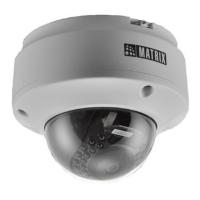
Wall/Ceiling
Mounting
Template
Hole for Concealed Wiring
9
10
Installation
Before you start
Please make sure,
• The device in the package is in good condition and all the
assembly parts are included.
• All the related equipments are powered-off before installation.
• The wall or ceiling is strong enough to support the weight of
camera.
The wired LAN hub providing Power over the Ethernet (PoE) in
accordance with IEEE 802-3af shall be a UL listed device with the
output evaluated as a limited power source as defined in UL60950-1
or Ps2 as defined in UL62368-1.
Installation Instruction
Step 1: Select a Location
• Select a suitable location for your camera to enable coverage of the
intended surveillance area. The location should preferably be a flat
surface, such as a Wall or a Ceiling.
Step 2: Prepare for Installation
• The camera can be powered by PoE switch.
• Provide proper connectivity between camera and recording
location through LAN cable.
• It is advisable to make concealed wiring. However, wiring can
also be done externally.
• Stick the Mounting Template at the exact location of camera
installation. The location can be a Ceiling or a Wall.
• Drill three holes through the markings provided on the Mounting
Template on Wall or Ceiling.
• Insert the screw grips in the holes you drilled, see Figure 2.
• In case of concealed wiring, a separate hole has to be drilled in the
center for cable outlet.
Step 3: Installing Mounting Template
For External Cabling:
• Pull the cable out through the cable guide, sideways to the camera,
see Figure 3a.
For Concealed Cabling:
• Insert the main-cabling through the center hole and make proper
connection with LAN Cable, see Figure 3b.
Step 4: Arranging the cables
Figure 2


 To Next Page
 Loading...