Radio Frequency (RF) Registration Procedures
Transmitter & Receiver are off.
Transmitter is already on.
transmit manually, terminates the auto registration process. Press and hold for 2 seconds to register
normal operation with full function.
turns remote roasting thermometer off while
Open the battery compartment of receiver and insert the two “AAA” b
atteries. Open the battery compartment of
transmitter and insert the two “AAA” batteries.
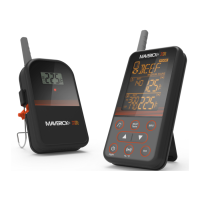
The Remote Roasting Thermometer needs the receiver to register
the radio frequency signal from the transmitter.
teel probe sensor into the plug in the bottom of the transmitter.
Turn the receiver on by sliding switch on the side of the receiver from OFF to ON. The unit will beep and
Turn the transmitter on by pressing the (ON/OFF) button on the bot
tom of the transmitter once. This needs to
0 seconds of turning on the receiver in order for the receiver to register the signal from the
transmitter. If it doesn’t beep within 5
10 seconds press the (ON/OFF) button again so it is OFF wait
seconds and then press the button back ON.
Registration is complete when the unit beeps and the probe temperature appears where the “
Plug the stainless steel probe sensor into the plug in of the transmi
Turn the receiver on by sliding switch on the side of the receiver from OFF to ON. The unit will beep and
Press and hold (TX) for 2 seconds on the bottom of the transmitter inside the battery compartment. This
of turning on the receiver in order for the receiver to register the
signal from the transmitter. Once (TX) is released it will take several seconds for the receiver to register. If it
10 seconds press and hold (TX) aga
Registration is complete when the unit beeps and the probe temperature appears where the “



 To Next Page