SmartDrive User’s Manual 7
Drive Unit Attachment and Removal
e SmartDrive drive unit is designed to easily attach to the adaptive clamp so the user can quickly attach/remove whenever
desired or necessary. Use of the handle and the drop and lock interaction make attaching the SmartDrive simple for all users.
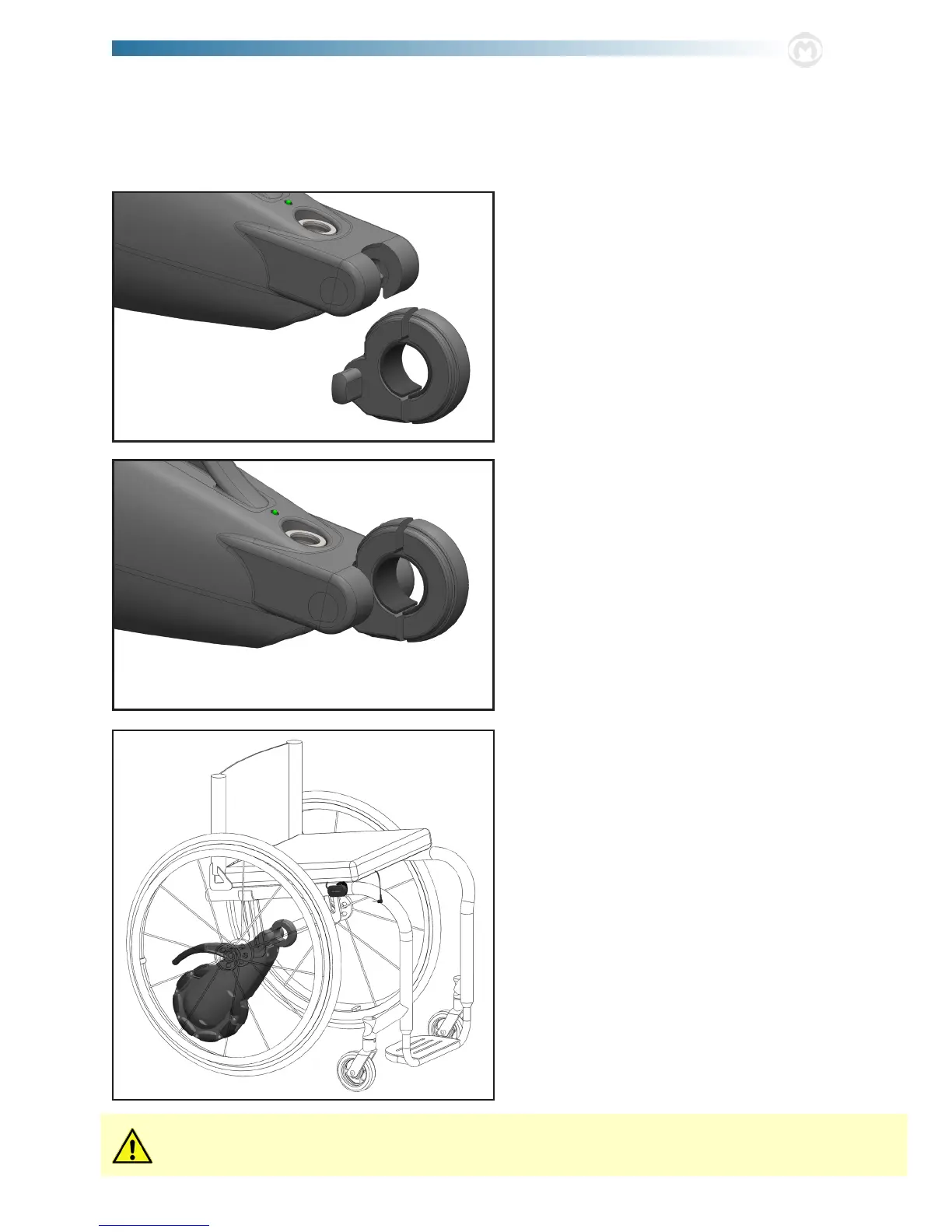
1. To attach the drive unit to the wheelchair, align the
ats in the adaptive clamp with the receiving slots on
the front, underside of the unit body [the drive unit will
be angled slightly higher than horizontal]. Lower the
receiving end of the drive unit over the extrusions of the
clamp.
2. Rotate the unit downward to pivotally attach the drive
unit to the clamp, and consequently the wheelchair.
3. Under its own weight, the omni-wheel end of the drive
unit rests on the ground between the rear wheels of the
wheelchair.
Remove the unit by rmly grasping the handle and perform-
ing these steps in reverse order, rst rotating upwards then
lifting the receiving slots o the adaptive clamp.
Never attempt to remove the drive unit from the clamp while still seated in the wheelchair. is presents a serious
risk of tipping over and injury.



 To Next Page