8 max mobility
®
Battery Unit Clipping
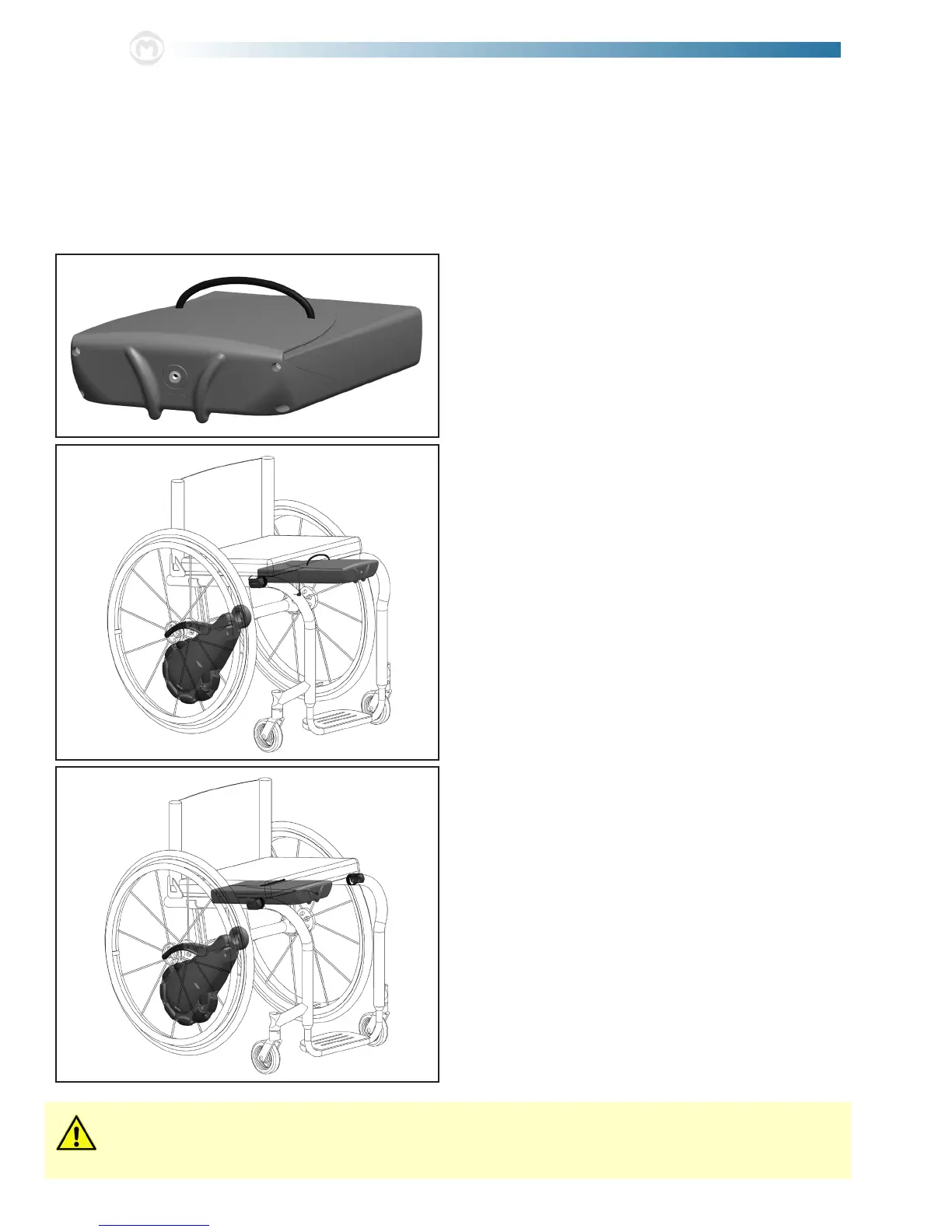
e Battery Unit is equipped with an oversized clip for attachment to the seat of the wheelchair. e unit is made to latch
onto and hang below the upholstered seat. ere is a connector holder in the back of the battery unit to aid in cord manage-
ment when handling the unit, in addition to the handle to assist in carrying/lifting.
1. Pick up the battery unit using the handle presented on
the top of the clip.
2. Lower the battery unit towards the seat of the wheel-
chair. Position the upholstery of the seat between the
bottom surface of the clip and the top surface of the bat-
tery housing. With the Button plug wire to the side, slide
the unit back until the front surface of the upholstered
seat is making contact with the handle.
3. Slide the battery back as far back as possible by pushing
on the front of the unit. en plug the button plug into
the jack on the front of the battery.
Under-seat clearance must be at least 2 in. for the battery unit to suciently t. Any bulging of the wheelchair
upholstery caused by the battery unit has the potential of causing pressure sores. Cease use of the SmartDrive if
this condition exists.
NOTE: Refer to the separate directions provided for folding frame wheelchairs, chairs with less than 2 in. under-seat clearance, and
other situations (i.e. standing frames) that make attaching the the battery unit dicult; then skip to step 4 of this section.



 To Next Page