4
CONTROLS
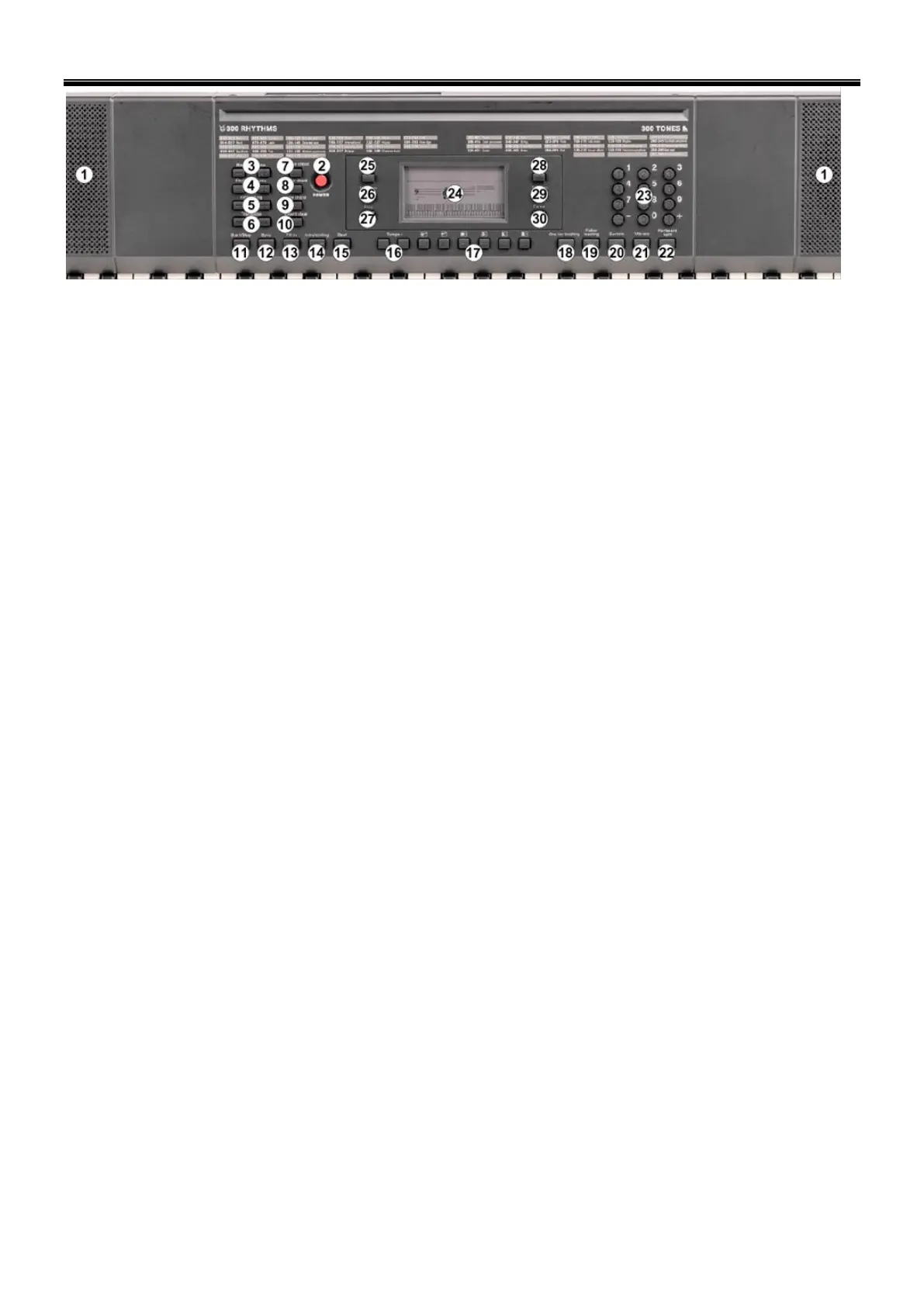
1. SPEAKERS
Loudspeakers to reproduce the sound of the music played. sound level is determined on the basis of the volume setting.
2. POWER
Press to turn power on/off.
3. MASTER VOLUME
Press [Master Vol +] or [Master Vol -] to raise or lower the master volume. The keyboard had 9 levels of volume from
00 till 08.
4. RHYTHM VOLUME
Press [Rhythm Vol +] or [Rhythm Vol -] to raise or lower the accompt volume. The default volume is 06. Press the Rhythm
[vol +] and [vol –] simultaneously will recover default Rhythm volume automatically.
5. FINE TUNING
Press the fine tuning [+ or -] to micro control the tone within the range of +/- 99 levels between the two connecting tones.
Keep pressing [+ or -] to increase or decrease levels continuously. Press [+ and -] simultaneously to return to the level of
initially set.
6. TRANSPOSE
Press [Transpose +] or [Transpose -] to increase or decrease the transpose value up and down +/- 6 levels and shift the
pitch of entire keyboard up and down in semitone intervals. Press the [Transpose +] or [Transpose -] simultaneously to
return to default status of keyboard tone.
7. SINGLE CHORD
Press [Start/Stop] to start the auto accompaniment. Then press [Single chord] to start single finger accompaniment. Press
any key of the left 19 keys to begin Rhythm. Press different key on left keyboard to select different chord. One key you press
will always determine the root of the chord you played. Press [Start/Stop] again to end the effect.
8. FINGER CHORD
Press [Start/Stop] to start the auto accompaniment. Press [Finger chord] to start fingered accompaniment. Press any key
of the left 19 keys to begin Rhythm. Press different key on left keyboard to select different chord. Once you play any chord in
auto accompaniment section of keyboard the chord along with Rhythm will be automatically begun to play key you press will
always determine the root of the chord you played. Press [Start/Stop] again to end the effect.
9. LOW CHORD
Press [Low chord] to change the effect of Bass.
10. CHORD CLEAR
Press [Chord clear] to end the accompaniment under chord status, the Rhythm will being continued to play.
11. START/STOP
Press to start or stop playing selected program.
12. SYNC
In rhythm mode, press [SYNC]. Play any key in the chord key zone (the 1st-19th key, from the left) to activate the
accompaniment rhythm.
13. FILL IN
Press [FILL-IN] to add a short fill in Rhythm variation at any time while the Rhythm is playing. Then the normal Rhythm will
begin from next measure.
14. INTRO/ENDING
Press [Intro/Ending] before Rhythm was started, the keyboard will perform a length of relative intro, then returns back to
relative normal Rhythm. Press [Intro/Ending] after Rhythm was started, the keyboard will perform a length of relative ending
to stop.
15. BEAT
There are 4 kinds of beat voice stored on the keyboard: 1/4 beat, 2/4 beat, 3/4 beat and 4/4 beat. Press [Beat]
simultaneously for the different beats.
16. TEMPO
Press [Tempo +] or [Tempo -] to increase or decrease the rhythm speed.
17. TOP PANEL PERCUSSION
Press one of the Percussion buttons. There are 6 kinds of percussion available for this keyboard.
• Hi-Hat Open
• Hi-Hat Closed
• Snare L
• Bongo L
• Bass Drum H Soft
• Bass Drum L


 To Next Page