5
18. ONE KEY TEACHING
Press [One Key] to enable the single key training function. Press the number keys [1-9] or [+/-] button to select the song to
be learned. One key training aims at duration learning, and there is no requirement on pitch or creativeness. This mode
allows for mistakes when playing the keys, but the keyboard still plays correct notes.
19. FOLLOW TEACHING
Press [Follow teaching] to enable the follow key training function. Follow the display to play the note correctly, then play the
next note shown automatically on the display.
20. SUSTAIN
Press [Sustain] and the notes played on the keyboard will be decayed gradually after lifting your finger from the keyboard.
Press this button again and the sustain effect will be disenabled.
21. VIBRATO
Press the [Vibrato] and the vibrato effect will be activated. Press this button again and the vibrato effect will be disenabled.
22. KEYBOARD SPLIT
Press [Keyboard Split] to divide keyboard into left hand keyboard and right hand keyboard. The left 24 keys will be left-
hand keyboard and the rest part of keys will be divided as right-hand keyboard. The voice on right-hand keyboard can be
selected by pressing the number on numeric group buttons. The voice on left-hand keyboard is initially set by producer.
Press the button once again to turn split effect off.
23. NUM-PAD
Press [+/-] or “0” to “299” in numeric group buttons to select accompaniment.
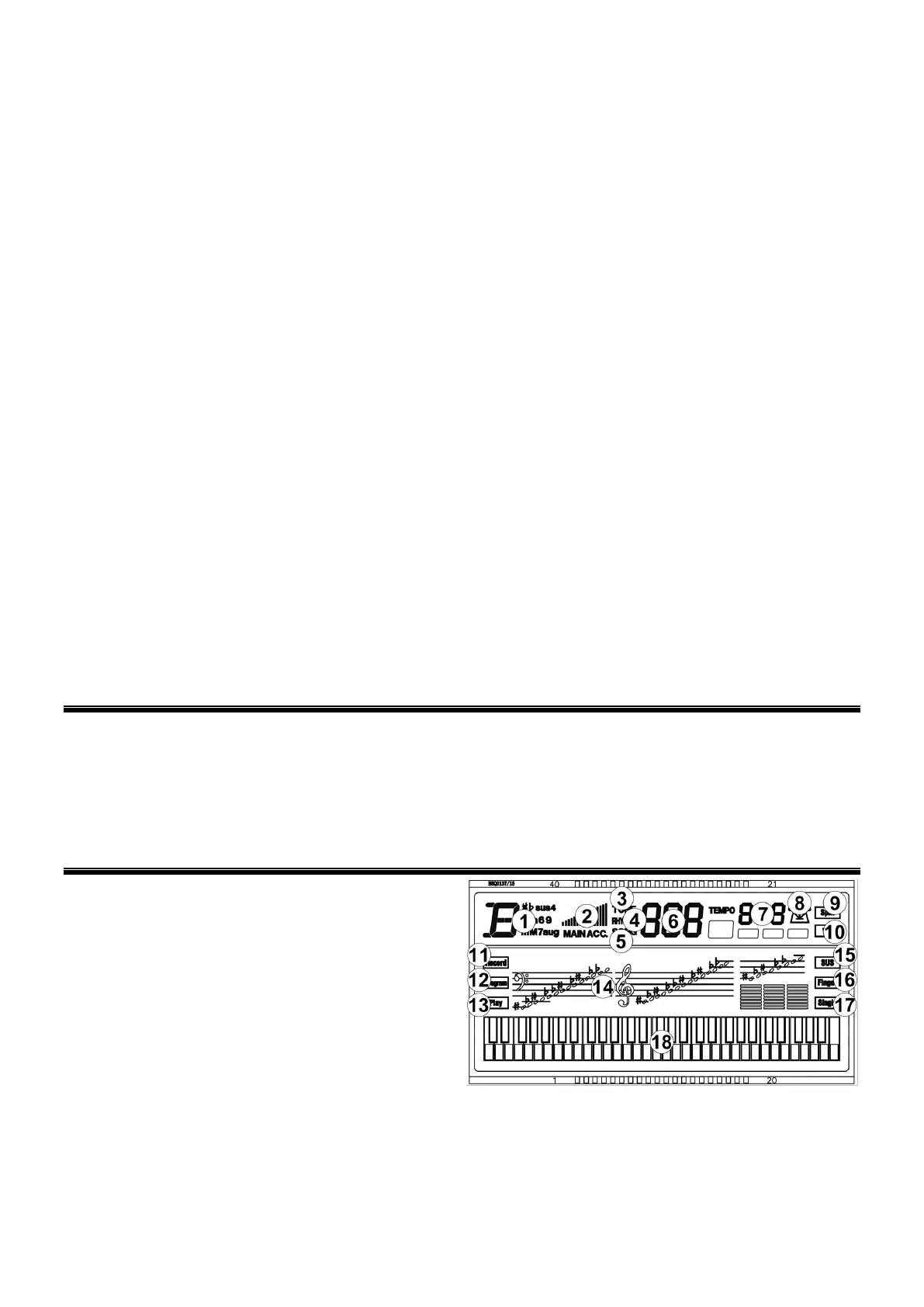
24. LCD DISPLAY
Displays current mode, notes to play, rhythm, tempo, etc.
25. RECORD
Press [REC] to enable the recording function, “REC” will show on the display.
26. PROGRAM
Press to enable the Rhythm programming function.
27. PLAY
Press to playback recorded notes or Rhythms.
28. VOICE
There are 300 different kinds of voices (Appendix I). Press [Voice] to start choosing a voice. You can press the [0-9]
number or [+/-].Voice starts from ‘’000’’ to ‘’299’’ and if the input is out of this range, it will be ineffective.
29. RHYTHM
There are 300 different kinds of rhythms (Appendix II). Press [Start/Stop] to start the rhythm you need. Press [Rhythm] to
choose a Rhythm starts from ‘’000’’ to ‘’299’’ and if the input is out of this range, it will be ineffective.
30. DEMO
This keyboard has 49 stored demo songs [“000” to “049”) for your selection (Appendix III). Press [DEMO] and the default
demo song will start to play. During playing process, press [DEMO] to play the next demonstration song. Press
[START/STOP] to stop playing. During the playing process, you can also press the [0-9] number or [+]/[-] to select other
demonstration songs. The selected demonstration song will then play repeatedly.
CONNECTIONS
31. MICROPHONE INPUT
Connect a microphone to the MIC port to sing while playing the keyboard.
32. HEADPHONES/OUTPUT
When connecting headphones to the PHONES/OUTPUT port, the loudspeaker will be disenabled automatically. You can
perform without disturbing others and other disturbing you.
33. DC 9V INPUT
Socket for plugging in the supplied DC-9V adapter.
DISPLAY
1. Chord display Area
2. Volume
3. Tone
4. Rhythm
5. Demo
6. Number display
7. Tempo
8. Beat (metronome shows the current beat)
9. Split
10. Vibrato
11. Record
12. Program
13. Play
14. Staff notation
15. Sustain
16. Finger chord
17. Single chord
18. Black/white key display


 To Next Page