EN-08
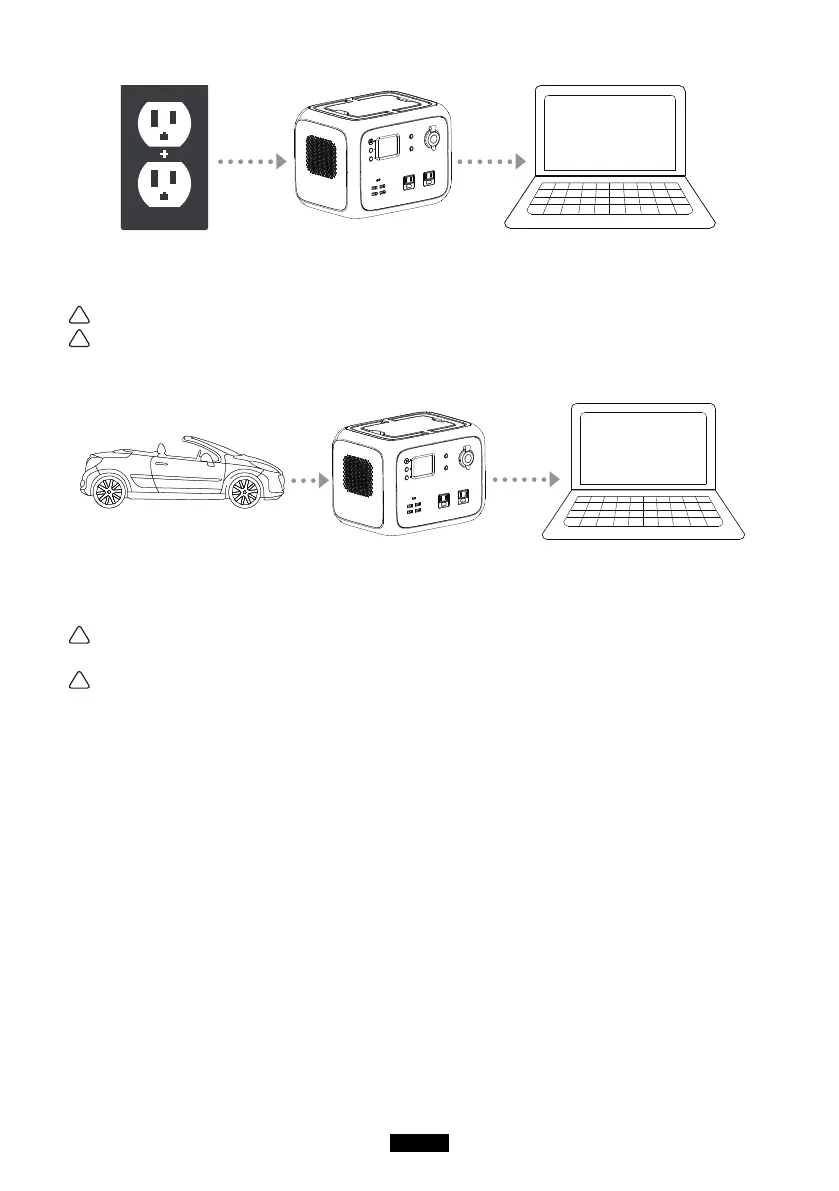
(1) Connect the product and socket with the AC charger in the package.
(2) please unplug the charger when charging completed.(it takes about 6-7hrs to fully
recharge the product if using 90W AC adapter charger)
Note: It is normal for this product to get hot during charging.
Note: Make sure that the wiring is in good contact, otherwise the contact terminals
may melt or ignite at high temperatures.
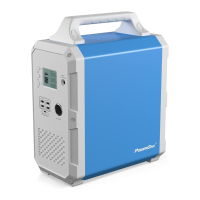
●Car charger charge the product
(1) Connect the product and the cigarette lighter socket with the cigarette lighter cable in
package
(2) Charge the product after starting the car.
Note: Make sure that the wiring is in good contact, otherwise the contact terminals
may melt or ignite at high temperatures.
Note: If the car battery is 12V, the product cannot be fully charged. If the car battery
is 24V, the product can be fully charged.
4. Discharge instructions
●Buttons operation
(1) Main power button
Power on: Short press the main power button, the power indicator lights, and the LCD
screen lights up.
Power off: Press and hold the main power button over 2 seconds, the indicator will be
off and the LCD screen will be off.
(2) DC power button
DC power on : Press and hold the DC button over 2 seconds, the DC indicator will
light, and the LCD will display “DC ON”.
DC power off: Press and hold the DC button for over 2 seconds, the DC indicator will
be off, and the LCD will display “AC OFF”.
(3) AC power button
DC power on: Press and hold the AC button for over 2 seconds, the AC indicator will


 To Next Page