6
After Sales Support
UK/N.IRELAND HELPLINE N
O
:
REP.IRELAND HELPLINE N
O
:
WEBSITE:
EMAIL:
01270 508538
1800 995 036
www.quesh.co.uk
enquiries@quesh.co.uk
Setup
First time use & Charging
After removing the camera from the packaging, connect the mini
USB cable supplied to the camera and the other end to a USB port
tocharge.
The camera will take about approximately 4 hours to fully charge on
a USB 2.0 port. The red LED indicator light will go out once it is fully
charged.
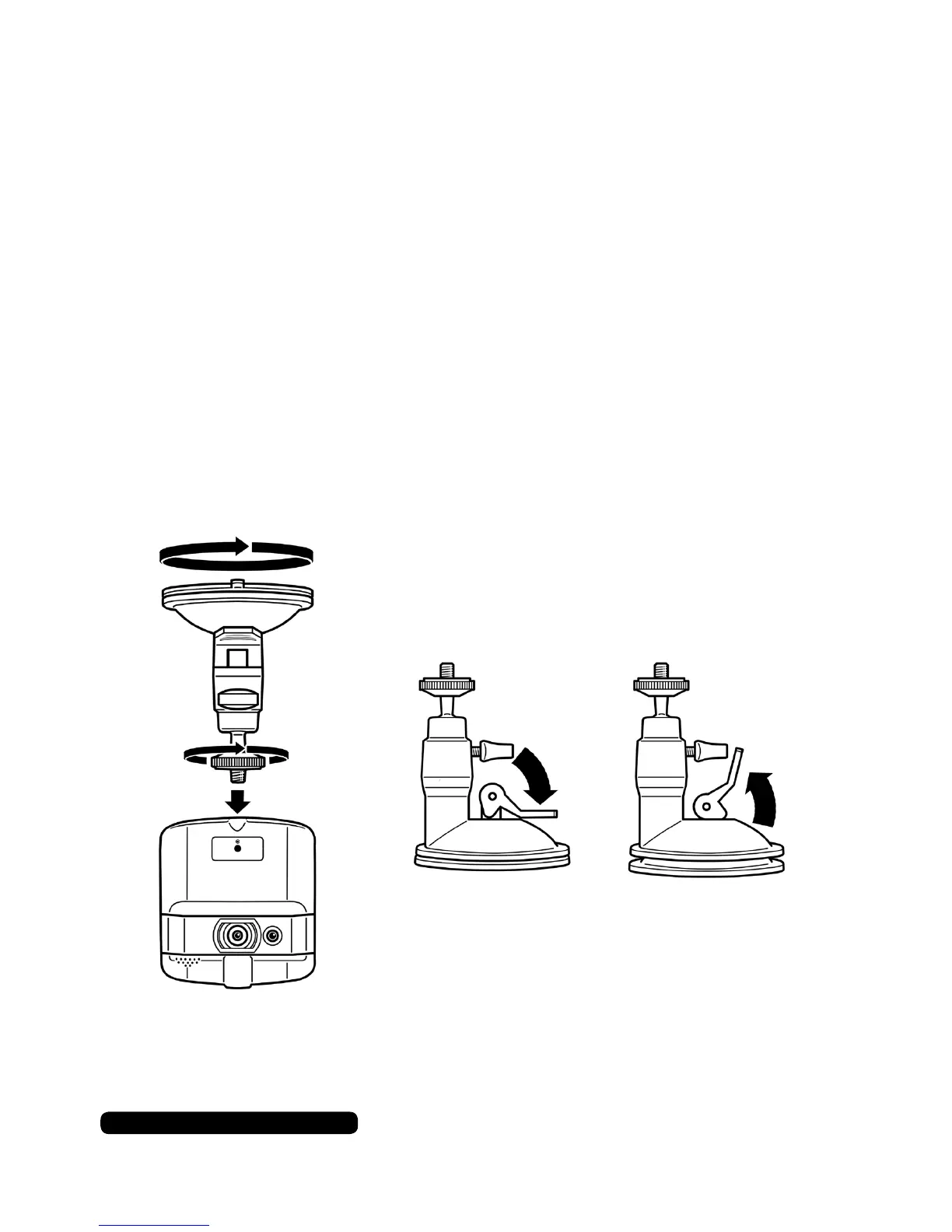
Attach the camera mount to the camera using either of the ttings on
the top or bottom or the camera body. Turn the mount until it is nger
tight, readjust the position of the camera to face in the direction you
want and secure into place with the locking nut on the screw mount.
Damp the sucker cup with water and place it on the window screen.
Press the leaver down to secure it in place. To release lift the leaver
up and remove the mount from the window screen.
Lock Position Release Position
(Pleaseseelegalrequirementsonpage25beforetting)



 To Next Page