10 CHAPTER 2: FEATURES / SYSTEMS
Sport Deck • Owner’s Manual Supplement
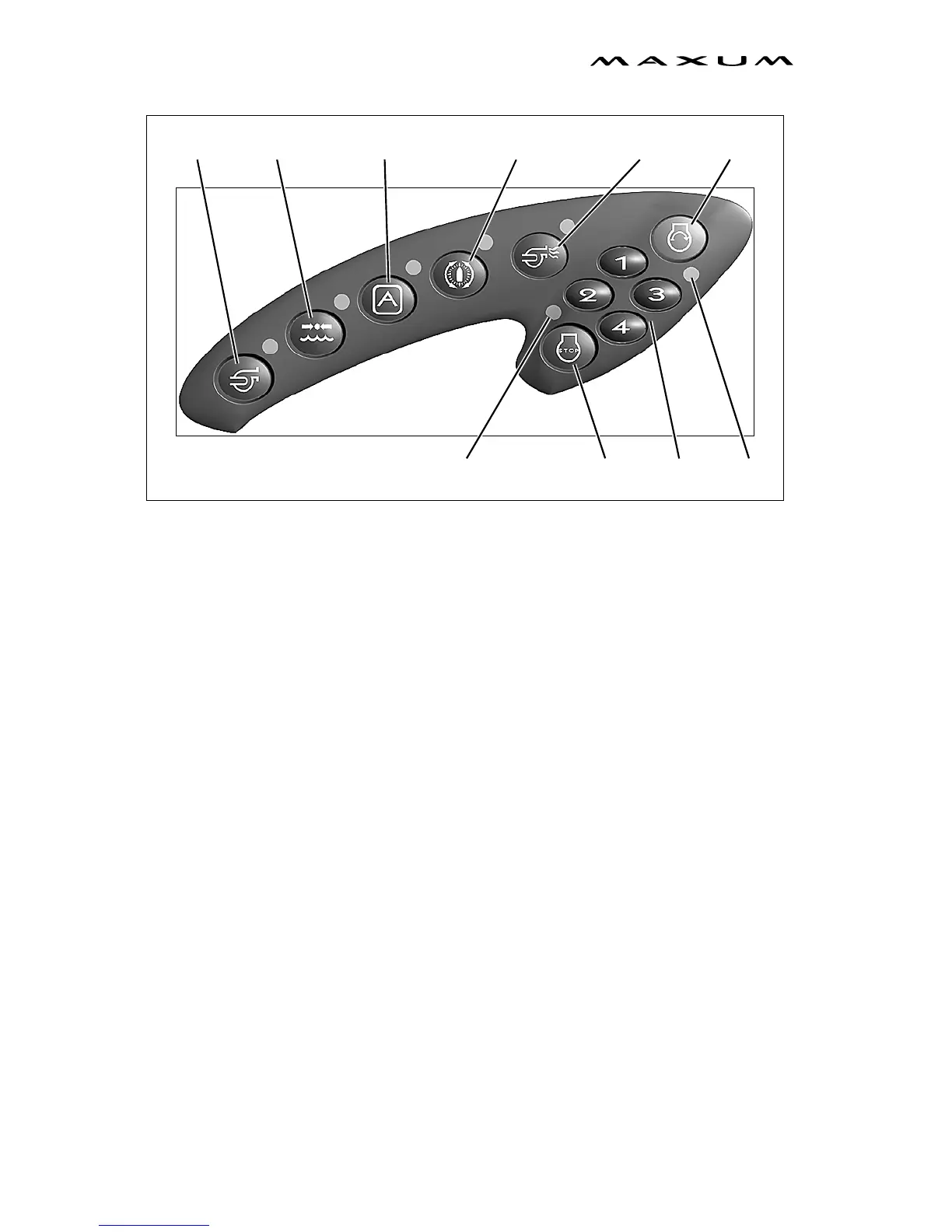
Touch Panel Controls
Bilge Pump
• Press the button once - Bilge pump turns on.
• Press a second time - Bilge pump turns off.
Accessory - Controls the operation of a switched 12-volt accessory. It will only
operate when the system is in the accessory mode.
• Press the button once - Accessory turns on.
• Press a second time - Accessory turns off.
Water Pump - The water pump will only operate when the system is in the
accessory mode.
• Press the button once - Water pump turns on.
• Press a second time - Water pump turns off.
Control Max System™ (if equipped) - Control Max will only operate when the sys-
tem is in the accessory mode.
• Press the button once - Control Max System turns on.
• Press a second time - Control Max System turns off.
Blower
• Press the button once - Blower turns on.
• Press a second time - Blower turns off.
WATER
(IF EQUIPPED) BLOWERACCESSORY
BILGE
*START
*STOP
PUMPPUMP
*USER CODE
BUTTONS
SEE PREVIOUS PAGE FOR
KEYLESS IGNITION INSTRUCTIONS
*
RUN
LED
LOCK
LED
CONTROL MAX™



 To Next Page