8
Installation
Required Tools & Equipment (not supplied)
Drill Set
Power Drill
No.2 Phillips screwdriver
Weather Resistant Elastic Adhesive* and Applicator gun
Surface Cleaner
Deburrer/Round File/Emery paper
Conduit (recommended method for securing cables)
*Maxview recommends the following adhesives:
Sikaflex®-512 Caravan
Geocel® Geobond HM
Sikaflex®-252
Selecting an Installation Location
Positioning Antenna Unit
Decide where you wish to mount your Dome Antenna, taking into account any obstacles that
might interfere with the tracking of the satellite such as roof lights & vents. It is
recommended that you do a dry run to find the best position.
Check for electrical cables beneath screw fixing points.
Check cables will reach the Control Box
The installation surface should be smooth, flat and rigid.
Before starting the installation of the antenna, make sure that the surface on which the
antenna is to be mounted is dry and clean.
Positioning Control Box
Site the Control Box in a convenient location where:
Rear connections are accessible.
Cables can be routed and concealed neatly.
There is an electrical supply of 12-24v dc permanent.
There is adequate ventilation.
Material construction and thickness is suitable for fixings.
Installation on the Vehicle
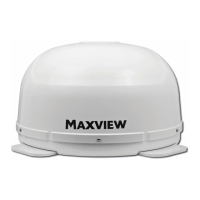
Position the Maxview Dome on top of the vehicle carefully in your chosen location. The ‘F’
connector should be directed to the rear of the vehicle.
Follow the adhesive manufacturer’s guidelines for surface preparation.
Apply the adhesive to the underside of each fixing area. Drill and fix screws provided,
ensuring the system is level and there is no distortion to the base of the system. We always
recommend using screws and adhesive for fixing.
We recommend you follow the adhesive manufacturer’s guidelines for curing time before
driving your vehicle.


 To Next Page