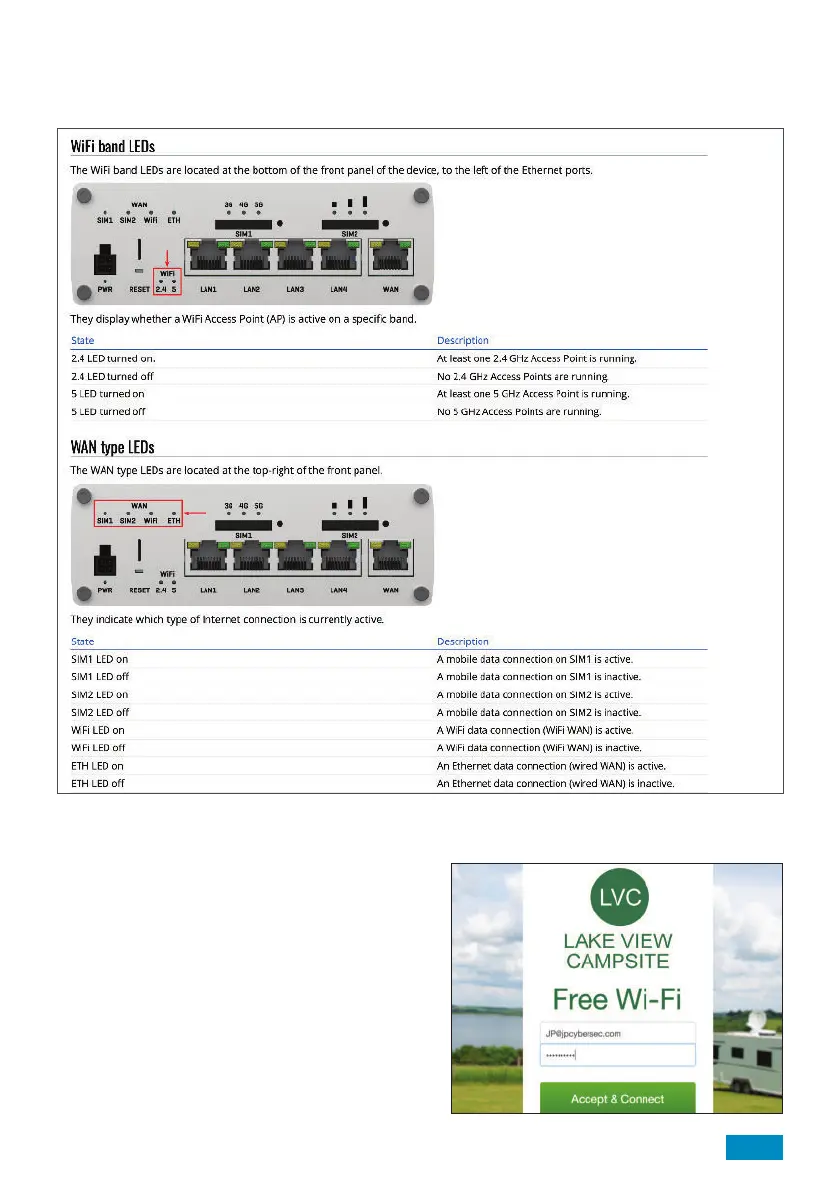
17. What are the lights on the side of the Roam 5G Router telling me?
Basic use and diagnosis using the LED’s has been outlined below.
35
Visit https://wiki.teltonika-networks.com/view/RUTX50_LEDs for a full list of the LED configurations and what
these mean.
18. What is a Captive Portal?
A Captive Portal is the term used when a public Wi-Fi
source redirects the user to a webpage before they
can gain access to the internet.
This page usually requires the user to input details
such as an email address and accept terms of use.
Wi-Fi sources requiring use of a Captive Portal
are not supported by the Maxview Roam 5G and
therefore cannot be used as an Wi-Fi source.
In this instance we suggest you continue to use the
3G/4G/5G connection or connect directly to the Wi-Fi
connection with your Wi-Fi enabled device.
Example of a typical captive portal login.


 To Next Page