D03
D04
B
A06
A07
E13
E32
E13
E32
E32
E13
E32
B
C
B
B12
B13
P
6
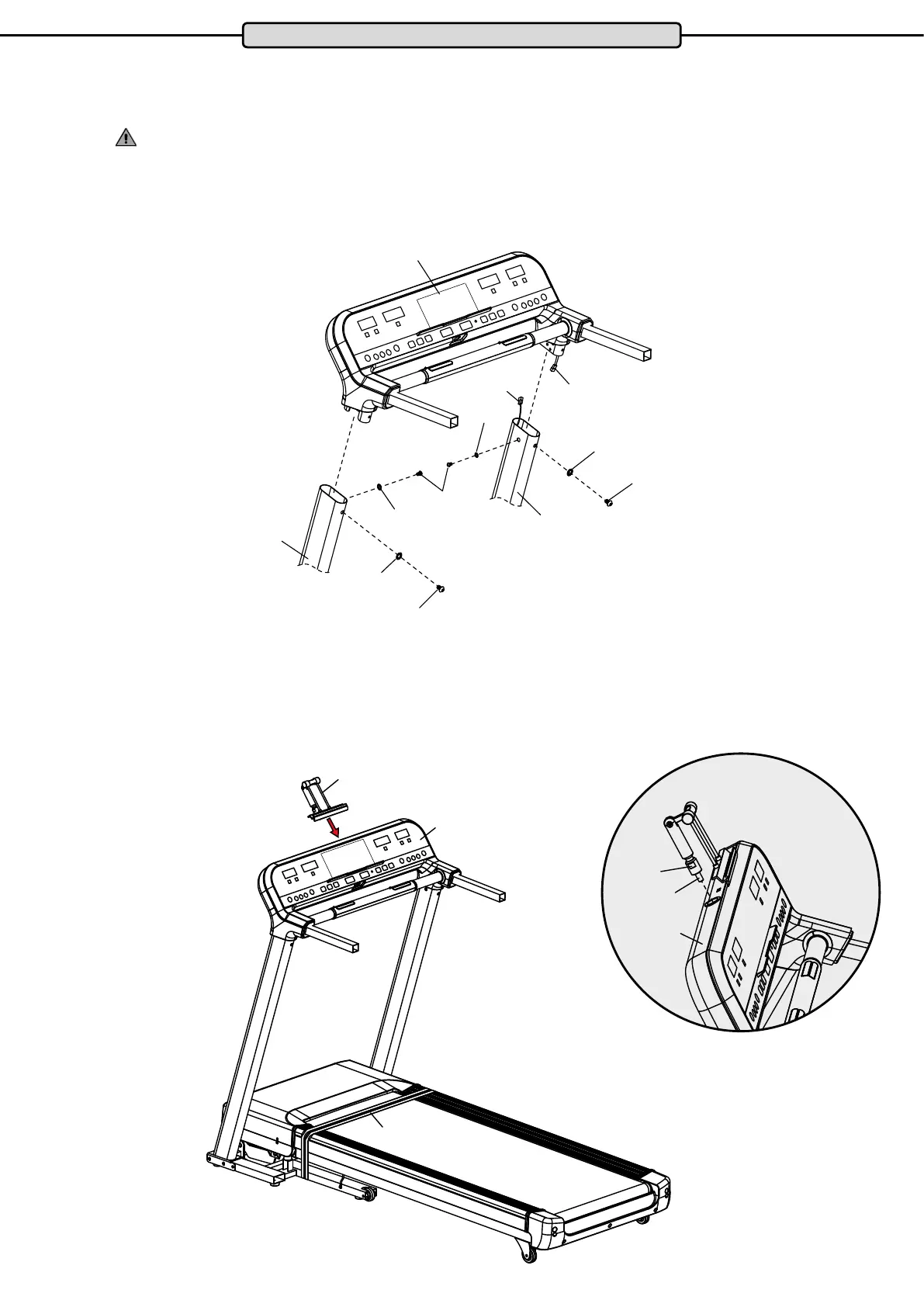
Step 2 - Mounting the cockpit frame:
Connect the cable (D04) protruding from the top of the right side frame to the cable (D03) protruding from the
right of the cockpit frame (B). Then place the cockpit frame (B) in the side frames from the top (A06 / A07).
ATTENTION: Make sure that you do not squeeze or damage the cables.
Then secure them both sides with one hexagon socket screw M8x15 (E13) and one locking washer M8 (E32)
each on the right and left side frames (A06 / A07).
Step 3: Mounting the Tablet PC Holder
Insert the thread of the tablet PC holder (C) into the cockpit (B). Then tighten the lower part of the shaft (B12) by
hand. align the tablet PC holder (C) then tighten the screw (B13) with the wrench (B15).
Assembly


 To Next Page