EasyManua.ls Logo

MayPole MP7428 - User Manual

MayPole MP7428
6 pages
Print Icon
To Next Page IconTo Next Page
Loading...
1
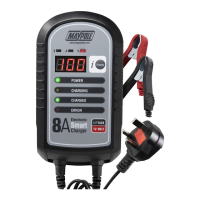
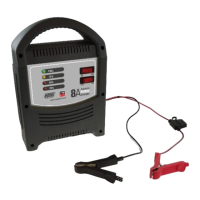
MP7428 12V 8A Electronic Smart Charger
Instruction and Information Manual
In order to ensure correct and safe usage of your battery charger, you should read these
instructions carefully. Please retain these instructions for future reference.
SAFETY
Ensure that cables are regularly inspected and kept in good condition.
Never use the battery charger if the mains lead, mains plug, output lead or crocodile clips are
damaged.
Never use the battery charger if it has been dropped or damaged in any way.
WARNING: Battery charging produces explosive gases. Prevent flames and sparks. Provide
adequate ventilation during charging.
Keep the charging area completely clear of combustible materials.
For indoor use only, do not expose to rain or any other forms of liquid or moisture.
The charger must not be used as a continuous DC power source or for any purposes other than those
listed.
The charger is designed to charge Lead-Acid & AGM batteries only and must not be used for the
charging of non-rechargeable batteries. Never attempt to charge a frozen battery.
There are no user-serviceable parts in this product other than the fuse in the mains plug. Opening the
case is dangerous and electrical repairs or replacement of the mains cable should only be carried out
by the manufacturer, its service agent or a suitably qualified electrician / electrical technician in order
to avoid a hazard. Resultant damage to the product will result in the loss of your guarantee.
GENERAL SAFETY
This appliance is not intended for use by persons (including children) with reduced physical, sensory or
mental capabilities, or lack of experience and knowledge, unless they have been given supervision or
instruction concerning use of the appliance by a person responsible for their safety. Children must be
supervised to ensure that they do not play with the appliance. Cleaning and user maintenance must not be
undertaken by children without supervision.
Gases: The charging process produces flammable and explosive gases - the area in which charging takes
place should be kept well ventilated. Only connect and disconnect the battery leads when the mains supply
is disconnected. Avoid flames or sparks! Do not smoke!
Cables: Make sure mains lead is located so that it will not be stepped on, tripped over, or otherwise subjected
to damage. An extension cord should not be used unless absolutely necessary. Improper use of an extension
cord could result in a risk of fire and electric shock. If an extension cord must be used, make sure it is in good
Question and Answer IconNeed help?

Do you have a question about the MayPole MP7428 and is the answer not in the manual?

Summary

Safety Precautions

General Safety Guidelines

Battery Charging Instructions

Battery Preparation

Check and prepare the battery by verifying liquid levels and ensuring proper ventilation.

Location and Connection

Position the charger correctly and connect the battery leads safely, ensuring no sparks.

Charging Process

Initiate charging by switching on the power and monitoring the indicators for status.

Completion of Charging

Recognize when charging is complete via the 'CHARGED' LED and monitor battery status.

Disconnecting the Charger

Safely disconnect the charger by first switching off mains, then removing leads from the battery.

Car Battery Maintenance

Technical Specifications

Overview of technical details including protection class, voltage, current, and battery capacity.

Troubleshooting Charging Problems

Identify and resolve common issues like 'Bad Battery' or 'Battery not charging'.

Summary

Safety Precautions

General Safety Guidelines

Battery Charging Instructions

Battery Preparation

Check and prepare the battery by verifying liquid levels and ensuring proper ventilation.

Location and Connection

Position the charger correctly and connect the battery leads safely, ensuring no sparks.

Charging Process

Initiate charging by switching on the power and monitoring the indicators for status.

Completion of Charging

Recognize when charging is complete via the 'CHARGED' LED and monitor battery status.

Disconnecting the Charger

Safely disconnect the charger by first switching off mains, then removing leads from the battery.

Car Battery Maintenance

Technical Specifications

Overview of technical details including protection class, voltage, current, and battery capacity.

Troubleshooting Charging Problems

Identify and resolve common issues like 'Bad Battery' or 'Battery not charging'.

Overview

The Maypole MP7428 12V 8A Electronic Smart Charger is designed for charging 12V lead-acid, sealed lead-acid, maintenance-free, and AGM vehicle and leisure batteries with capacities ranging from 1.2Ah to 192Ah. It is an automatic, 9-step charging program device that diagnoses battery condition, performs recovery with pulse charging, prepares the battery with a soft start, and then proceeds with automatic current selection and bulk charging using constant current. This is followed by constant voltage absorption charging, a resting and condition monitoring period, and finally, maintenance float charging, where the charger automatically maintains the battery's condition through voltage monitoring and pulse charging once fully charged.

Technical Specifications:

  • Protection Class: IP65
  • Rated Input Voltage: 230V 50Hz
  • Rated Input Current: 1.8A
  • Rated Output Current: 12V : 8A
  • Max Lead-Acid Battery Capacity: 1.2-192Ah
  • Minimum Residual Voltage for Operation: 1.5V

Usage Features:

The charger features an LED digital display that shows battery voltage (V), output charging current (A), and a percentage estimate of the battery's charge (%). A "DISPLAY" select button allows toggling between these options, with the display automatically reverting to battery voltage after 5 seconds. Indicator LEDs are present for "POWER," "CHARGING," "CHARGED," "ERROR," "V," "A," and "%."

Safety Precautions:

  • Always inspect cables regularly and keep them in good condition.
  • Never use the charger if the mains lead, mains plug, output lead, or crocodile clips are damaged, or if it has been dropped.
  • Battery charging produces explosive gases; ensure adequate ventilation and prevent flames or sparks. Do not smoke near the charging area.
  • Keep the charging area clear of combustible materials.
  • For indoor use only; do not expose to rain or moisture.
  • The charger is not a continuous DC power source and should not be used for non-rechargeable or frozen batteries.
  • No user-serviceable parts exist except the mains plug fuse. Opening the case or attempting electrical repairs will void the guarantee.
  • Avoid short circuits, which can cause severe burns or explosions. Remove personal metal items when working with a battery.
  • Wear safety goggles, clothing protection, and gloves when working with lead-acid batteries. In case of electrolyte contact, rinse immediately with cold water and seek medical advice if symptoms persist.
  • Children and persons with reduced physical, sensory, or mental capabilities should be supervised when using the appliance.

Preparation and Connection:

  1. Check battery voltage and capacity. For lead-acid batteries, remove cell caps, check liquid levels, and top up with deionized or distilled water if needed. Replace caps loosely to allow gas escape.
  2. Maintain distance between battery and charger. Position the charger on a level, stable surface, free of combustible materials. Never place it directly above the battery.
  3. Ensure mains supply is disconnected before connecting battery clips to avoid sparks.
  4. Connect the positive charging lead (RED) to the positive post of the battery (+ / +ve or P).
  5. For negative-earth vehicles with the battery installed, connect the negative charging lead (BLACK) to the vehicle chassis, away from the battery, fuel line, and hot or moving parts.
  6. For batteries removed from the vehicle, connect the negative charging lead (BLACK) to the negative post of the battery (- / -ve or N).
  7. Rotate clips slightly after connection to ensure good contact.

Charging Process:

  1. Switch on the mains power supply; the "POWER" LED will illuminate.
  2. If the "ERROR" LED illuminates, refer to the troubleshooting section. Rectify the problem before switching on the mains power supply again.
  3. The "CHARGING" LED will illuminate, and the 9-step charging cycle will commence, displaying charging information.
  4. WARNING: Supervise charging at all times. If the battery temperature exceeds 40°C, cease charging until it cools to a safe temperature to prevent explosion.

Disconnection:

  1. Once the "CHARGED" LED illuminates, the charger will continue to monitor and maintain the battery.
  2. Switch off the mains supply and unplug the charger (pull by the plug, not the cable).
  3. Disconnect the negative lead (BLACK) first, then the positive lead (RED) from the battery.
  4. For non-sealed lead-acid batteries, inspect liquid levels, top up if necessary, and clean any surplus acidic fluid from cell tops with extreme care.

Troubleshooting:

  • Bad Battery (ERROR LED illuminates):
    • Residual voltage less than 1.5V.
    • Battery voltage still less than 11V after 4 minutes of charging.
    • Battery reaches full charge but falls below 12V within 2 minutes.
    • Battery does not reach full charge within 24 hours.
    • Solution: Have the battery tested by a qualified technician; replace if necessary.
  • Battery Not Charging (No 230V AC input power):
    • Solution: Ensure the charger is plugged into the mains supply, the "POWER" LED is illuminated, and check/replace the mains plug fuse.
  • Battery Not Charging (Corroded terminals or poor clip connection):
    • Solution: Switch off the charger, check clips, remove dirt/corrosion, and connect correctly.
  • Battery Not Charging (Reversed battery connection leads):
    • Solution: Switch off the charger and connect the leads correctly.
  • Battery Not Charging (Very cold battery):
    • Solution: In temperatures below 0°C, the battery will not accept a high charge rate. The rate will increase as the battery warms. Never attempt to charge a frozen battery.

Maintenance Features:

  • Store in a clean, dry place to avoid moisture damage.
  • Loosely coil cords when not in use.
  • Clean the case and cords with a slightly damp cloth.
  • Clean any corrosion from the clamps with a solution of water and baking soda.
  • Periodically examine cords for cracking or damage and have them replaced if necessary.
  • All other service should be done by qualified personnel only.
  • Always unplug the charger before performing any maintenance or cleaning.

Protection Features:

The charger includes protection against short circuits, open circuits, sparking, over-heating, current overloads, and over-charging.

MayPole MP7428 Specifications

General IconGeneral
BrandMayPole
ModelMP7428
CategoryBattery Charger
LanguageEnglish

Related product manuals