ADJUSTING THE REFRIGERATOR AND FREEZER INTERIORS
Refrigerator Interior Meat/Cheese Drawer Shelf
Sure-Lock Shelves The shelf that hokls tile Meat/Cheese drawer
can be placed in one of three positions. When
The refrigerater shelves are adjustable, allocating adjusting this shelf, remove the Meat/Cheese
you to arrange the sheh6ng to fit your family's drawer and look at file back wall of the drawer
food storage needs. Never attempt to adjust a frame, It is necessary for the air inlet tube
shelf that is loaded with food. at the back of the refrigerator to llne up at
the top, middle or bottom of the air slots in
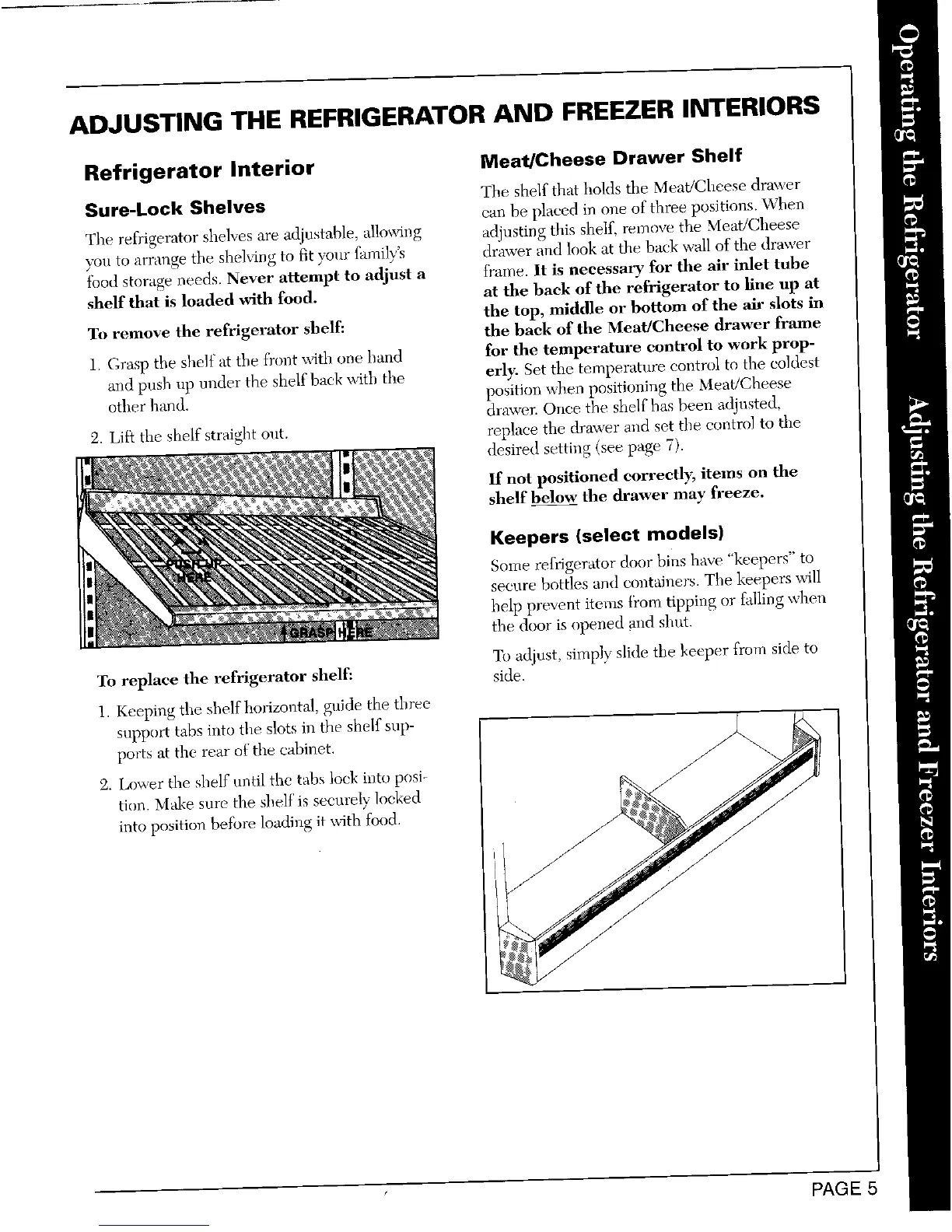
To remove the refrigerator shelf: the back of the Meat/Cheese drawer flame
1. (;rasp the shelf at the ff(n_twith one band for the temperature control to work prop-
and push up under the shelf back with the erly. Set the temperature control to the coldest
other hand. position when positioning the Meat/Cheese
drawer. Once tbe shelf has been adinsted,
2. Lift the shelf straigbt out. replace the drawer arid set the control to the
desired setting (see page 7).
If not positioned eorreelly, items on the
shelf below the drawer may freeze.
Keepers {select models)
Some refrigerator door bins have "keepers" to
secure bottles and col_tainers. The keepers will
help pre_ent items i_'om tipping or t_Jling when
tbe door is opened mid shut.
To adjust, simply slide the keeper from side to
To replace the refrigerator shelf: side.
1. Keeping the shelf horizontal, guide the tbree
support tabs into the slots in the shelf sup-
ports at the rear of"the cabinet.
.7"
2. Lower the shelf until the tabs lock inte posi- /
tion. Make sure the shelf is securely locked
into position betbre loading it \_dth food.
it
///
PAGE 5



 To Next Page