6-26
Interior Comfort
Audio System
Form No. 8Q36-EA-01F
▼
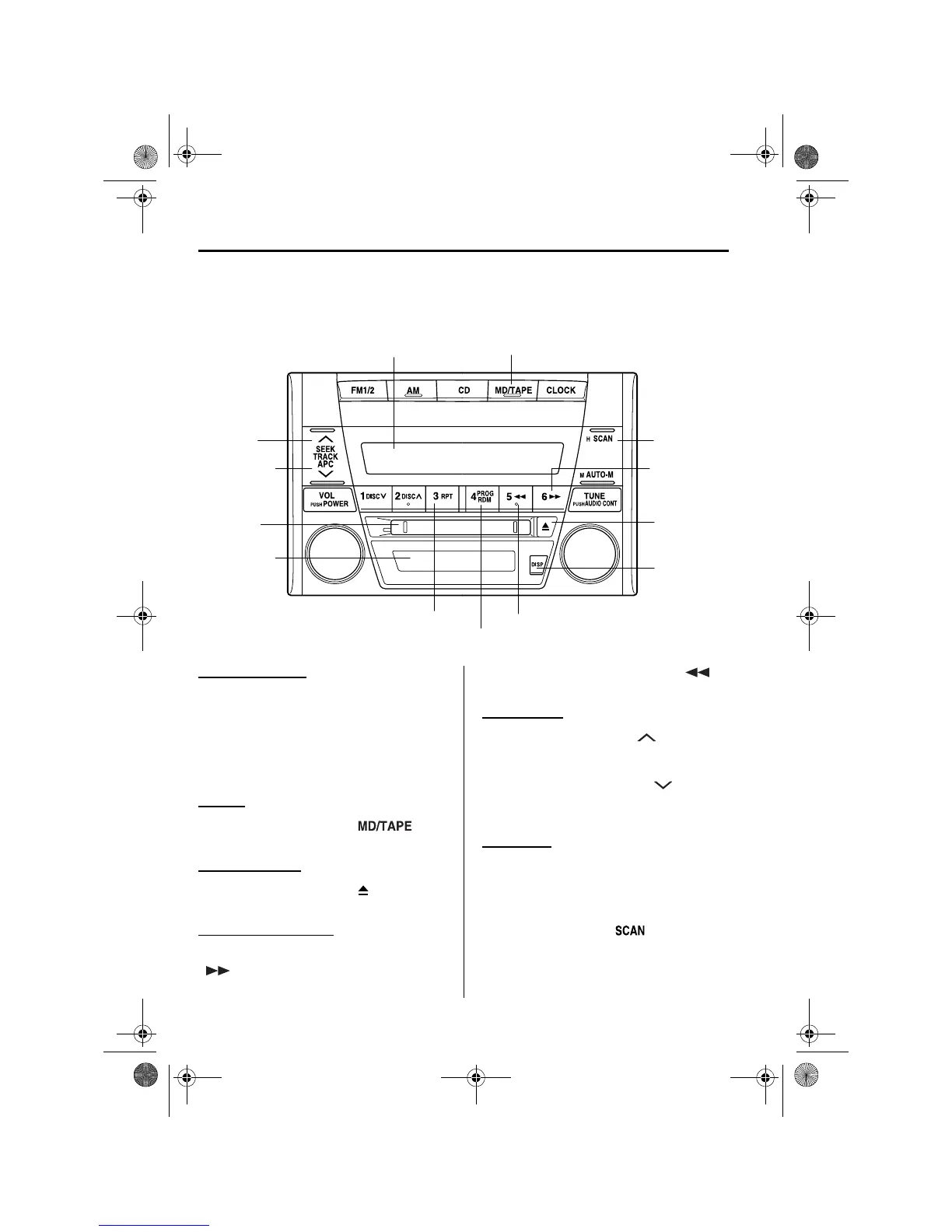
Operating the Mini Disc (MD) Player
Inserting the MD
Insert the MD, label-side up with the
arrow pointed to the slot. The auto-
loading mechanism will set the MD and
begin play. There will be a short lapse
before play begins while the player reads
the digital signals on the MD.
Playing
Press the MD play button ( ) to
start playing when a MD is in the unit.
Ejecting the MD
Press the MD eject button ( ) to eject the
MD.
Fast-forward/Reverse
Press and hold the fast-forward button
( ) to advance through a track at high
speed.
Press and hold the reverse button ( )
to reverse through a track at high speed.
Track search
Press the track up button ( ) once to
skip forward to the beginning of the next
track.
Press the track down button ( ) once to
skip back to the beginning of the current
track.
Music scan
This feature helps to find a program by
playing about the first 10 seconds of each
track.
Press the scan button ( ) during play
to start scan play operation (the track
number will flash).
Display
Track up
button
Track down
button
MD play button
Reverse button
Scan
button
Repeat button
MD display
MD slot
Random button
MD eject
button
Display
button
Fast-
forward
button
J39L(02MY).book Page 26 Thursday, November 1, 2001 10:49 AM



 To Next Page