29
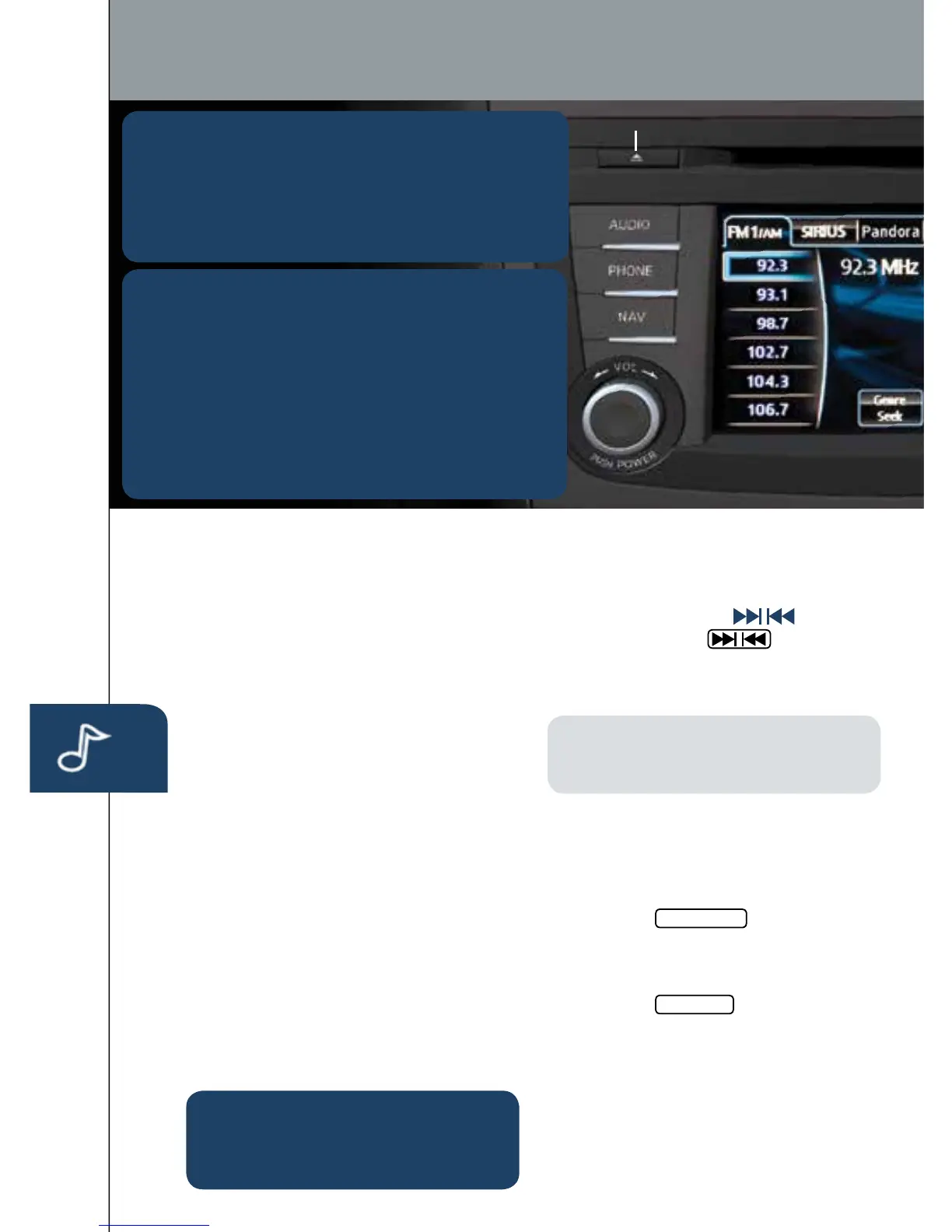
POWER ON
PushthePower/Volumedialto
turntheaudiosystemon.
MEDIA SELECTION
PushtheAUDIObuttontoselectthe
appropriateon-screenbutton:
Radio:
S
elect
F
M/AM
b
utton
f
or
F
M1,
FM
2,
o
r
A
M
b
and.
CD:SelectforCDplayer.
Blu
etooth
®
:SelectforBTAudio.
Pandora:
S
elect
t
o
p
lay
Pa
ndora
f
rom
Bl
uetooth
d
evice
(
with
Pa
ndora
a
pp).
USB:SelecttoplayiPod/iPhone
®
throughUSBport.
AUX:
S
elect
t
o
s
witch
t
o
A
UX
i
nput.
SIRIUS:SelectforSiriusXMSatellite
Radio
®
.Ifyourvehicleisequipped
withSiriusXMSatelliteRadio
®
(satellite
radioantennaonroof),yournew
Mazdaincludesafreeintroductory
subscriptionwithalimitedtermtrial
offer.Call888-539-7474toactivate.See
theOwner’sManualand/ordealerfor
details,orcontactyourdealerabout
addingSiriusXMSatelliteRadio
®
.
See
y
our
O
wner’s
M
anual
f
or
f
urther
in
formation
on:
•Pandoraaudioapplication
•Audiomenuvoice-command
T
UNIN
G
Manual:TurntheTUNE/FILEdialto
ma
nually
c
hange
t
he
f
requency.
Seek:PushtheSEEK
buttonor
to
uch
a
nd
h
old
t
he
on-screen
b
utton,
t
o
a
utomatically
s
eek
ahigherorlowerfrequencyortrack,
de
pending
o
n
m
edia
s
elected.
NOTE:
Ifyoucontinuetopushand
hold
t
he
b
utton,
t
he
f
requency
w
ill
co
ntinue
c
hanging
w
ithout
s
topping.
Scan:TouchtheSCANon-screen
bu
tton
t
o
a
utomatically
s
ample
s
trong
stationsforsecondseach.Touchagain
toc
ancel.
Auto Memory Tuning:
1To
uch
t
he
Auto Memory
on-screen
bu
tton.
T
he
a
uto
m
emory
p
reset
l
ist
isdisplayedandthepreviouslytuned
fr
equency
i
s
r
eceived.
2Touchthe
Update List
on-screen
bu
tton
t
o
d
isplay
t
he
f
requencies
o
f
uptotenradiostationsontheauto
me
mory
p
reset
l
ist.
3Touchthedesiredfrequency.
Refer
t
o
t
he
O
wner’s
M
anual
f
or
completedetails.
Preset Channel:
C
an
b
e
u
sed
t
o
s
tore
6AMor12FMstations.
Eject CD
Audio Controls (with 5.8” LCD screen)
PLAYING BLUETOOTH
®
(BT) AUDIO
1 MakesureBTaudiodeviceispairedto
your
ve
hicle.
2 TurnonBTaudiodevice.
3
To
uch
t
he
B
luetooth
®
on-screentab.
4
Se
lect
t
he
B
T-Audio
o
ption.
GRACENOTE
TheGracenotemediadatabaseisusedtoimprove
voice
r
ecognition
o
f
a
rtist
a
nd
a
lbum
n
ames
w
ith
t
he
Ma
zdaHandsFreesystem.Tomakebestuseofthe
voice
r
ecognition,
i
nstall
t
he
m
ost
r
ecent
d
atabase.
1
Lo
ad
t
he
G
racenote
u
pdate
o
n
am
emory
s
tick
fr
omwww.MazdaUSA.com/USB.Insertmemory
stick
i
nto
t
he
U
SB
p
ort.
2 PushthePHONEbutton.
3
Se
lect
S
etup
a
nd
s
croll
d
own
t
o
G
racenote
U
pdate.



 To Next Page
 Loading...











