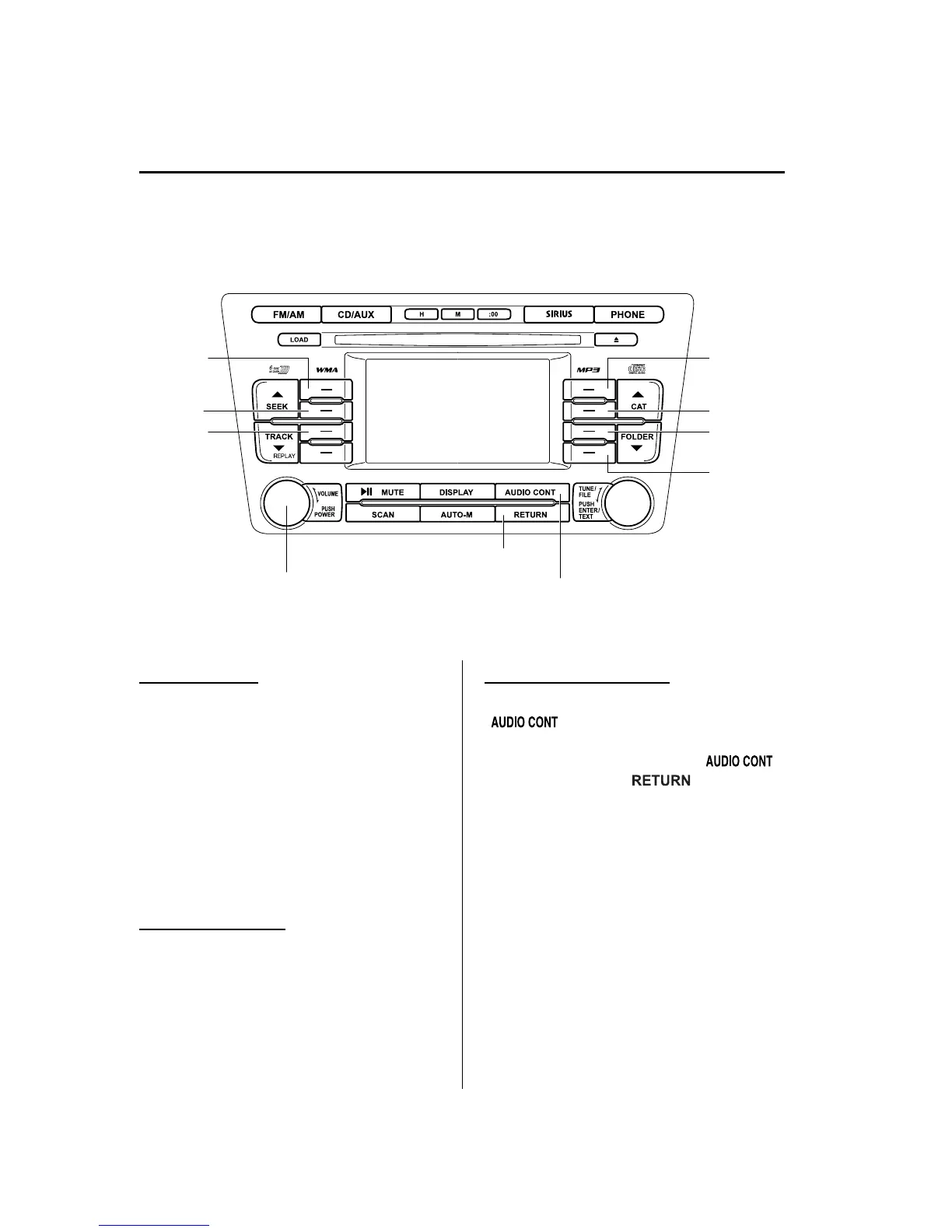
qPower/Volume/Sound Controls
Audio control buttonPower/Volume dial
Return button
Selection
button 1
Selection
button 2
Selection
button 3
Selection
button 5
Selection
button 6
Selection
button 7
Selection
button 8
Power ON/OFF
Switch the ignition to ACC or ON.
Press the power/vo lume dial to turn the
audio system on.
Press the power/vo lume dial again to turn
the audio system off.
NOTE
To prevent the battery from being discharged,
do not leave the audio system on for a long
period of time when the engine is not running.
Volume adjustment
To adjust the volume, turn the power/
volume dial.
Turn the power/volume dial to the right to
increase volume, to the left to decrease it.
Audio sound adjustment
When the audio control button
(
) is pressed, the audio settings
screen is displayed.
Press the audio control button (
)
or the return button (
) to return
to the previous screen.
Next page display
Press selection button 1.
Previous page display
Press selection button 5.
Initialization
Returns all of the audio setting items to
their initial setting.
6-48
Interior Comfort
Audio System
Mazda6_8BG7-EC-10H_Edition1 Page272
Monday, August 2 2010 1:28 PM
Form No.8BG7-EC-10H



 To Next Page