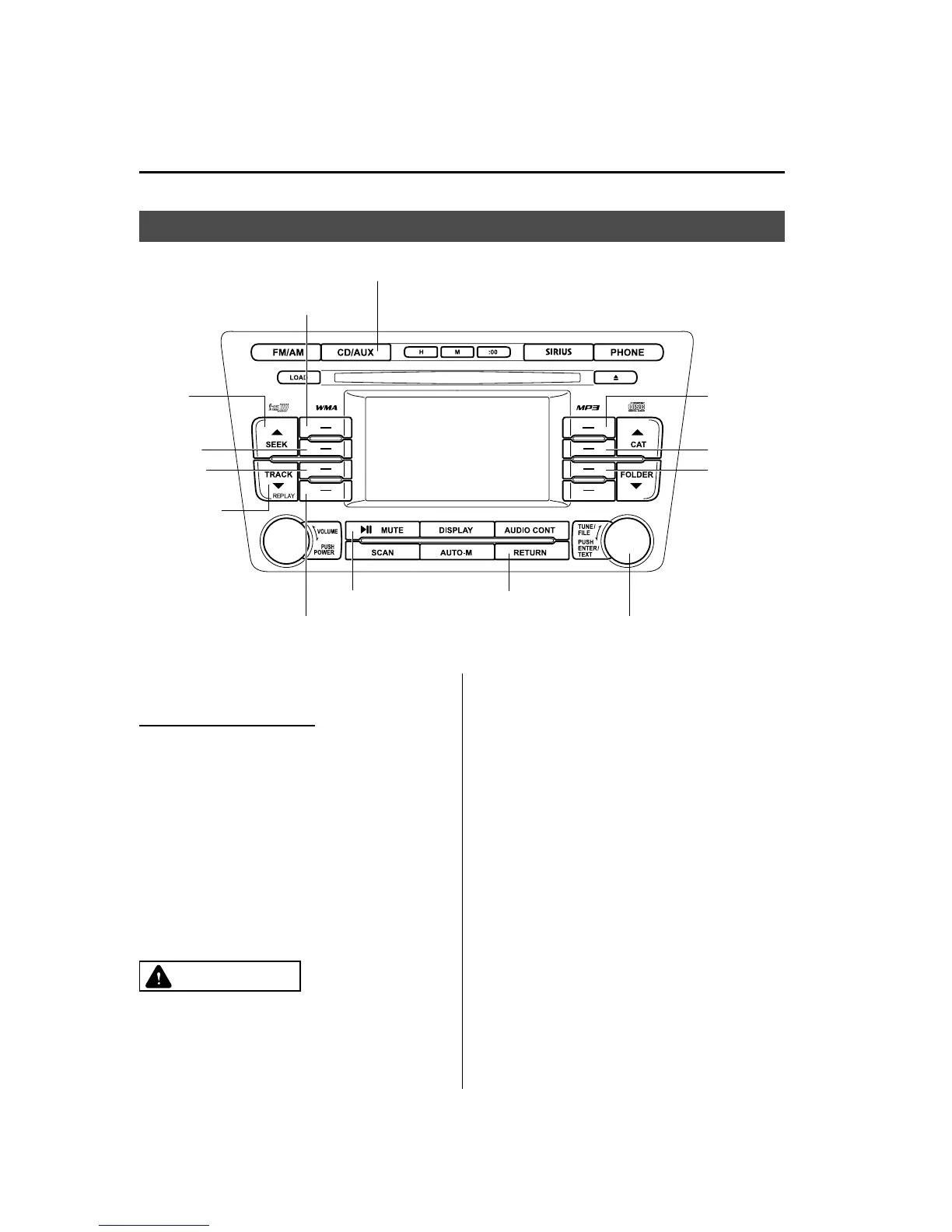
Bluetooth Audio (Type B)
í
Selection
button 1
Selection
button 2
Track up
button
Selection
button 3
Selection
button 4
Manual tuning dial/Enter button/Text button
Track down
button
Play/Pause button
AUX button
Selection
button 5
Selection
button 6
Selection
button 7
Return button
qWhat is Bluetooth Audio?
Bluetooth audio outline
By programming portable audio devices
equipped with the Bluetooth
communication function to the vehicle's
Bluetooth unit, you can listen to music or
audio recorded on these audio devices
from the vehicle's speakers. Bluetooth
audio devices do not need to be plugged
into the auxiliary jack.
After programming, operate the audio
system's control panel to play/stop the
music or audio.
CAUTION
Ø Always program audio devices to
the Bluetooth audio syste m while
the vehicle is stopped.
6-88
Interior Comfort
í
Some models.
Bluetooth Audio (Type B)
Mazda6_8BG7-EC-10H_Edition1 Page312
Monday, August 2 2010 1:28 PM
Form No.8BG7-EC-10H



 To Next Page