Black plate (273,1)
3. Enter the code number shown on the
vehicle display using the phone
keypad. If no code number is shown on
the display, enter the Bluetooth® PIN
number 0000 using the phone keypad.
Now enter the Bluetooth® PIN number
shown on the vehicle display.
4. If your mobile phone asks you to
authorise the automatic connection,
select YES .
NOTE
A phone call will be disconnected if the
audio unit is switched off. If the ignition
key is turned to the off posit ion the
phone call will remain in progress.
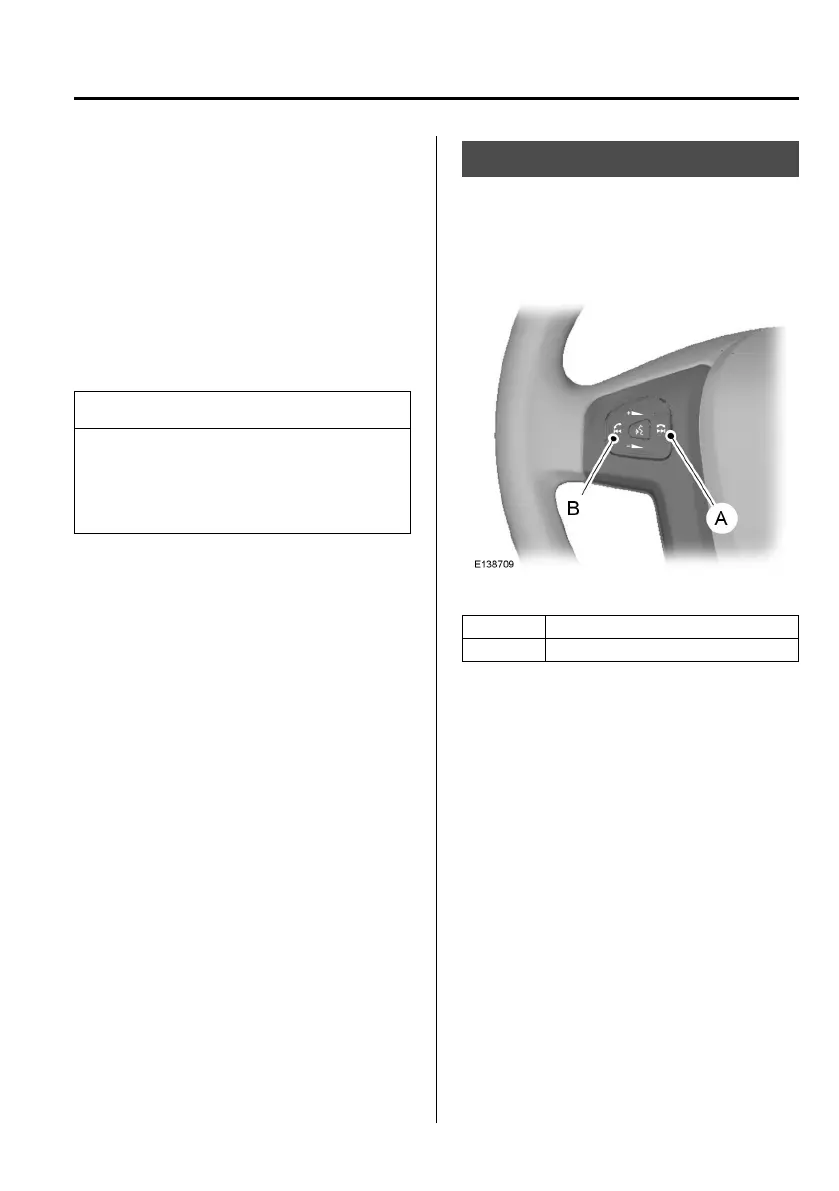
TELEPHONE CONTROLS
qRemote control
Voice and mode button
A Reject call
B Answer call
Incoming calls can be accepted by
pressing the answer call button once.
Press the reject call button to end the call
or to reject the incoming call.
Telephone
265
Mazda BT-50_8FX5-EI-17DT_Edition2 Page273
Thursday, May 11 2017 5:34 PM
Form No.8FX5-EI-17DT




 To Next Page