Black plate (91,1)
GENERAL INFORMATION
WARNING
Do not operate the information display
controls when the vehicle is moving.
NOTE
The infor mation display will remain on
for several minutes after you switch off
the ignition.
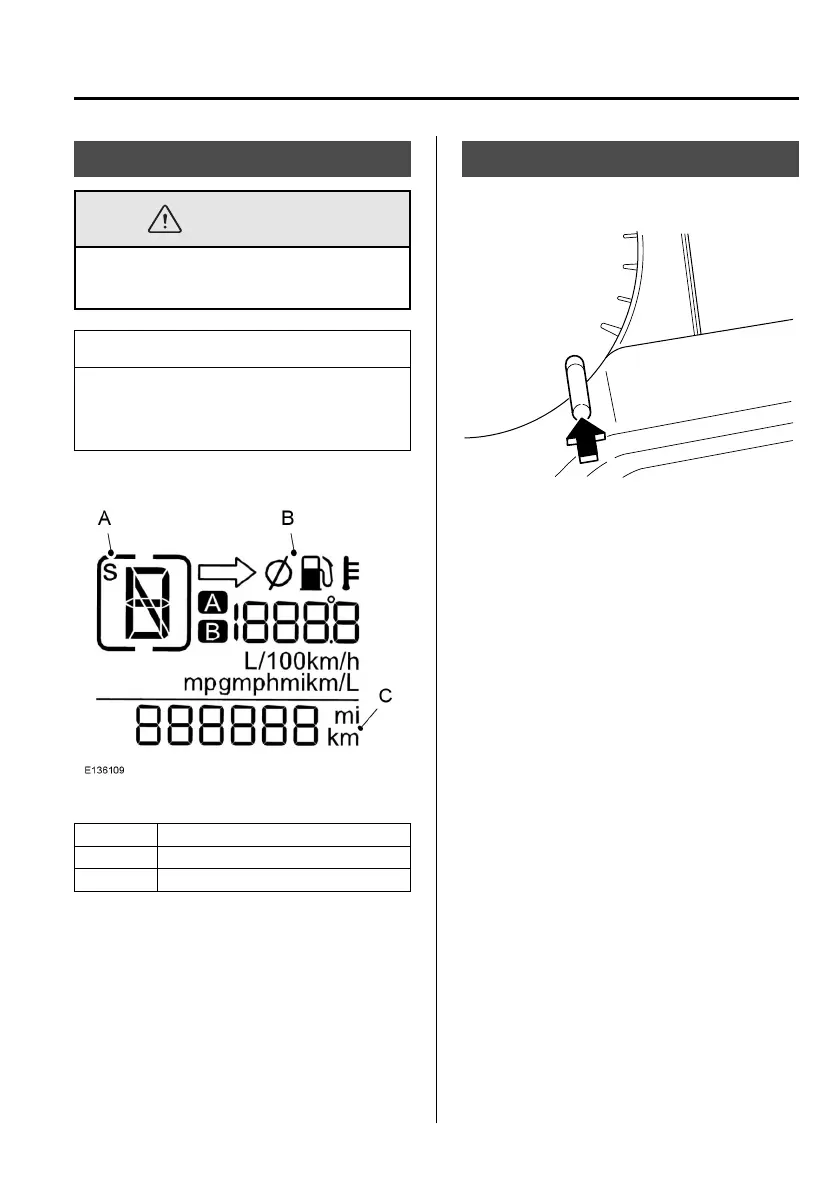
A Gear display (auto transmission only)
B Trip computer display
C Odometer display
qOdometer
Registers the total mileage of the vehicle.
TRIP COMPUTER
qControls
For item location: See Gauges (page 73).
Press the SET/RESET button less than 2
seconds to:
l
Select between the trip computer
displays
Press and hold the SET/RESET button
for more than two seconds to:
l
Reset trip A
l
Reset trip B
l
Reset average fuel consumption
l
Reset average speed
Information Displays
83
Mazda BT-50_8FX5-EI-17DT_Edition2 Page91
Thursday, May 11 2017 5:31 PM
Form No.8FX5-EI-17DT











 To Next Page