5656
3-5. Using Send to Car (Continued)
■
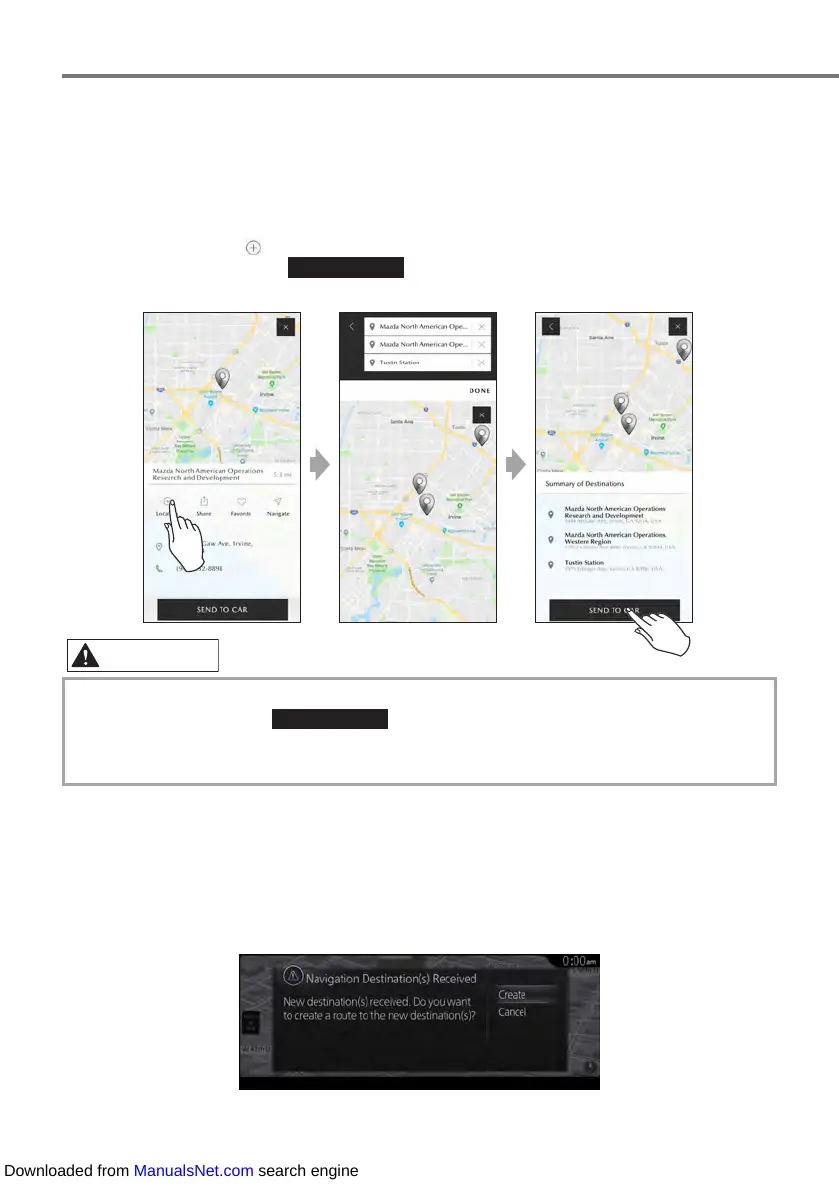
When Sending Multiple Destinations
1.
Display the detailed information for the first destination that was searched.
2.
Touch [Location] ( ), and add the second destination.
For the last spot, touch SEND TO CAR , which collectively sends points up to this point
to the vehicle.
• Up to three destinations can be sent at a time. Touch [Location] at the first and second
destinations, then touch SEND TO CAR at the third destination to send the three
destinations.
• The same destination cannot be sent repeatedly.
3.
The destinations are automatically received by the vehicle.
• If a Navigation Route Has Not Been Created by the Vehicle
When setting the route using the received destination, select [Create] and edit the
navigation route.
Downloaded from ManualsNet.com search engine



 To Next Page