NOTE
If a vehicle ahead is detected while travelling at a constant speed, the vehicle-ahead
indication is displayed and headway control is performed. Additionally, when a vehicle
ahead is no longer detected, the vehicle-ahead indication turns off and the system
switches back to travel at constant speed.
The lowest possible speed which can be set on the MRCC with Stop & Go function system
is 30 km/h (19 mph).
Headway control is not possible if the vehicle ahead is driving faster than your vehicle's
set speed. Adjust the system to the desired vehicle speed using the accelerator pedal.
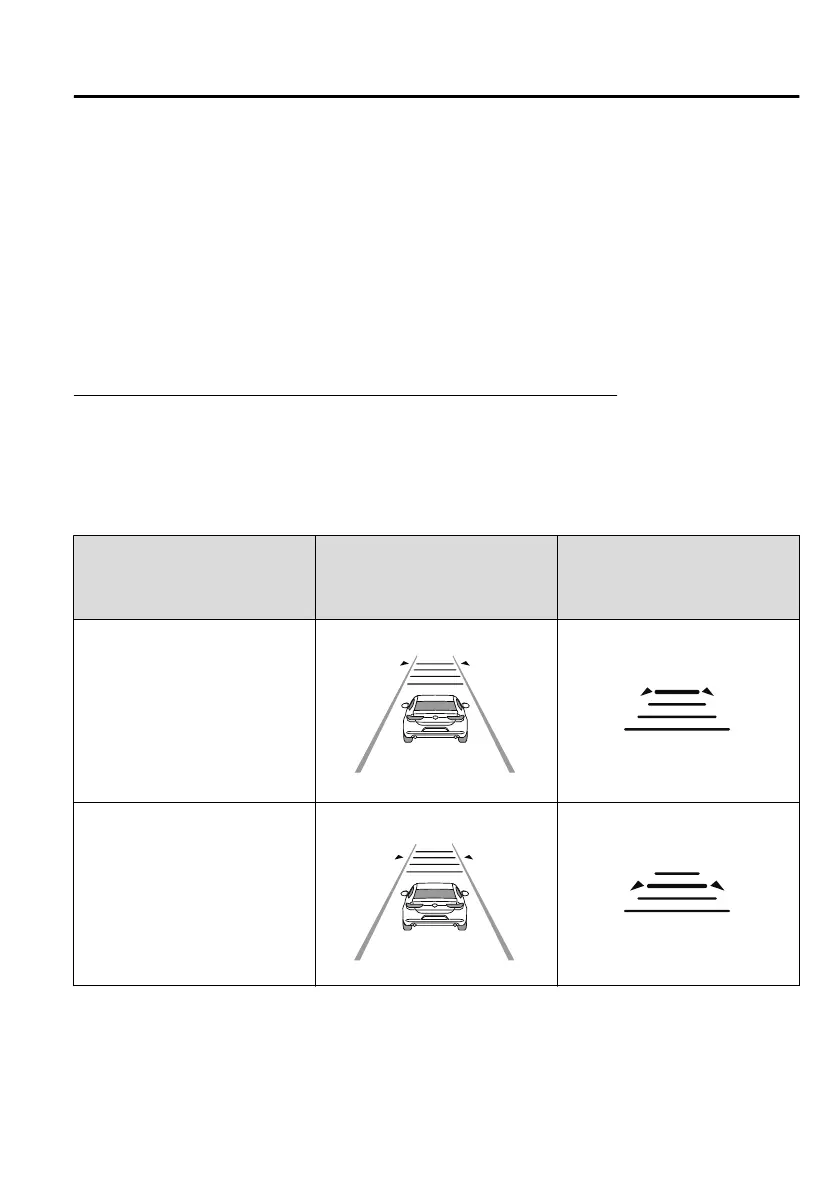
How to set the distance-between-vehicles during headway control
The distance-between-vehicles can be set to 4 levels; Long, medium, short, and extremely
short distance.
The distance-between-vehicles is set to a shorter distance by pressing the CANCEL switch
down. The distance-between-vehicles is set to a longer distance by pressing the CANCEL
switch up.
Distance-between-vehicles guide‐
line
(at 80 km/h (50 mph) vehicle
speed)
Indication on multi-information
display
Indication on active driving dis‐
play
*1
Long (about 50 m (164 ft))
Medium (about 40 m (131 ft))
When Driving
i-ACTIVSENSE
4-135
Mazda3_8HC2-EO-19A_Edition1 2018-11-22 10:58:46




 To Next Page