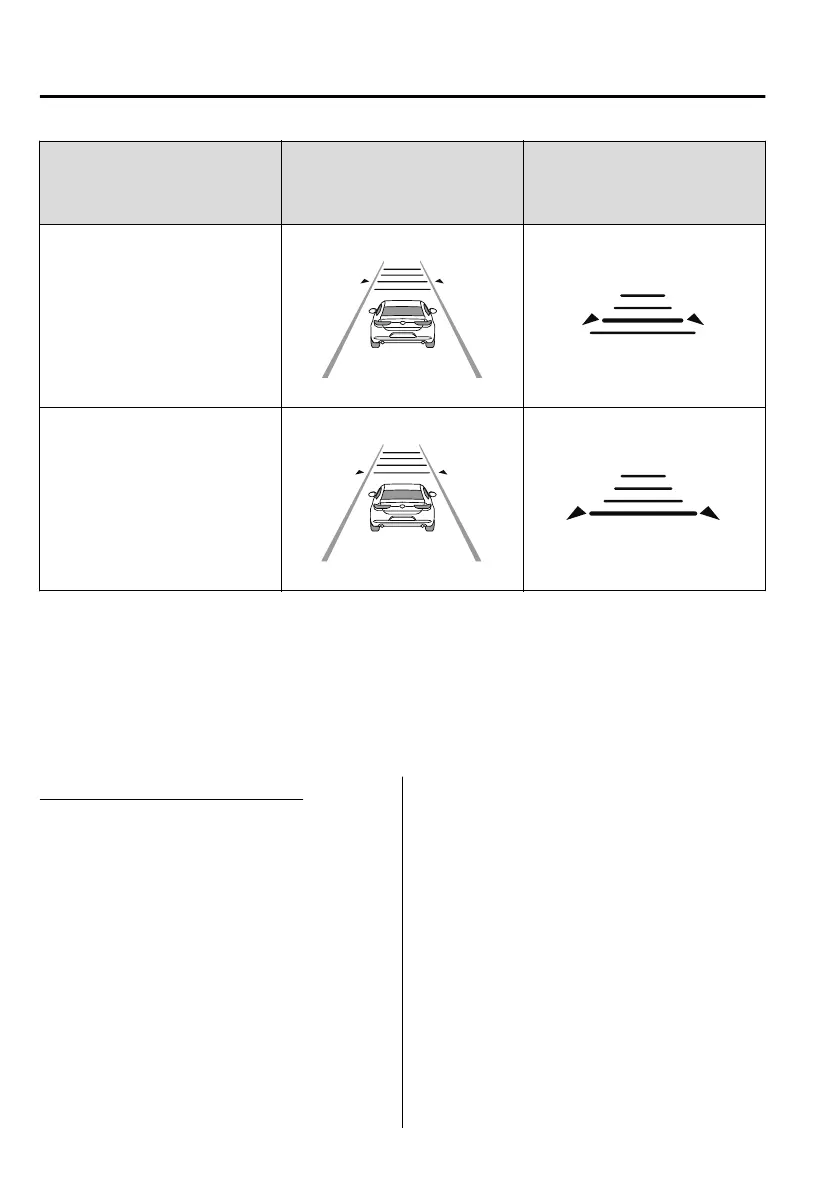
Distance-between-vehicles guide‐
line
(at 80 km/h (50 mph) vehicle
speed)
Indication on multi-information
display
Indication on active driving dis‐
play
*1
Short (about 30 m (98 ft))
Extremely short (about 25 m (82 ft))
*
1 Displays a pop-up image in the active driving display only when the driver operates the switch.
NOTE
The distance-between-vehicles differs depending on the vehicle speed, and the slower the
vehicle speed, the shorter the distance.
When the ignition is switched to ACC or OFF and then the engine is started again, the
system automatically sets the distance-between-vehicles to the previous setting.
Changing the Set Vehicle Speed
To accelerate/decelerate using the RES
switch
When the RES switch is pressed up (SET
+), the vehicle accelerates and when the
RES switch is pressed down (SET-), it
decelerates.
Press and release immediately: 1 km/h
(1 mph)
Press and hold: 10 km/h (5 mph)
To increase speed using accelerator
pedal
Depress the accelerator pedal and press the
RES switch up (SET+) or down (SET-) at
the desired speed. If the switch is not
operated, the system returns to the set
speed after you release your foot from the
accelerator pedal.
NOTE
The warnings and brake control do not
operate while the accelerator pedal is
depressed.
When Driving
i-ACTIVSENSE
4-136
Mazda3_8HC2-EO-19A_Edition1 2018-11-22 10:58:46




 To Next Page