▼
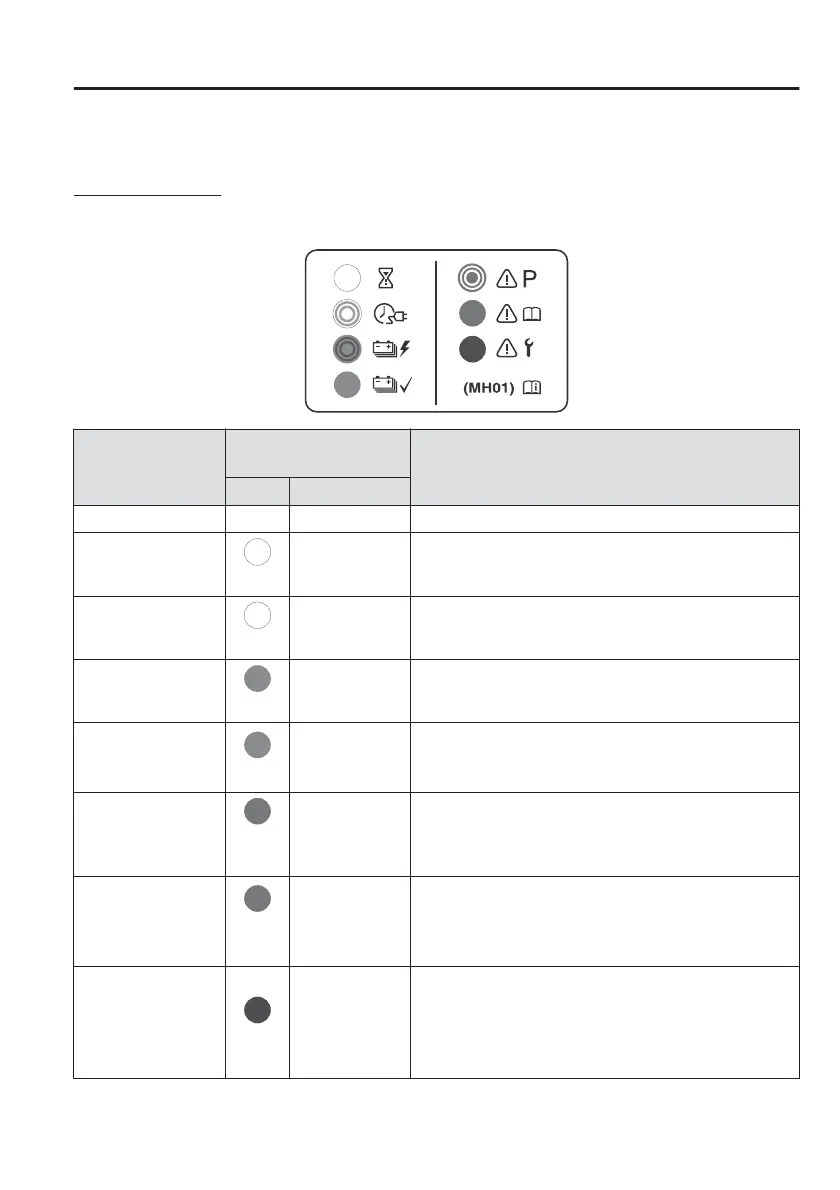
Checking Charging Status
Charge indicator
The illumination/flash pattern of the charge indicator can be checked using the
labels on the charge lid.
Charging system
status
Charge indicator illumi-
nation/flash pattern
Content
Colour Pattern
Chargeable — OFF Charging is possible.
Stand-by for charg-
ing
(White)
ON Turns on when waiting for starting to charge.
Setting charging
timer
(White)
Flashes slowly The brightness changes when the charging timer is set.
Charging starts
(Green)
Flashes slowly The brightness changes during charging.
Charging completed
(Green)
ON
Turns on when charging is completed.
Turns o after a certain period of time has passed
since charging was completed.
Charging conditions
not met
(Am-
ber)
Flashes
Flashes when the charging connector is connected
and the selector lever is in a position other than P.
Shift the selector lever to the P position.
Charging system
problem
(Am-
ber)
ON
Turns on if there is a problem with the charging system
when the charging connector is connected.
Wait a few minutes then reconnect the charging con-
nector.
Charging system
problem
(Red)
ON
Turns on if there is a problem with the charging system
and the charging port lid is opened or the charging
connector is connected.
Have your vehicle inspected by an Authorised Mazda
Repairer.
Before Driving
Electric Vehicles
3-23



 To Next Page