Audio Controls Without Navigation
19 20
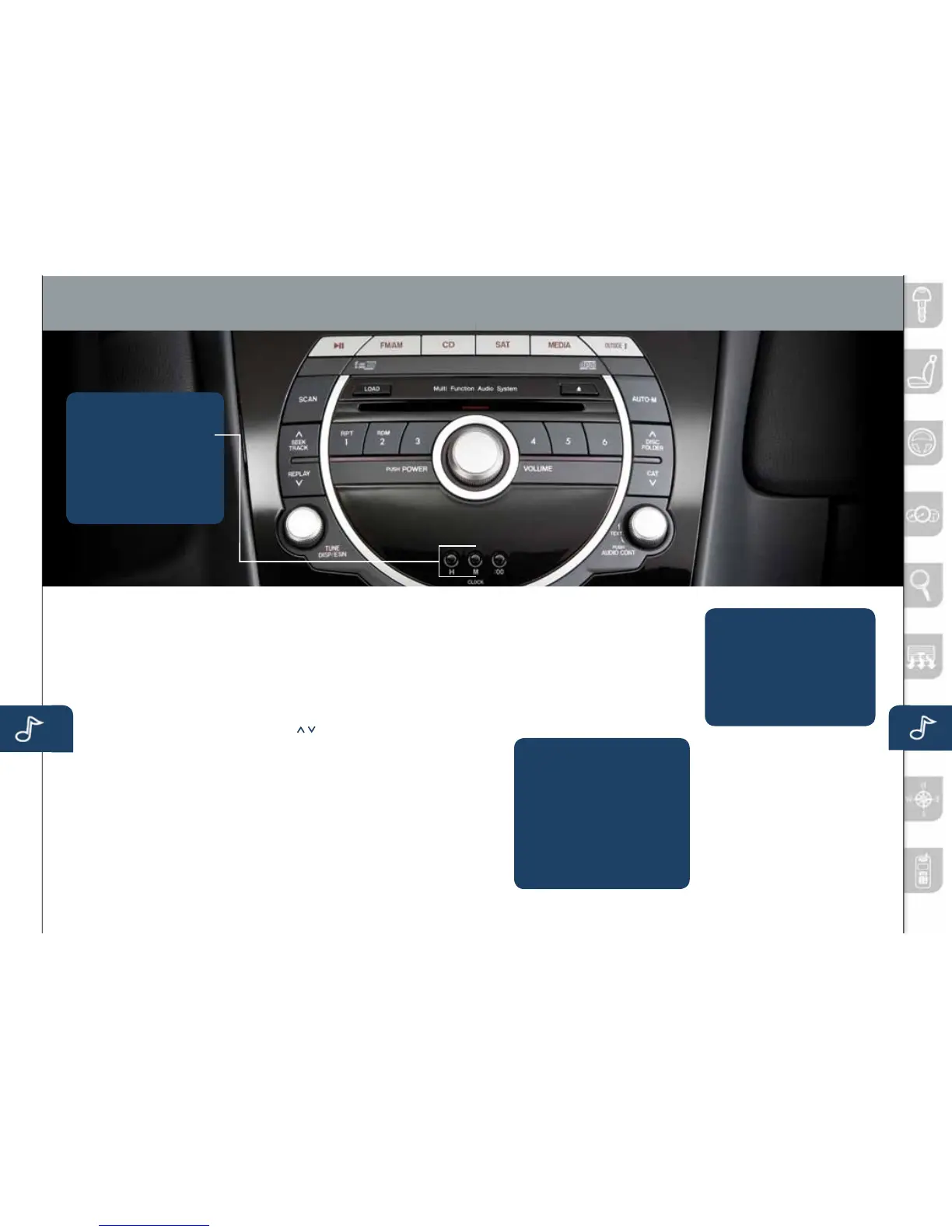
AUDIO SYSTEM ON
PushthePower/Volumedialtoturn
theradioon.
MEDIA SELECTION
Radio:PushFMorAMbuttonto
selecttheFM1,FM2,orAMband.
Theselectedbandwillbeindicated
intheInformationDisplay.
CD:PushCDtoselecttheCDplayer
.
Satellite Radio:PushtheSAT
buttonforSIRIUSXMRadio
®
.Ifyour
vehicleisequippedwithSIRIUS
XMRadio
®
(satelliteradioantenna
onroofortrunklid),yournew
Mazdaincludesafreeintroductory
subscriptionwithalimitedtermtrial
offer.Call888-539-7474toactivate!
SeetheOwner’sManualand/or
dealerfordetails.Contactyour
MazdadealeraboutaddingSIRIUS
XMRadio
®
ifyourMAZDARX-8is
notalreadyequippedwithit.
MEDIA:Pushtoselectthe
auxiliaryjack.
TUNING
Theradiohasthefollowing
tuningcontrols:
• Manual:TurntheTUNEdialto
manuallychangethefrequency.
• Seek:PushtheTRACK/SEEK
tuningbuttonsto
automaticallyseekahigheror
lowerfrequencywithastation.
• Scan:PushtheSCANbutton
toautomaticallysamplestrong
stationsforafewseconds
each.Pushagaintocancel.
• Preset Channel:Pushthe
PresetChannelbuttons(1-6)
toselectastationstoredin
memory.Tostoreastation,
pushandholdabutton(1-6)
untilabeepisheard.
• Auto Memory Tuning:
PushtheAUTO-Mbuttonto
storeanadditional6stationson
eachFMandAMbandwithout
disturbingthepreviouslystored
stations.Thisisusefulwhen
drivinginanareawherethe
localstationsarenotknown.
RefertotheOwner’sManualfor
completedetails.
LOADING A CD
Single CD Player
• InserttheCDintotheslot,
label-sideup.Theauto
loadingmechanismwillload
theCDandbegintoplayit.
In-Dash CD Changer
• PushtheLOADbuttonand
when“IN”isdisplayed,insert
theCD.
PLAYING A CD
• PushCDbutton.
• PushDISC-CATbuttonto
selectaCD(6CDchanger).
• PushFOLDERbuttonto
selectafolder(MP3/WMA).
• PushSEEK/TRACKbutton
toselectatrack.
Outside Temperature Display
PushOUTSIDEbuttontodisplay
outsidetemperatureinthe
informationdisplay.
6-Disc CD Changer
ContactyourMazdadealerabout
addinga6-discCDchangerif
yourMAZDARX-8isnotalready
equippedwithit.
• PushtheHbuttontoset
thehour.
• PushtheMbuttontoset
theminutes.
NOTE:Pushthe:00 buttonto
resetclocktonearesthour.
SETTING YOUR CLOCK
www.MazdaUSA.com
280340_11a_RX-8_SSG_081010.indd 20-21 8/10/10 3:12 PM



 To Next Page