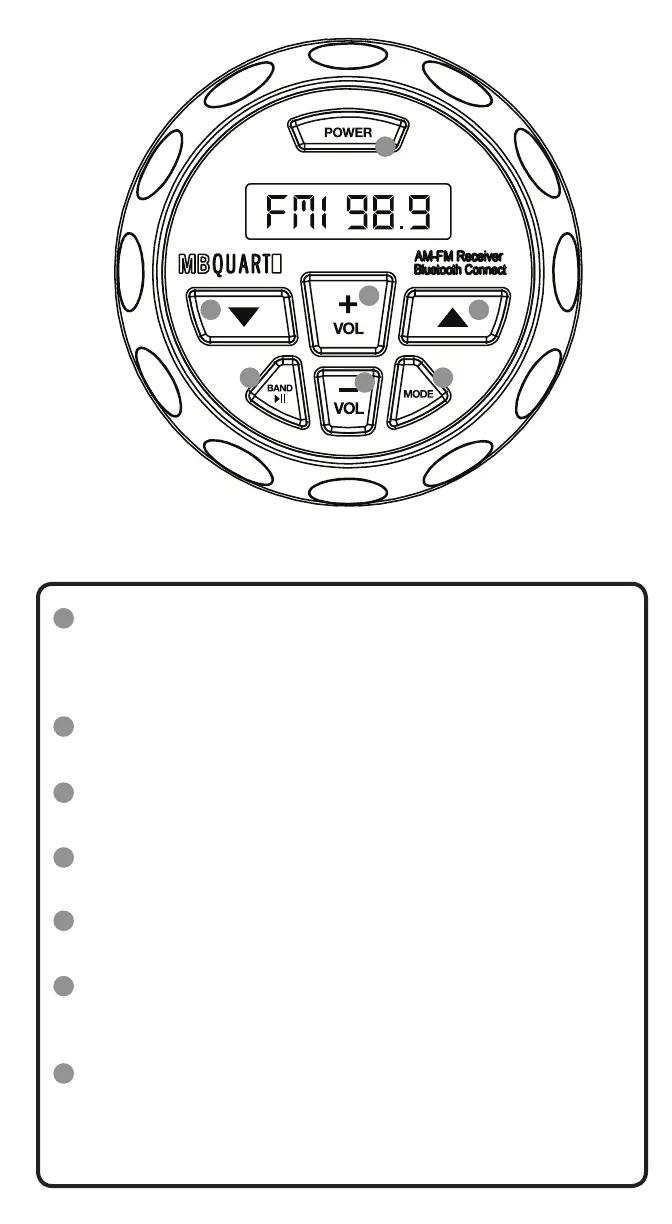
Controls
POWER Button
-Press the POWER button to power on the unit.
-Press the POWER button to mute the audio.
-Press and hold the POWER button to power the unit off.
VOL+ Button
-Press the VOL+ button to increase the volume.
VOL- Button
-Press the VOL- button to decrease the volume.
▲ Button
-Press the ▲ button to track up.
▼ Button
-Press the ▼ button to track down.
BAND ►|| Button
-Press the BAND button to switch between AM & FM in Radio mode.
-Press the BAND button to play / pause in USB mode.
MODE Button
-Press the MODE button to switch between RADIO / BT / MUSIC /
USB / AUX IN.
-Press and hold the MODE button for 2 seconds to access the
Adjustment Menu.
1
2
3
45
6 7
1
2
3
4
5
6
7


 To Next Page