ASSEMBLY AND INSTALLATION INSTRUCTIONS
MEDIUM HANGING UNIT - 18" / 24" / 30" / 36"
2
3
3.1 Assemble Set Shelves (C) and Rear Hanging Cleats (E) onto Right Side Panel (B)
by sliding the Shelves and Cleats onto the Cam Posts (I) on Right Side Panel. BE
SURE dowel pins in Shelves and Cleats engage drilled holes in Right Side Panel,
and all parts are pressed flush against Right Side Panel.
IMPORTANT NOTES
Install Set Shelves (C) with finished edges
facing forward (toward front of unit).
Install Rear Hanging Cleats (E) with holes
for Cam Locks facing the rear of the unit and
the unfinishededge against the Set Shelf (C).
Install upper Set Shelf (C) with holes for Cam
Locks facing the top of the unit.
Install lower Set Shelf (C) with holes for Cam
Locks facing the bottom of the unit.
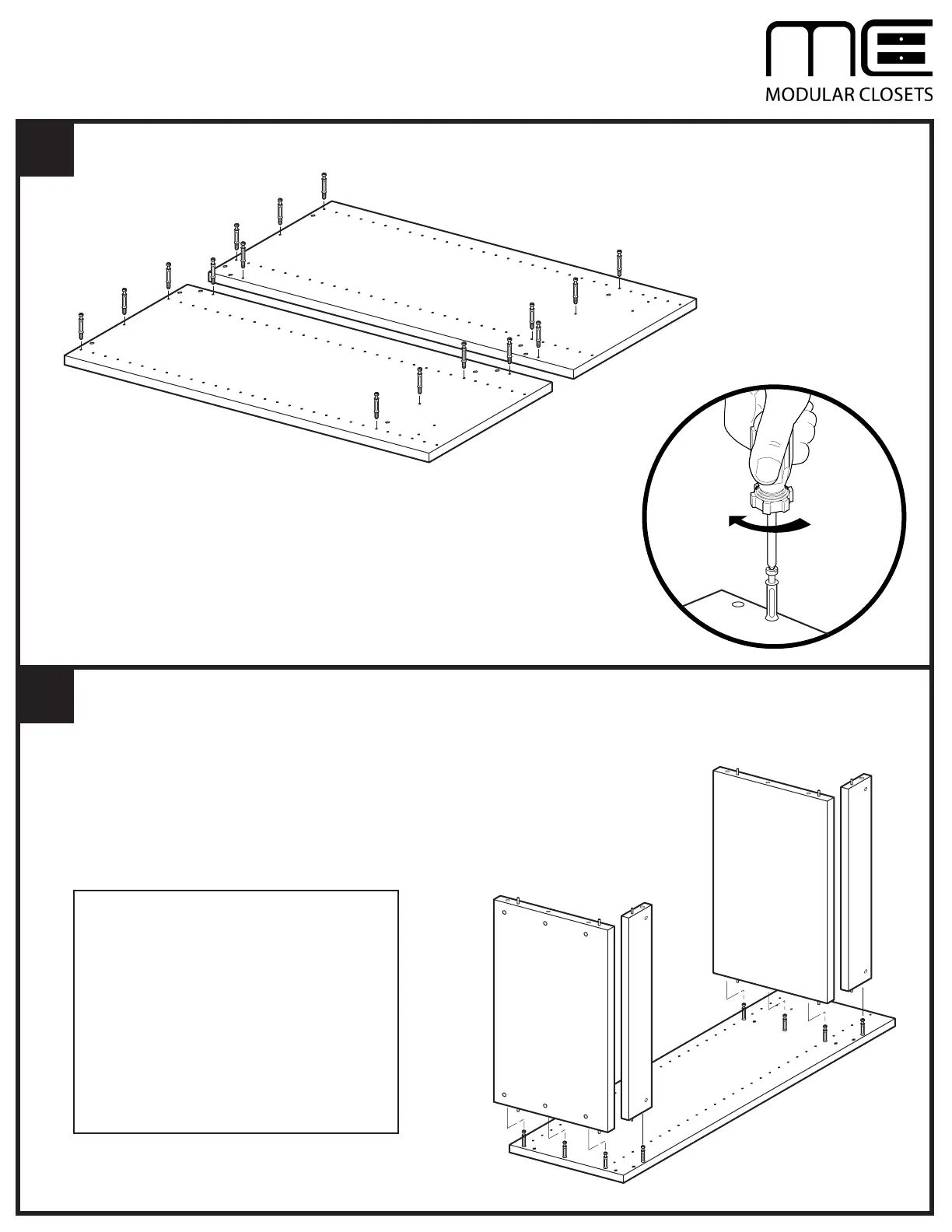
2.1 Install one Cam Post (I) into each of the eight holes on Left Side Panel (A)
and Right Side Panel (B). Tighten until Cam Posts are seated against Side
Panels.
I
I
B
A
C
E
I
B
C
E
I



 To Next Page