The required settings for Hyperterminal are:
• Baud rate: 115200 • Stop Bits: 1
• Number of Bits: 8 • Control Flow: None
• Parity: None
5
Plug one end of the power cable into the power inlet and plug the other end into a power source. The
Sensor ships with standard US power and international cables.
The NS-series Sensor does not have a power switch. You can directly plug the power cable into a power
source.
Connect the monitoring ports
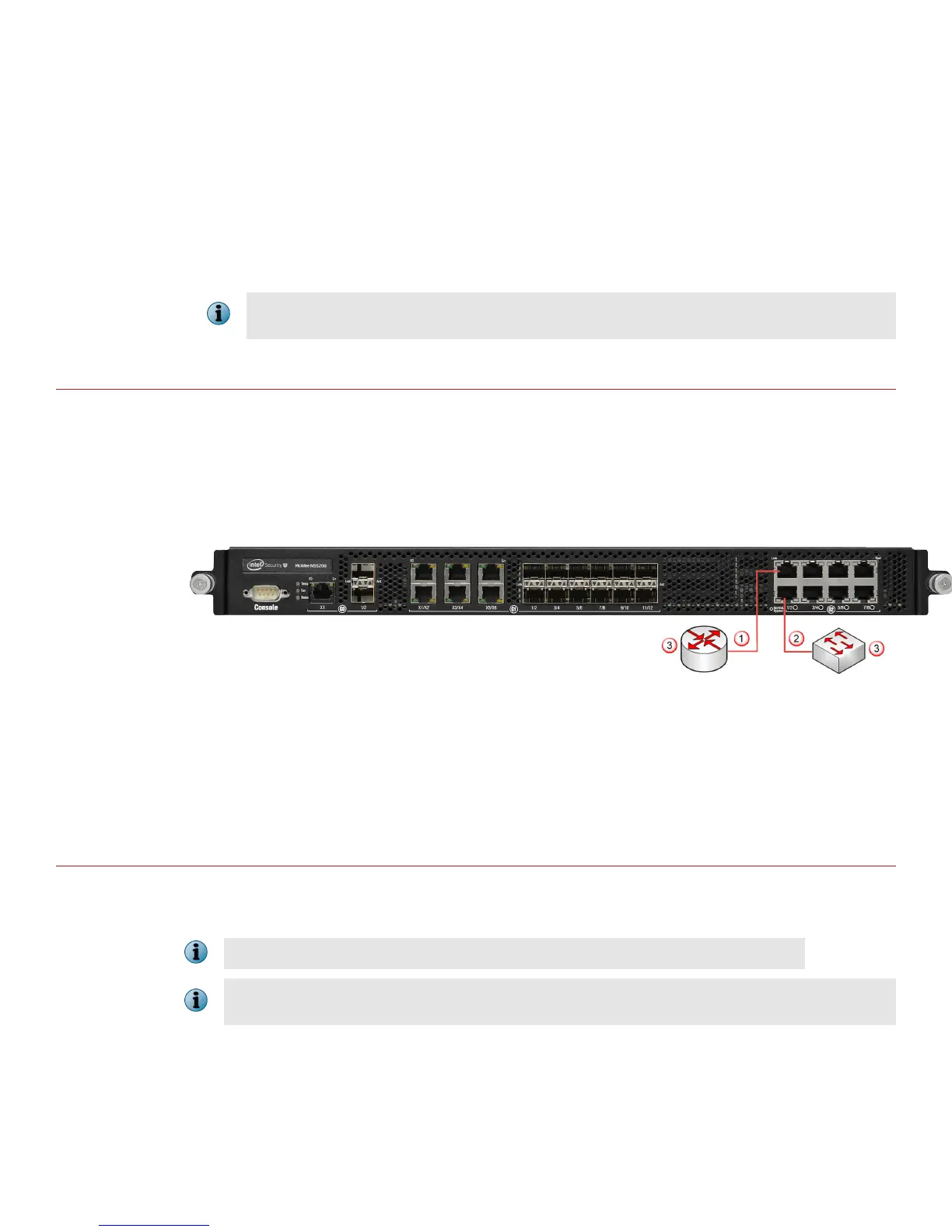
This procedure describes how to connect cables to a Sensor that runs in inline mode.
Task
1
Plug the cable appropriate for use with your transceiver module into one of the monitoring ports labeled x
(for example, 1).
2
Plug the cable appropriate for use with your transceiver module into one of the monitoring ports labeled y
(for example, 2).
3
Connect the other end of each cable to the network devices that you want to monitor. For example, if you
plan to monitor trac between a switch and a router, connect the cable connected to 1 to the router and
the one connected to 2 to the switch.
Install the Manager software
For detailed instructions, see the McAfee Network Security Platform Installation Guide.
You must have administrator rights on the target Windows Server to install the Manager software.
A MySQL database is included with the Manager and is installed (embedded) automatically on your target
Windows Server during this process.
7



 To Next Page