EasyManua.ls Logo

McCulloch MAC 291 - REMOVING; REPLACING STRINGHEAD; AIR FILTER; FUEL CAP;FUEL FILTER

McCulloch MAC 291
22 pages
Print Icon
To Next Page IconTo Next Page
To Previous Page IconTo Previous Page
Loading...
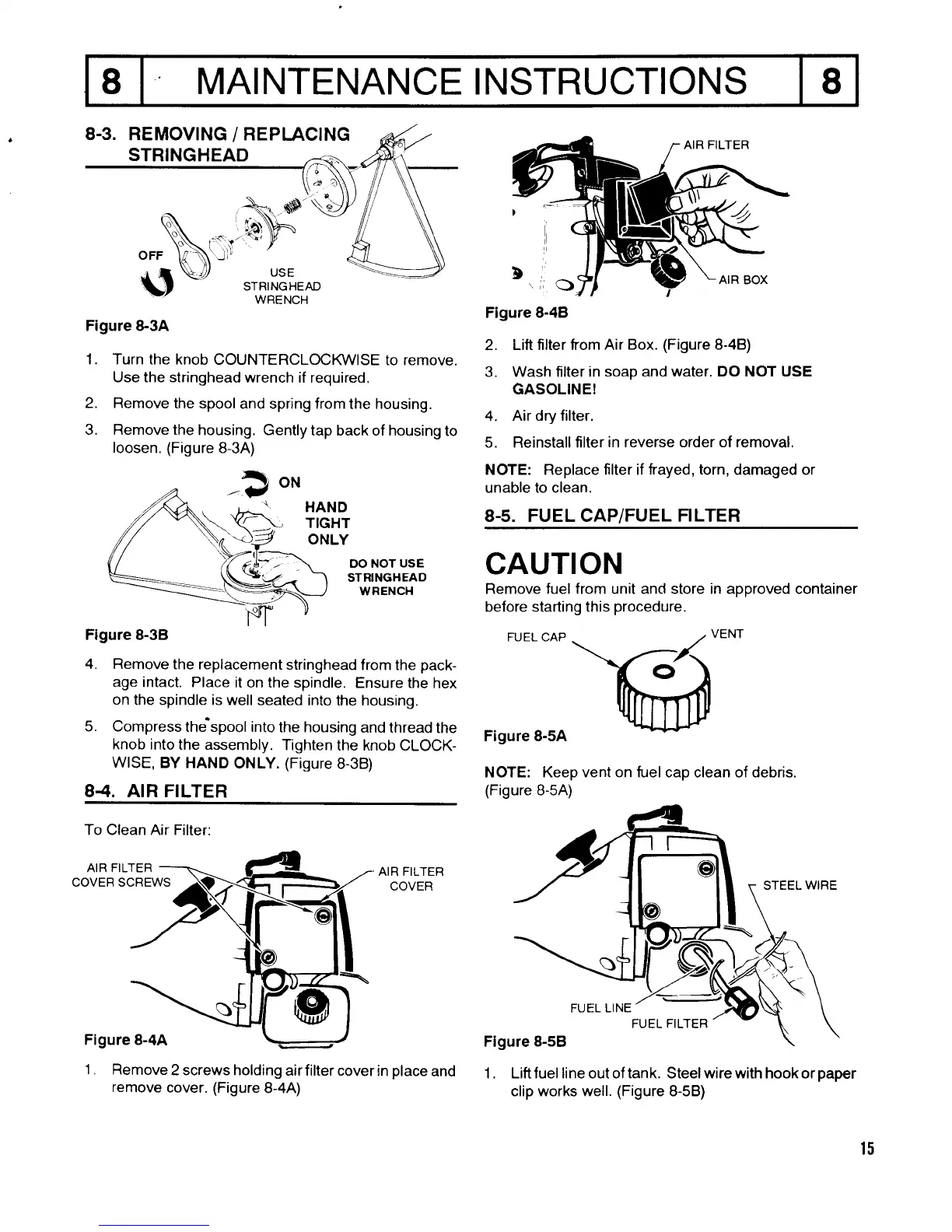
8-3.
REMOVING
/
REPI-ACING
STRINGHEAD
I MAI NTENANCE
I NSTRUCTIONS
8
Figure &3A
1. Turn the knob
COUNTERCLOCKWISE
to remove.
Use the stringhead
wrench if required.
2. Remove the spool
and spring from
the housing.
3. Remove the
housing. Gently
tap back of housing
to
loosen. (Figure
8-3A)
_?
o*
Figure
8-48
2.
Lift filter from Air
Box.
(Figure
8-4B)
3. Wash filter in soap
and water. DO NOT USE
GASOLINEI
4.
Air dry filter.
5. Reinstall filter
in
reverse
order of removal.
NOTE: Replace f lter if frayed,
torn,
damaged or
unable to clean.
8.5. FUEL CAP/FUEL FILTER
CAUTION
Remove fuel from unit and store in approved container
before starting this
procedure.
FUEL.AP
\ t--<
htu
Figure 8-5A
NOTE: Keep vent on fuel cap clean of debris.
(Figure
B-5A)
1. Liftfuel line outoftank. Steelwirewith hookorpaper
clip works well.
(Figure
8-5B)
HAND
TlGHT
ONLY
OO NOT
USE
STRINGHEAO
WRENCH
Figure 8-3B
4. Remove
the replacement
stringhead
from the
pack-
age
intact. Place
it on the spindle.
Ensure the
hex
on
the spindle is
well seated
into the housing.
5. Compress
the'spool into
the housing
and thread
the
knob
into the assembly.
Tighten
the knob
CLOCK-
WISE,
BY HAND
ONLY.
(Figure
8-38)
84. AIR FILTER
To Clean Air Filter:
AIR
FILTER
AIR FILTER
COVER
COVER SCREWS
Figure 8-4A
1 . Remove
2 screws holding
airfilter cover
remove
cover.
(Figure
8-4A)
15
FUEt
FILTER
in
place
and

Related product manuals