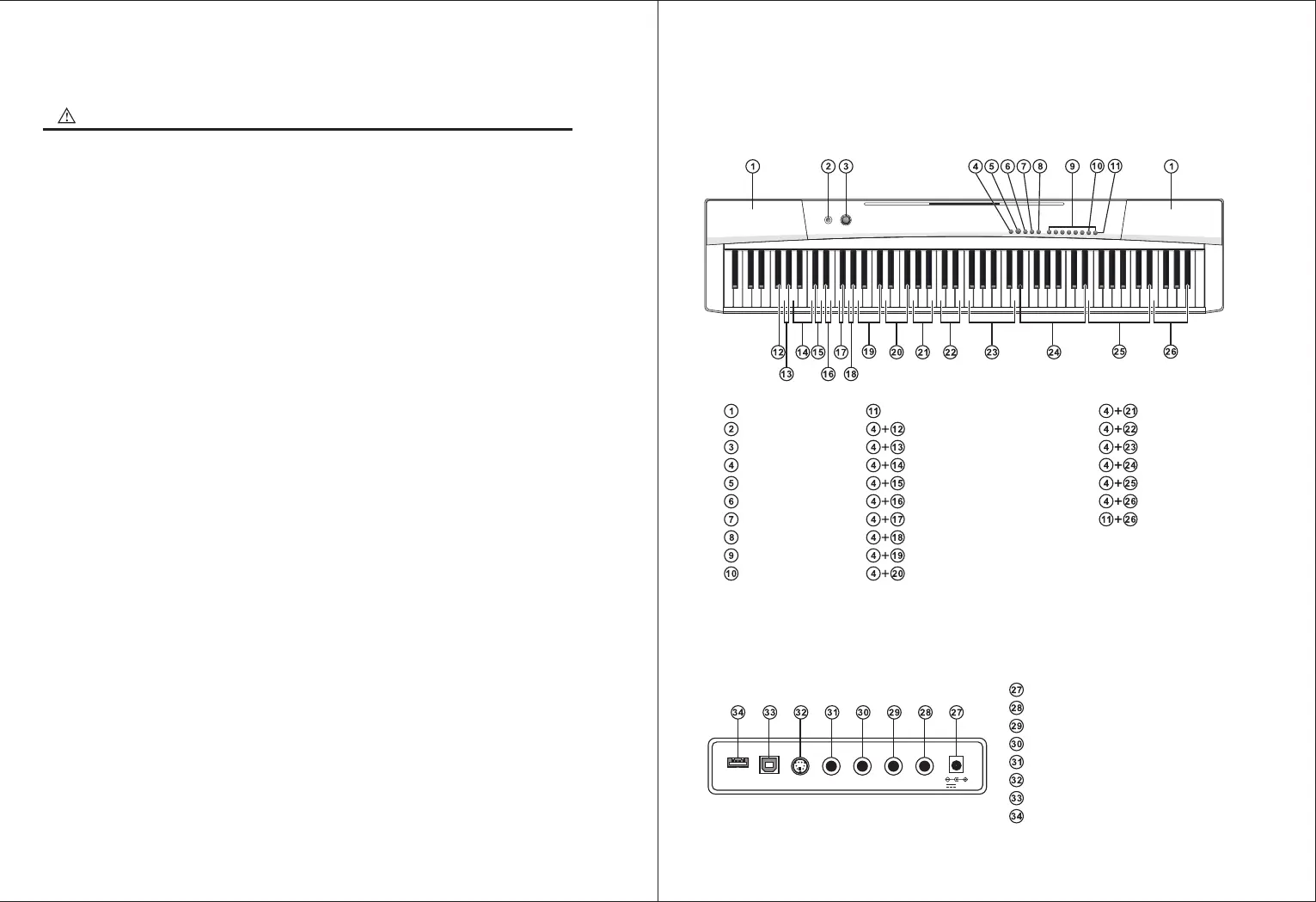
● Rear-Panel Controls
● Front Panel Contols
Speaker
Power Switch
Master Volume
Function
Demo
Metronome
Lesson
Split
Timbre
Percussion
Upper Volume
Metronome Volume
Metronome
Tempo
Demo Song
GM Timbre
Udisk Music Player
GM Timbre
Click
Record
Touch
Sustain
Vibrato
Transpose
Octave
Split Volume
Lower Volume
D. C 12V
PHONES-1
PHONES-2
AUDIO OUT
AUDIO IN
PEDAL
USB-MIDI
U ISKD
PEDAL AUDIO IN
USB-MIDI
12V
AUDIO OUT PHONES-2 PHONES-1
UDISK
Precautions
Please read it through carefully before proceeding.
● Dedicated power adapter shall be used, and in case of adaptor damage, replace it
immediately
● The keyboard can only be disassembled by professionals, and no change can be made to
the internal structure. In case of any functional abnormality during performance , stop
performing immediately and send the keyboard to professionals for maintenance.
● When connecting the keyboard to other device, ensure both the keyboard and the device to
be connected are powered off before connection.
● Do not turn and keep the volume to the maximum or to an uncomfortable degree for a long
time when performing
● Keep the keyboard away from heat source to protect its parts from damage.
● Prevent liquid, dust, small particle and other foreign matters from entering the case of the
keyboard, for which may result in element short circuit.
● Pull out the plug before cleaning the keyboard, and do not pull out the plug with wet hand.
● Please use dry and soft cloth to clean the keyboard. Paint, alcohol or other chemical solvents
shall not be used for cleaning, for which may damage the keyboard surface.
● Please pull out the plug after performing or when the keyboard is left unused for a long time.
NOTICE
I.Panel Control And Extension Ports


 To Next Page
 Loading...