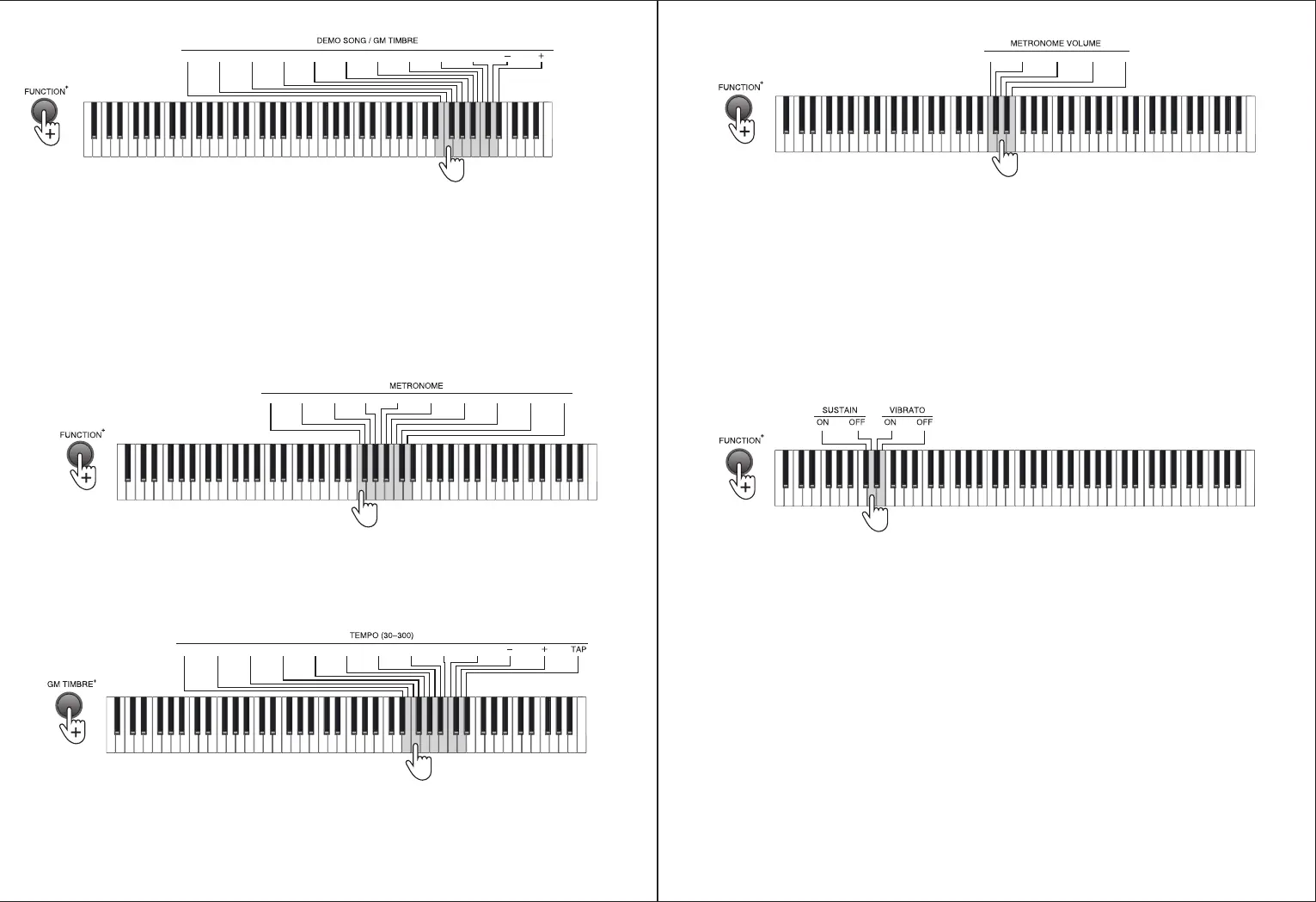
SONG/GM TIMBER] keys to select the corresponding demo song.
During the demo song playing process, you can select other timbres for playing the demo song. (Note: percussion and
dual timber is not applicable)
IV. Metronome
● Metronome
Press the [METRONOME] button to activate the metronome. Press the [METRONOME] button again to deactivate the
metronome.
The Piano contains 10 tempos. Press the [FUNCTION+] button + the [METRONOME] 1/4~12/8 keys for metronome
setting.
● Tempo
The tempo is defaulted to be 120, which is adjustable between the range of “30” to “300”. Press the [FUNCTION+]
button + [Tempo] number + “-/+” keys to select the required tempo.
Press the [FUNCTION+] button + the [TAP] key of the [TEMPO] to restore the default value.
● Metronome volume
The Piano contains 5 metronome volumes. Press the [FUNCTION+] button + the [METRONOME VOLUME] 1 - 5 keys for
0 1 2 3 4 5 6 7 8 9
Enter a 2-digit code or press the “-/+” button for selection.
1/4 2/4 3/4 4/4 6/4 3/8 6/8 7/8 9/8 12/8
Enter the tempo (30-300) or press the “-/+” button for selection,
and press the “TAP” key to restore the default value
0 1 2 3 4 5 6 7 8 9
metronome volume setting.
V. Effect Change
● Timbre change
♦ Sustain: prolong the lasting time of a pitch.
Press the [FUNCTION+] button + the [SUSTAIN - ON] key to enable the sustain effect.
Press the [FUNCTION+] button + the [SUSTAIN - OFF] key to disable the sustain effect.
♦ Vibrato: add a pulsating change to the pitch
Press the [FUNCTION+] button + the [VIBRATO - ON] key to enable the vibrato effect.
Press the [FUNCTION+] button + the [VIBRATO - OFF] key to disable the vibrato effect.
♦ Soft pedal: decrease the pitch volume
Press and hold the [soft pedal] to enable the soft effect, and release the pedal to disable such effect.
(Note: this function is only supported by the configuration with the optional items - three pedals)
♦ Sustain pedal: prolong the lasting time of a pitch.
Press and hold the [sustain pedal] to enable the sustain effect, and release the pedal to disable such effect.
(Note: this function is supported by both configurations with a single pedal or three pedals.)
♦ Damper pedal: prolong the lasting time of the pressed key.
Press and hold the [sustain pedal] to enable the damper effect, and release the pedal to disable such effect.
(Note: this function is only supported by the configuration with the optional items - three pedals)
1 2 3 4 5


 To Next Page
 Loading...