9V BATTERY
RCA IN
S/PDIF IN
L
R
PHANTOM
+48V
S/PDIF OUT
R
L
PRE
AMP
CPU
USB
MIX
LEVEL
MONITOR
OUTPUT
Min Max
9V DC
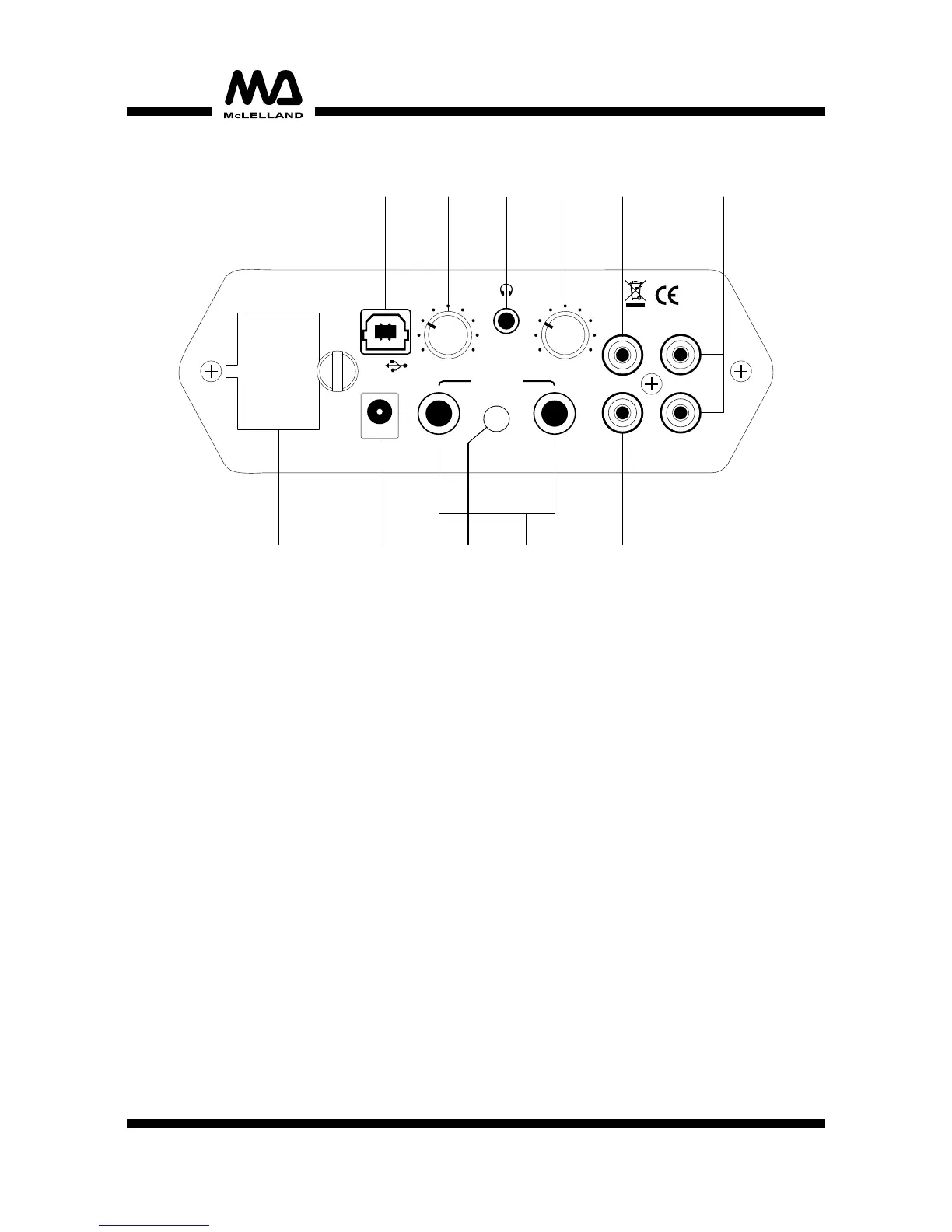
1. USB port:
Type B connector, for connecting a computer. The audio data, digitized in the interface, is sent
to your computer via this USB port. It also acts as power supply for the Mix-Lite.
2. Mix control:
Selects and fades the signal for the analog outputs of the audio interface:
• left position PREAMP: preamplified signal of the input sources.
• right position CPU: audio signal coming via the USB connection.
• center position MIX: both signal sources(PREAMP and CPU) can be heard.
3. Monitor output:
3.5mm jack for connecting stereo headphones.
4. Level control:
For adjusting both the monitor output volume and main output volume.
5. S/PDIF IN:
Coaxial input(RCA) for connecting a signal source with digital output and supported sampler
frequency.
6. RCA IN:
Stereo RCA line input for connecting a signal source with line level(e.g. CD player)
7. S/PDIF OUT:
Coaxial output(RCA) supplies a digital audio signal output.
8. Main output:
Analog outputs(6.3mm jacks), supply the preamplified sinal of the input sources and/or an
audio signal coming from the computer(depending on the position of the control MIX). A
monitor system or units with line level input such as mixer, recorders or amplifiers may be
connected here.
9. +48V phantom power switch:
On/off switch for +48V phantom power at the XLR inputs.
NOTE: When phantom power switched on, no microphones with unbalanced output
must be connected as these microphones may be damaged.
10.9V AC/DC power input:
For connecting the supplied power unit to the unit.
11.9V battery:
For power supply of the audio interface using a 9V battery.
REAR PANEL
10 7
6
4
2
1
3 5
8911
5


 To Next Page
 Loading...