12
6
7
11
10
9
8
1
3
5
2
4
5252
3- REMOTE CONTROL KEYS
EN
52
EN
3- REMOTE CONTROL KEYS
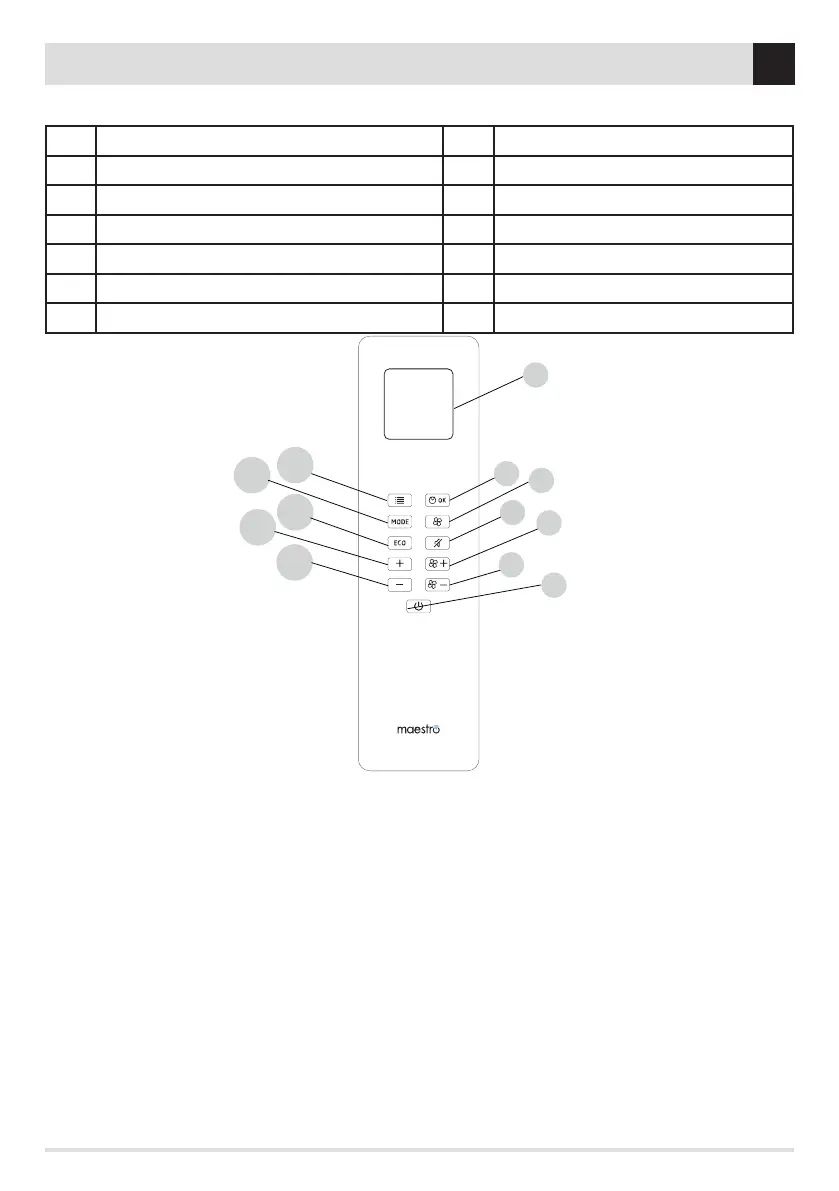
REMOTE CONTROL FUNCTION KEYS
KEY PRIMARY FUNCTION / SECONDARY FUNCTION KEY PRIMARY FUNCTION / SECONDARY FUNCTION
1 MENU / ESC 7 FAN SELECTION / RIGHT
2 MODE / LEFT 8 NO AIR (ON / OFF) / n.c.
3 ECOSTOP (ON/OFF) / n.c. 9 VENTILATION UP (+) / n.c.
4 TEMP UP/ POWER UP / MENU SCROLLING 10 VENTILATION DOWN (-) / n.c.
5 TEMP DOWN / POWER DOWN / MENU SCROLLING 11 ON / OFF / n.c.
6 TIMER (ON / OFF) / OK 12 DISPLAY
With KEY 2 it is possible to modify the air (COMFORT DYNAMIC OVERNIGHT POWER MANUAL) or hydro (ROOM/BOILER/PUFFER/DHW) stove
operating modes.
Use KEY 3 to enable and disable the ECOSTOP function.
Use KEY 4 to increase the temperature set in COMFORT SET (COMFORT DYNAMIC OVERNIGHT) or to increase the ame power if in MANUAL
mode
Use KEY 5 to decrease the temperature set in COMFORT SET (COMFORT DYNAMIC OVERNIGHT) or to decrease the ame power if in MANUAL
mode
Use KEY 6 to enable and disable operation with the programmable thermostat
Use KEY 7 for rotation selection (V1 - V2 - V3) of the fan you want to modify
Use KEY 8 to enable and disable the NO AIR function
Use KEY 9 to increase the fan level of the selected fan
Use KEY 10 to decrease the fan level of the selected fan
Use KEY 11 to switch the product on/o. To switch the stove on/o, keep the key pressed for approximately 3 seconds. When the stove is
switched on, “LAVORO” (WORK) will be displayed on the screen of the remote control.
Attention! For as long as the stove is in start-up mode, adjustments (Room temperature/ame power/ventilation and
pre-set operating mode - COMFORT/DYNAMIC/OVERNIGHT/MANUAL/POWER-ROOM/BOILER/PUFFER/DHW) are not carried
out. Wait for the screen to display LAVORO (WORK), which indicates that the stove is in OPERATING mode.


 To Next Page
 Loading...