5353
Technical Dept. - All rights reserved - Reproduction is prohibited
4-OPERATION
EN
53
EN
Technical Dept. - All rights reserved - Reproduction is prohibited
4-OPERATION
PRELIMINARY OPERATION ON FIRST STARTUP
The rst operation is to pair the remote control with the stove by following this procedure:
• connect the stove to the power supply
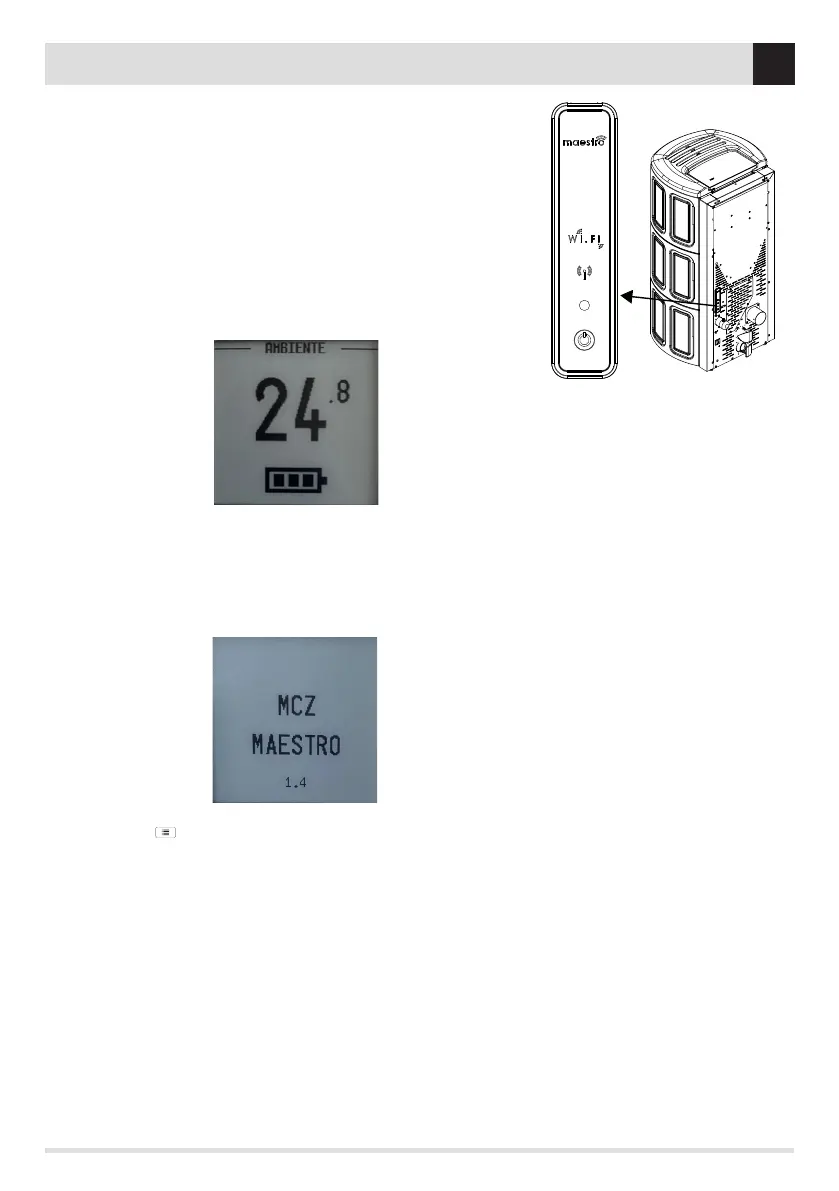
• go near (40-50 cm) the stove’s emergency panel (see the image to the side)
• click on any key on the remote control for 5 seconds
• wait for a buzzer to indicate that pairing has completed successfully.
ATTENTION! In the case of a non-visible emergency panel, refer to the product’s
user manual to identify its position rapidly.
ATTENTION! If the remote control is not paired with the stove, it is not possible to
access the SETTINGS menu.
ATTENTION! After coupling, the remote control automatically detects the
Temperature probe inside of it.
HOW TO DISCONNECT THE REMOTE CONTROL
To disconnect the remote control from the stove, proceed as follows:
• move approximately 3/5 metres away from the stove
• rst press key 8 (SILENT) followed by key 11 (ON/OFF) for 5 seconds
• release key 11 rst and then key 8
• the remote control is disconnected
MENU SETTING ( )
With the remote control connected to the stove, we can proceed with the various menu settings by pressing key 1. When the function is
not used for a few seconds, it exits the screen. To access it once again, press key 1 again.
The menu options are as follows:
• LANGUAGE
• DATE
• TIME
• BOARD INPUTS
• ECOSTOP HYSTERESIS
• ECOSTOP DELAY
• TIMER T1-T2-T3
• DAYS TIMER
• BEEP ON / OFF
• SLEEP
• FEED SCREW ON
PAIRED REMOTE CONTROL PANEL
DISCONNECTED REMOTE CONTROL PANEL


 To Next Page