PREPARATION
ASSEMBLING THE DETECTOR
Assembling your detector is easy
and requires no special tools. Just
follow these steps.
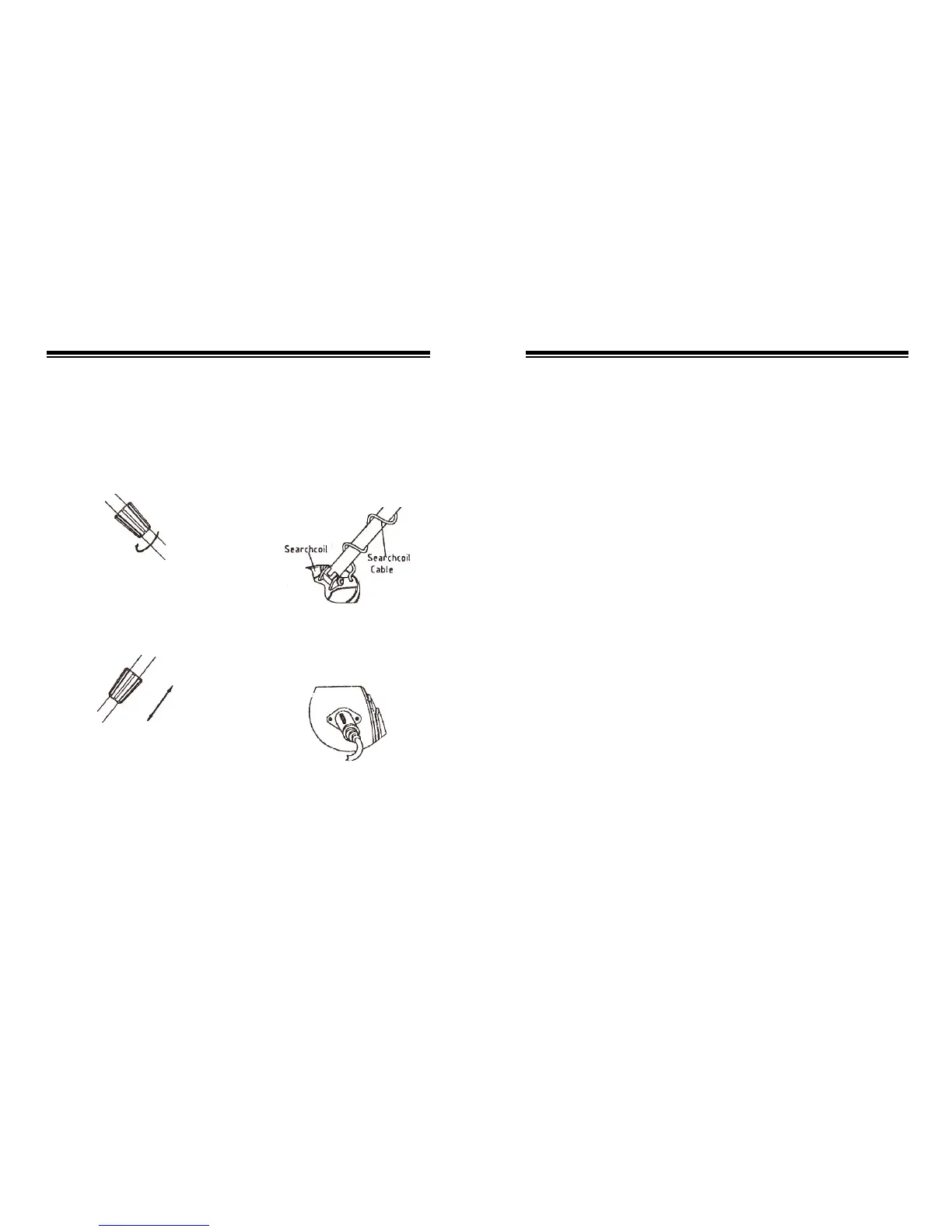
1. Turn the stem’s lock nut
clockwise until it loosens.
2. Lengthen or shorten the stem so
when you stand upright with the
detector in your hand, the search
coil is level with and about 8
inches above the ground with your
arm relaxed at your side.
3. Turn the stem’s lock nut
counterclockwise to lock it in
place.
4. Unscrew the knob on the search
coil and remove the knobs and
connector. Insert the stem and
align the holes on the search coil
3
bracket and the stem. Push the
connector through the holes and
tighten the knob
5. Wind the search coil cable
around the stem. Leave enough
slack in the cable to let you
adjust the search coil when you
are hunting on uneven ground.
6. Insert the search coil’s plug into
the search coil jack on the
detector’s control housing. Be
sure the pins on the plug align
with the holes in the jack.
Cautions:
z The search coil’s plug fits
into the connector only one
way. Do not force the plug or
you could damage it.
Remove any watch, ring, metal
button, cigarette box, etc you are
wearing, and wear shoes without
iron nail.
GROUND BALANCE MODE
This mode can eliminate the
“minerlization reaction” and has
better penetrability, so this mode
is preferentially selected
wherever indoor or outdoor
search. In this mode, as long as
the search coil is moved right
over the target, the detector
sounds and the viewmeter
indicates the change, any type of
metal raises the volume.
Follow these steps to set it
1) Turn on the switch;
2) Set the MODE to “GROUND
BALANCE”;
3) Stop the search coil 24inch
above the ground, press and
relieve the “Zeroing Button”
for several times to preheat
the detector until the pointer
returns to the “0”;
Set the “critical sound”;
4) Set “GROUND BALANCE” as
mentioned above;
5) Sweep the search slowly along
the ground and keep 8inch
above the ground.
DISCRIMINATION MODE
This mode is used to distinguish
ferrous metal and non-ferrous metal,
to select bigger metal and to
eliminate smaller ones between
the same type of metals. This mode
hasn’t “GROUND BALANCE”
function, so the “minerlization
reaction” is heavy, the operator
should use it carefully.
Follow these steps to set it:
1) Turn on the switch;
2) Set “MODE” to
“DISCR-IMINATION”;
3) Preheat;
4) Set the “critical sound”;
5) Distinguish the ferrous and
non-ferrous metal:
Use the discrimination turn
button turn to MIN position. The
pointer will rotate to right when you
detect the ferrous metal,
simultaneously, the detector sound
will raise.
If you turn the discrimination turn
button to MAX position, the pointer
will rotate to right when you detect
the non-ferrous metal,
simultaneously, the detector sound
will raise.
12


 To Next Page
 Loading...