EasyManua.ls Logo

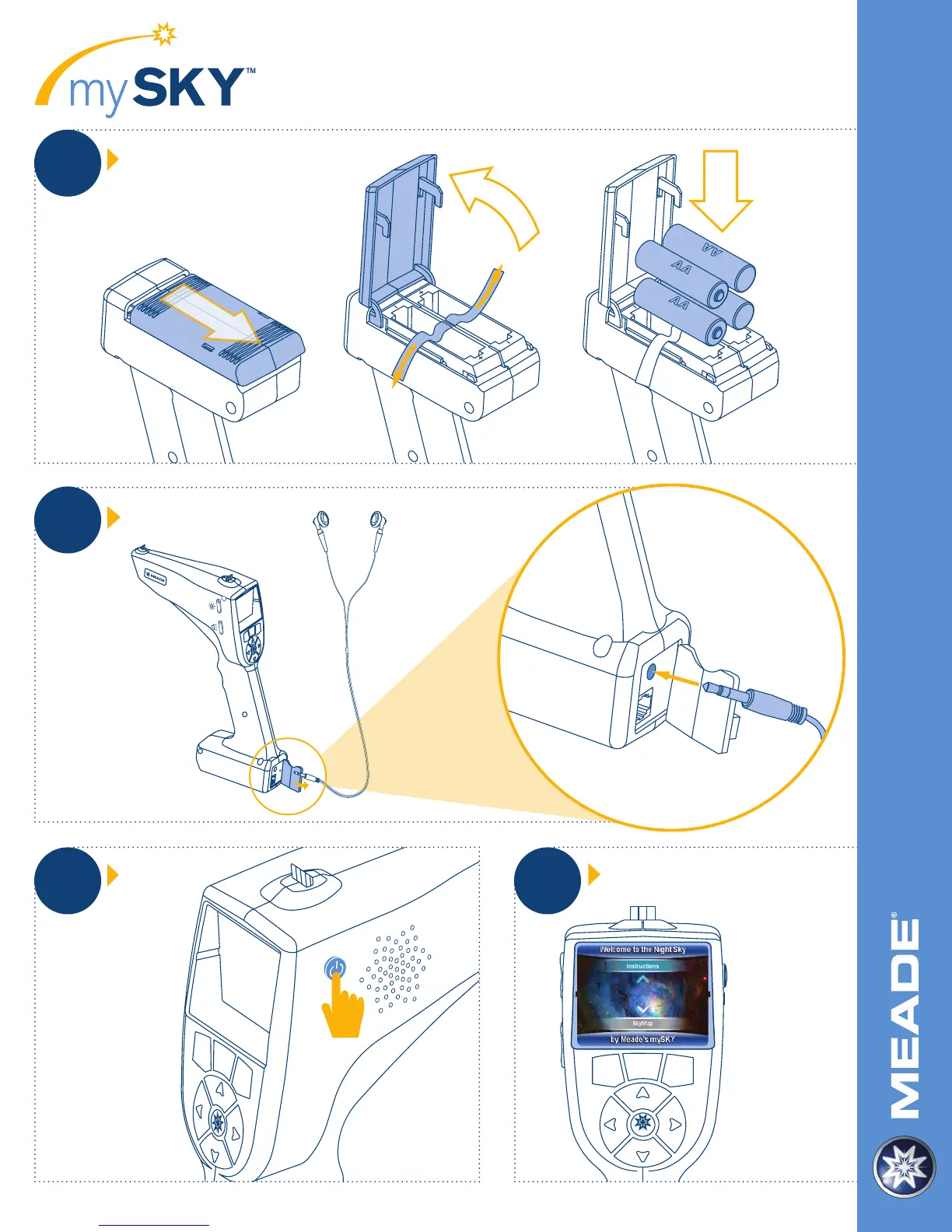
Meade mySKY - Quick Start Guide: Step-by-Step; Install Batteries; Connect Headphones; Power On and Initial Selection

Meade mySKY
12 pages
Print Icon
To Previous Page IconTo Previous Page
Loading...
34%0
05,,25""%2#/6%2/&&
&2/-(%!$3%4*!#+).3%24
(%!$3%40,5')&53).'
).3)$%2%-/6%2%$#/6%2
34%0
452./."902%33).'0/7%2"544/.
STEP
1
34%0
05,,25""%2#/6%2/&&
&2/-(%!$3%4*!#+).3%24
(%!$3%40,5')&53).'
).3)$%2%-/6%2%$#/6%2
QUICK START GUIDE
For technical support, please call: (800) 626-3233
Install Batteries
Connect Headphones
Power On
Choose Instructions or SkyMap
PRESS
STEP
2
STEP
3
STEP
4
Slide door forward
and flip open.
Open rubber cover.
Plug headphone jack
into headphone port.
Press power button
to power on.
Choose Instructions
to view introduction
video or SkyMap
to start exploring.

Related product manuals