7
www.thetenscompany.co.uk Telephone: 0800 121 4626
CHARGING INSTRUCTIONS
Before using your Premier TENS & Muscle Stimulator please charge the unit, as
follows:
Charging your TENS device.
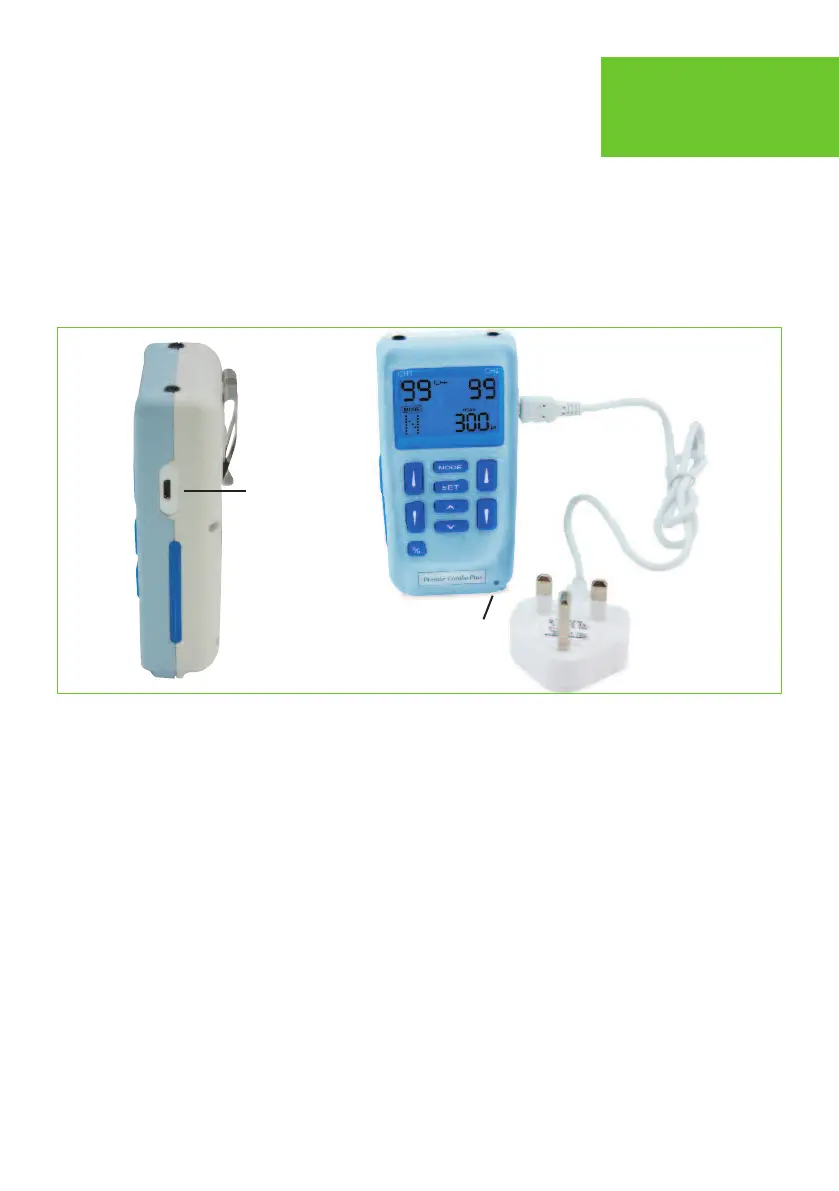
Connect the USB cable to the AC adaptor or USB port as shown in figure 1.
Now connect the USB cable directly into the USB socket, which is located on the right
hand side of your Premier TENS.
A red indicating light will be seen in the bottom right hand corner of your TENS device.
We recommend you charge the device for approximately 2 hours. Once fully charged
the unit will be ready for use and the LED charging light will turn to green, this indicates
the unit is fully charged. Remove the USB charging lead from your TENS device and
disconnect from the mains supply or USB port. Please store your adaptor and cable in
the carry case provided when not in use.
Charging
Port
fig1
LED indicator
Important information The USB charging cable connects to TENS charging port as
shown in fig 1 (Please ensure you connect the cable the right way round)


 To Next Page