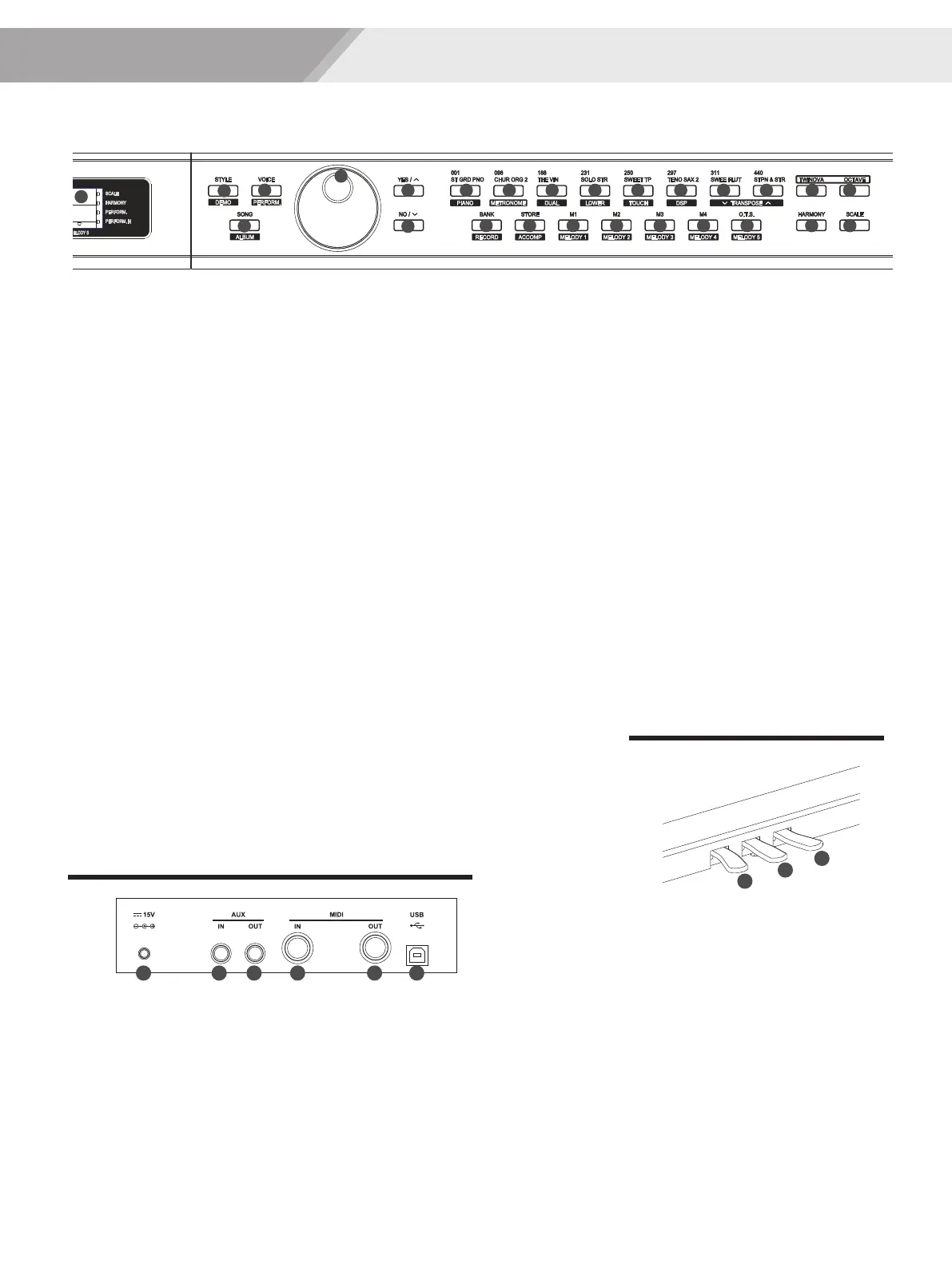
Panel & Display Description
5
Rear Panel
46. DC IN Jack
Connect the DC 15V
power adaptor.
47. AUX. IN Jack
Connect an external sound
source, such as an Mp3 or
CD player.
48. AUX. OUT Jack
Connect the audio equipment.
52. Soft Pedal
When you step on the soft pedal, all
notes played on the keyboard will
have a softer effect.
53. Sostenuto Pedal
When you step on the sostenuto
pedal, the notes played before you
step on the pedal would have a
sustain effect.
54. Sustain Pedal
(multi function pedal)
Use this pedal to sustain the sound.
It also supports the half-pedal
operation. Performing with the sustain
pedal will achieve a smooth effect.
Pedal
20. LCD
Display the information of the piano
24. Data dial
Adjust the value
25~26. [YES/+]/[NO/-] button
Adjust the value
35. [TWINOVA] button
Turn the TWINOVA on or off
36. [OCTAVE] button
Set octave in TWINOVA mode
44. [HARMONY] button
Turn harmony effect on or off
45. [SCALE] button
Turn the scale effect on or off
When [SHIFT] button released
21. [STYLE] button
Enter style mode
22. [VOICE] button
Enter voice mode
23. [SONG] button
Enter song mode and play songs
27~34. Voice direct button
Shortcut to select a voice
37. [BANK] button
Adjust the memory bank
38. [STORE] button
Register the current panel settings
39~42. M1~M4 button
Recall the registered panel settings
43. [O.T.S] button
Turn one touch setting on or off
24
25 27
26
28 29 30 31 32 33 34 35 36
37 38 39 40 41 42 43 44 45
23
22
20
21
When [SHIFT] button pressed
21. [DEMO] button
Enter demo mode
22. [PERFORM] button
Enter the Performance Assistant
mode
23. [ALBUM] button
Enter album mode
27. [PIANO] button
Select the piano mode
28. [METRONOME] button
Turn the metronome on or off
29. [DUAL] button
Turn the Voice R2 on or off
30. [LOWER] button
Turn the Voice L on or off
31. [TOUCH] button
Choose a keyboard touch setting
32. [DSP] button
Turn the DSP effect on or off
33~34. [TRANSPOSE+/-] button
Adjust the transpose
37. [RECORD] button
Enter record mode
When [SHIFT] button pressed
38. [ACCOMP] button
Select the accomp track to record
39~43. MELODY 1-5 button
Select the melody1-5 track to record
49 50
52
53
54
5146 47 48
49. MIDI IN
Connect the MIDI OUT of external
device to the MIDI IN terminal on
the rear panel.
50. MIDI OUT
Connect the MIDI IN of external
device to the MIDI OUT terminal
on the rear panel.
51. USB Jack
Connect to a computer.
0
5
25
75
95
100
AW_DP330_Manual_G06_150420
2015420 10:28:32


 To Next Page