EasyManua.ls Logo

Mediana P10 - User Manual

Mediana P10
87 pages
Print Icon
To Next Page IconTo Next Page
Loading...
OPERATOR’S MANUAL
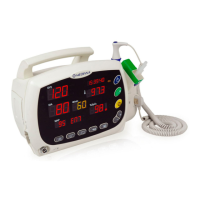
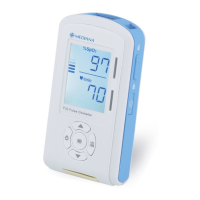
P10 Pulse Oximeter
ȱ
ȱ
ȱ
ȱ
ȱ
ȱ
ȱ
ȱ
ȱ
ȱ
ȱ
ȱ
ȱ
ȱȱ
ȱŘŖŖŖȱǯǯȱ
ǰȱŘśȱȬȱŘŞŖŗŘȱȱȱ
ȱ
ȱ
ȱǯǰȱǯȱ
ȱȱ¢ȱǰȱŗŜśŖȬŗȱȬǰȱ
ȬǰȱȬǰȱȬǰȱȱ
DZȱǻŞŘǼȱŘȱśŚŘȱřřŝśȱ ȱ ǻŞŘǼȱřřȱŝŚŘȱśŚŖŖȱ
¡DZȱǻŞŘǼȱŘȱśŚŘȱŝŚŚŝȱ ȱ ǻŞŘǼȱřřȱŝŚŘȱśŚŞřȱ
ȱ
ŗŖȱȂȱȱ
ȱDZȱŖśŖşȱ
ȱȬDZȱŝŗřŜȬȱ
ȱȱȱ
¢ȱȚȱŘŖŖşȱȱǯǰȱǯȱȱȱǯȱ

Other manuals for Mediana P10

Questions and Answers

Summary

Safety Information

Warnings and Cautions

Alerts users to potential serious outcomes and equipment damage.

Introduction

Intended Use

Details the purpose and recommended environments for the P10 pulse oximeter.

Cautions

Operational and Electrical Precautions

Details specific precautions regarding operation, storage, fluids, and electrical safety.

Safety Information

Warnings

Alerts users to potential serious outcomes like death or injury to patients or users.

Cautions

Equipment and Fluid Precautions

Details precautions regarding equipment use, fluid spills, and battery replacement.

Introduction

Intended Use for the P10 Pulse Oximeter

Details the purpose and recommended environments for the P10 pulse oximeter.

Description of the P10

Front Panel Controls

Identifies and describes the buttons and display elements on the front of the unit.

Rear Panel Components

Battery Cover

Identifies the battery cover on the rear panel.

Right and Left Panel Components

Hold Key and Speaker

Describes the hold key and speaker on the side panels.

Top and Bottom Panel Components

Sensor and Data Ports

Identifies the SpO2 sensor port and data port connector.

Display

Display Elements

Explains the various indicators and values shown on the P10 display.

Setting Up the P10

Unpacking and Inspection

Provides instructions for examining the unit upon receipt and handling potential damage.

Battery Placement

Inserting Batteries

Provides step-by-step instructions for correctly installing batteries into the unit.

Sensor Connection

Connecting the SpO2 Sensor

Details the procedure and precautions for attaching the SpO2 sensor.

Battery Operation

Low Battery Indication

Describes the visual and audible alerts for low battery power.

Using the P10

Patient Monitoring Precautions

Covers essential warnings about patient surveillance, accessory use, and sensor application.

Turning on the P10

Power-on Sequence and Self-Test

Details the procedure for powering on the P10 unit and initial checks.

Sensor Attached

Pulse Search and Finger Off Indicators

Explains indicators when searching for pulse and when the sensor is off the patient.

No Sensor Attached

Sensor Off Indicator

Describes the indicator displayed when the sensor is not connected to the P10.

Interference

Interference Indicator

Explains the interference indicator and its potential impact on measurements.

Sensor Failure

Sensor Failure Indicator

Describes the sensor failure indicator and when it appears.

Loss of Pulse

Loss of Pulse Indicator

Explains the loss of pulse indicator when the SpO2 signal is not detected.

Setting Date;Time

Date and Time Configuration

Provides instructions on how to set the date and time on the P10 unit.

Audible Alarm Indication

Alarm Tone Characteristics

Details the tone pitch and beep patterns for different alarm priorities.

Verifying Visual and Audible Alarm Indication

Alarm Function Test

Provides a test procedure to verify alarm functionality.

Setting Alarm Limit

%SpO2 Alarm Limits

Details how to set the lower and upper alarm limits for SpO2.

%SpO2 Alarm Limits

Setting Low Alarm Limit

Guides the user through setting the current and changing the low SpO2 alarm limit.

%SpO2 Alarm Limits

Setting High Alarm Limit

Guides the user through setting the current and changing the high SpO2 alarm limit.

Pulse Rate Alarm Limits

Setting Pulse Rate Alarms

Details how to set the lower and upper alarm limits for pulse rate.

Audible Alarm Silence Indication

Silencing Audible Alarms

Explains how to silence audible alarms and switch between silence states.

Beep Silence Indication

Silencing Beep Tones

Explains how to silence beep tones and manage silence states.

Menu Structure

SEL1-SEL7 Overview

Summarizes the menu structure for setting alarms, modes, and intervals.

Using the Data Port

Overview and PC Connection

Details how patient data is stored and obtained via the data port and PC.

Connecting the Data Port

RS-232 Cable Connection

Explains how to connect the P10 to a PC using an RS-232 cable.

Menu Structure

Menu Options Overview

Provides a detailed list of menu selections for configuration and data management.

Using the Data Port

Data Transmission to PC

Details the process of transmitting patient data to a connected computer.

Transmitting the Patient Data

RS-232 Setting Menu

Guides the user through configuring the RS-232 settings for data transfer.

Trend Data

Viewing Trend Data Table

Explains how to view patient trend information in a tabular format on the PC.

Error Condition

Error Codes and Troubleshooting

Lists error codes and provides guidance for resolving common issues.

Trend Data Saving Time Interval Set Menu

Setting Trend Data Interval

Details how to adjust the time interval for saving trend data.

Spot Check Trend

Viewing Spot Check Data

Explains how to view spot check trend information by ID.

Maintenance

Recycling and Disposal

Provides guidance on recycling and disposing of the unit and its components.

Returning Unit for Service

Details the procedure for returning the P10 and accessories for repair or service.

Service

Periodic Safety Checks

Recommends performing safety checks every 24 months for optimal performance.

Cleaning

Surface Cleaning Procedures

Details how to safely clean the unit's exterior surfaces.

Battery Maintenance

Battery Handling Precautions

Provides essential precautions for handling, charging, and storing batteries.

Troubleshooting

Corrective Action for Common Issues

Lists common problems and suggestions for corrective actions.

Troubleshooting Alarms

Alarm Condition Checks

Provides a table to check and resolve common alarm conditions.

EMI (Electromagnetic Interference)

Interference Precautions and Compliance

Details precautions regarding electromagnetic interference and device compliance.

Obtaining Technical Assistance

Support Contact and Information

Provides guidance on contacting technical support and ordering manuals.

Technical Information

Principles of Operation

Explains the underlying technology and principles of pulse oximetry used by the unit.

Factory Defaults

Parameter Ranges and Defaults

Lists the configurable parameters and their default settings.

Specification

Display and Controls Specification

Details the screen size, type, and the unit's control buttons.

Electrical and Battery Specs

Provides specifications for the unit's electrical requirements and battery performance.

Environmental Conditions

Operating and Storage Conditions

Specifies the temperature, humidity, and altitude ranges for operation and storage.

Tone Definition

Alarm Tone Characteristics

Details the tone pitch, pulse width, and repetitions for different alarm priorities.

Tone Definition

Alarm Reminder and Key Beep Tones

Details tone characteristics for alarm reminders, key beeps, and POST tones.

Performance

%SpO2 and Pulse Rate Performance

Details the range and accuracy for SpO2 and pulse rate measurements.

Trends

Trend Data Types and Format

Describes the types of trend data stored and its tabular format.

Compliance

Medical Device Directives and Standards

Lists compliance with various medical device directives and quality system standards.

Compliance

Biological, Electromagnetic, and Reliability Standards

Details compliance with standards for biological evaluation, EMC, and reliability.

Compliance

Labeling and Marking Standards

Lists compliance with standards for device labeling and marking requirements.

Manufacturers Declaration

Electromagnetic Emissions

Declares compliance with electromagnetic emission standards and the suitable environment.

Electromagnetic Immunity

ESD, Transients, Surge, and Voltage Variations

Details immunity levels for electrostatic discharge, transients, surge, and voltage variations.

Electromagnetic Immunity

Power Frequency Fields and RF Immunity

Details immunity levels for power frequency magnetic fields and conducted RF.

Electromagnetic Immunity

Radiated RF Immunity Guidelines

Details immunity levels for radiated RF fields and guidance on separation distances.

Recommended Separation Distances

RF Equipment Separation Guidelines

Provides recommended separation distances based on transmitter power for RF equipment.

Cables (IEC60601-1-2)

Cable Compliance

Lists compliance of non-terminated RS-232 and SpO2 sensor cables with EMC standards.

Mediana P10 Specifications

General IconGeneral
BrandMediana
ModelP10
CategoryMedical Equipment
LanguageEnglish

Related product manuals