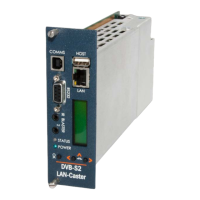
Front panel operation
The front panel LCD can be used with the three adjacent push buttons to view status information and congure the
operation of the unit.
The < (LEFT) and > (RIGHT) buttons scroll up and down
the menus, and change parameter values. The OK
button selects the currently displayed menu item or
conrms a parameter change.
Pressing the < (LEFT) and > (RIGHT) buttons and
releasing them together returns up a menu level,
usually aborting a parameter change.
The upper line of the LCD display (right column)
shows the setting name, and the lower line (left column)
shows the parameter itself and any instructions on how
to change the current setting.
Pressing the < (LEFT) and > (RIGHT) and OK buttons
for 5 seconds and releasing them together will present
a unit RESET option. Pressing the OK button to conrm
will then reboot the encoder.
Front Panel LEDs
Status LED
Green steady: Normal operation
Green pulse: RF input fail or Streams turned o
(see LCD for error condition)
Green/Orange: Unit locator mode on
Orange pulse: Unit booting up
Red steady: Internal error / unit failure
Red pulse: Software upgrade in progress
Power LED
Blue steady: Unit Power on
The structure of the menus presented on the
LCD are as follows:
Part Number and Status
• View unit model number and current operational
status
RF Input status
• View incoming RF details; (Signal level / S//N Ratio /
Mux name / Mux frequency)
Output streams
• View stream details; (Channel No. / Channel name /
Stream address / Port No.)
CAM Status
• CAM present / not present
IP address settings
• DHCP (activate/show allocated address)
• Static IP address (activate/show static IP address)
• View/Edit IP address
• View/Edit Netmask
• View/Edit Gateway address
• View/Edit DNS address
• Network Link
IR Blaster Repeat
• Turn on / o IR Blaster repeat function
Unit details
• MAC address
• Serial number
• Software version number
Locator LED
• Turn on unit locator front panel LED
Help
• Various help topics
MediaStar 782-DS Digital Media Player
Quick Start Guide
783 DVB Lan-Caster Unit
200-2342_v2
6/12


 To Next Page