Cleaning Instructions
To clean a Mediatrix unit, wipe with a soft dry cloth.
Caution: Do not use volatile liquids such as benzine and thinner as they can damage the unit's casing.
For resistant markings, wet a cloth with a mild detergent, wring well and then wipe off. Use a dry cloth to dry the surface.
Top
Mounting Tools and Equipment
Tools
ESD wrist strap
Equipement
RJ-45 cables for the WAN and LAN connections
RJ-11 cable for telephony connections
Top
Connectors and Indicators
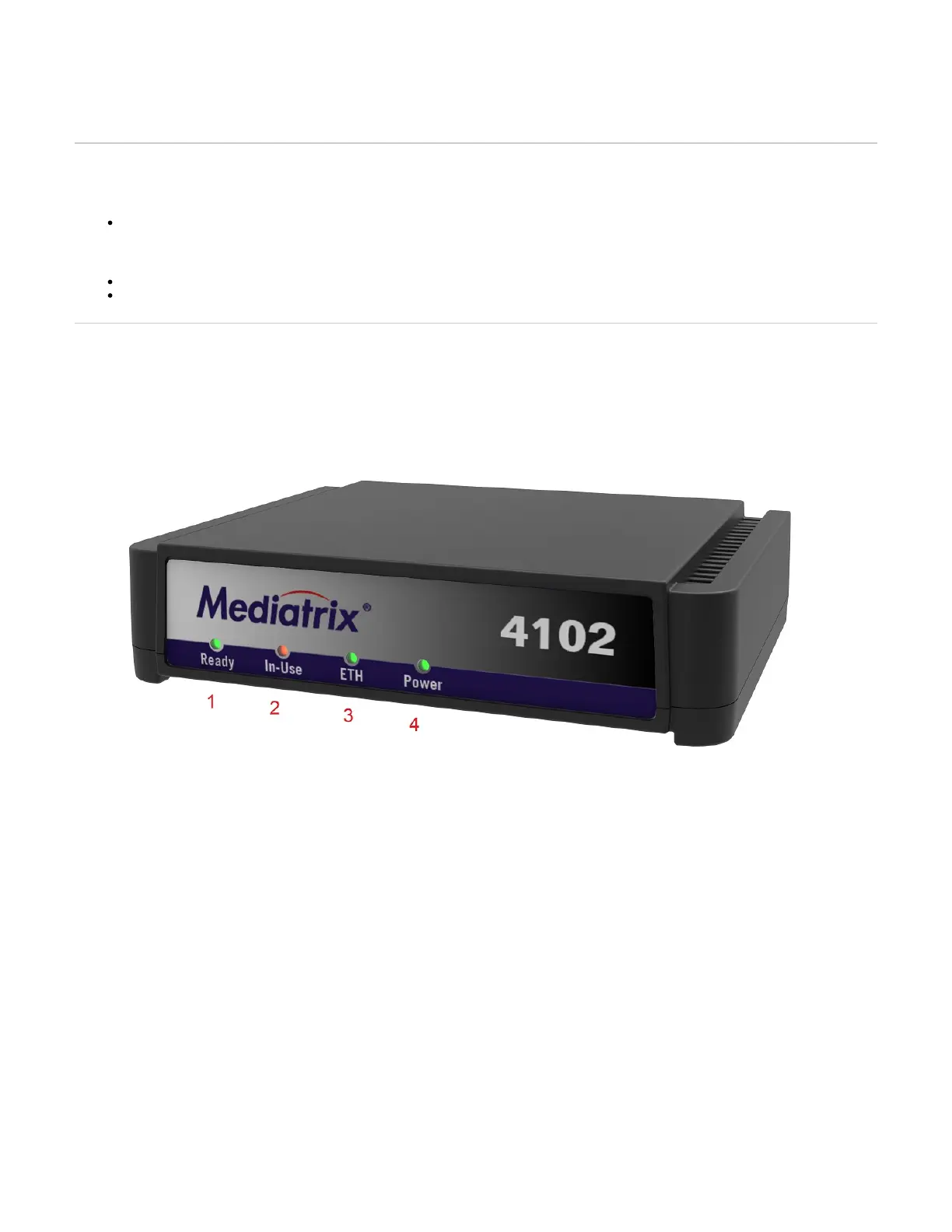
LEDs
# LED Behavior Condition
1 Ready
Green, steady ON All lines are enabled (operational state)
OFF All lines are disabled (operational state)
Blinking 1 cycle per 4 seconds, 75% duty At least one line is enabled and at least one line is disabled (operational state)
2 In-Use
OFF Lines idled and unlocked
Steady ON Lines in use and unlocked
Steady yellow Shutting down
Yellow, blinking yellow, 1 cycle per second, 50% duty Locked
3 ETH
Green, blinking, variable rate Network traffic
Green, steady ON No network traffic
OFF Not connected
5 Power
Amber, steady ON Restart completed
OFF Indicates that the unit is not connected
Blinking, 1 Hz, 50% duty Restart in progress
Switches


 To Next Page