POWER METER
6
Using the Medicus
Power Meter
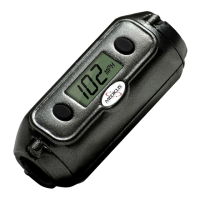
Once the power meter has been
configured, all you need to do is
swing the club. Every time you
take a swing, your swing power
number will be shown. If you
want to save your reading, you
can press the right button, and
enter it into memory.
If you don’t swing the club or
press any buttons for 40
seconds, the meter will go into
“standby mode”. You can “wake
up” the meter for your next
swing, (bring it back to ‘ready
mode”) by pressing the left
button.
Using the
Memory Mode
The Medicus PowerMeter™
comes with a built in memory to
let you store up to five of your
swing speed-readings. This can
come in handy for later review.
To enter “Memory Mode”, press
the left button.
Once in “Memory Mode”, the last
reading will flash. To save the
reading, press the right button.
Pressing the left button will move
to the next memory location. If
no buttons are pressed within
four (4) seconds, then the
PowerMeter™ will automatically
return to the “Ready” mode.


 To Next Page