INSTRUCTIONAL MANUAL
Button Overview
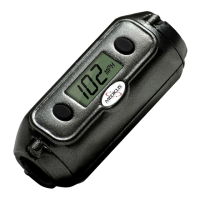
The Medicus PowerMeter™
comes with a built in memory to
let you store up to five of your
swing speed-readings. This can
come in handy for later review.
To enter “Memory Mode”, press
the left button.
Once in “Memory Mode”, the last
reading will flash. To save the
reading, press the right button.
Pressing the left button will move
to the next memory location. If
no buttons are pressed within
four (4) seconds, then the
PowerMeter™ will automatically
return to the “Ready” mode.
Changing the Battery
The Medicus PowerMeter™ is
powered by two (2) Lithium 3
volt batteries. You can use
Energizer CR2032, Duracell
DL2032, or equivalent batteries.
To replace the batteries, simply
remove the two Phillips head
screws on the back of the meter,
and lift up the cover. Make sure
you use the proper orientation
(the + or positive faces up), then
replace the cover. As with any
Lithium battery, make sure you
dispose of the used batteries
properly.
7


 To Next Page