D-0123003-B 05/2019
Masking for Pure Tone Audiometry
There are several accepted methods for masking. This manual will not promote one over
another, however, to use the masking function on the AVANT Audiometer, follow the
steps below:
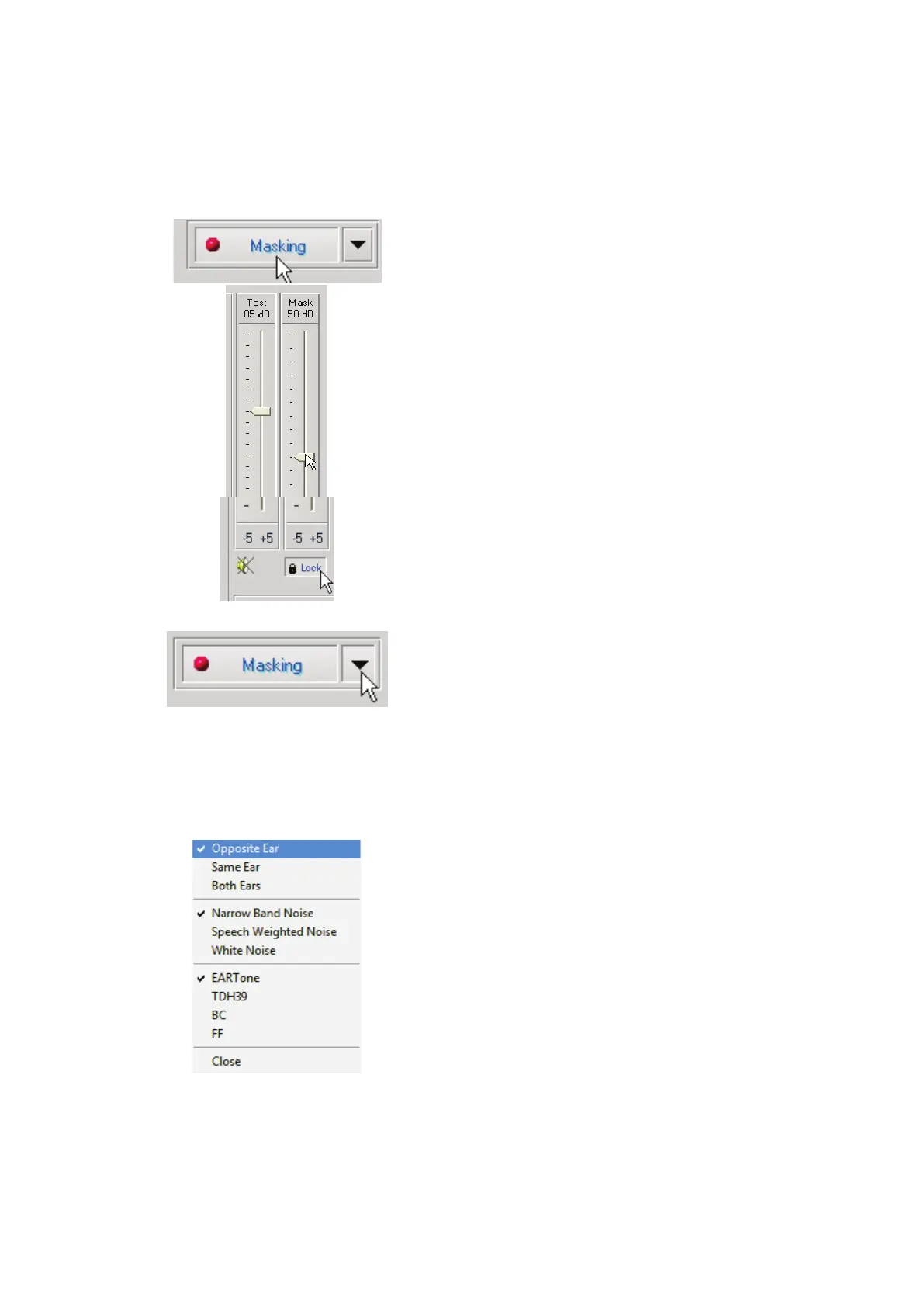
1. Click the Masking button. The red light will
appear indicating that the masking is on.
2. Use your mouse to adjust the Masking Level
slider shown on the left to the appropriate
level based on your preferred method of
masking.
3. If you wish to maintain the balance of signal
and masking (for example, masking always
30 dB above the signal), Click the Lock
button after setting the masking and signal
levels.
4. The default for pure tone audiometry is to
deliver narrow band masking to the ear
opposite the test ear. If you wish to use a
different stimulus, or route the masking to
the same or both ears, Click on the arrow to
the right of the Masking On button.
5. Use your mouse to select the new masking
type and routing for your specific
application.
6. When you are finished making changes to
the Masking, Click Close.


 To Next Page