D-0123003-B 05/2019
Performing the Tinnometer Testing:
• Click the Tinnometer button from
the main Avant Audiometer main
screen.
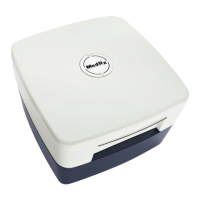
The following screenshot shows the key features of the Tinnometer:
1. Toggle Switch to Start/Stop
stimulus
2. Sliders to control frequency,
bandwidth, slope and tempo of the
stimulus
3. Slider to control the intensity of the
stimulus
4. Buttons used in determining
tinnitus match, threshold and
minimum masking level
5. Area where description of items will
be displayed
6. Channels designed to present
multiple types of tinnitus sounds
7. A graphical display of the sounds being played for the patient. Stimulus and
Audiogram (if done within Avant or Noah) are display in dB SPL
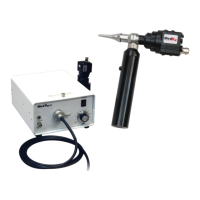
Interactions with the patient are controlled as follows:
1. Patient response switch indicator
2. Patient monitor microphone
5. Toggle help section


 To Next Page