
 Need help?
Do you have a question about the MEE H6D and is the answer not in the manual?
How to charge the headset using the provided dock and USB cable.
How to charge the headset directly via a USB port.
Explains functions like power, call handling, and voice commands.
Controls volume and track skipping during media playback.
Information on how to get further assistance and setup guides.
Guidelines for cleaning, battery care, and usage in extreme temperatures.
Details about the product's 1-year manufacturer warranty coverage.
Crucial safety information regarding volume, handling, and modifications.
Details on FCC compliance and interference mitigation measures.
Instructions for responsible disposal of the product and its battery.
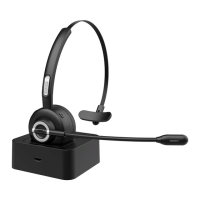
The MEE audio H6D Bluetooth Wireless Headset with Dock and Boom Microphone is a versatile communication device designed for ease of use and comfort, offering both wireless freedom and convenient charging options. This headset is engineered to provide a reliable audio experience for calls and media playback, making it suitable for various environments.
The H6D headset serves as a wireless audio solution, primarily for communication and media consumption. It connects to compatible devices via Bluetooth, allowing for hands-free operation. The integrated boom microphone is designed to capture clear audio during calls, ensuring effective communication. The headset also features controls for managing calls, adjusting volume, and controlling media playback directly from the earpiece. A dedicated charging dock is included, providing a convenient and organized way to recharge the headset when not in use. The headset is powered by Bluetooth technology, ensuring a stable and efficient wireless connection.
Package Contents: The H6D package includes the H6D Bluetooth wireless headset, a charging dock, and a Micro-USB charging cable, providing everything needed to get started.
Headset Overview: The headset features several intuitive controls and indicators. The Volume Down button (A) and Volume Up button (F) allow for audio level adjustments. A Status Indicator Light (B) provides visual feedback on the headset's operational status, such as pairing mode or low battery. The Micro-USB Charging Port (C) is available for direct charging, while the Charging Dock Connector (D) facilitates charging via the included dock. A Multifunction Button (E) handles various call and media controls. The Microphone (G) is a boom-style mic for clear voice pickup.
Charging Dock Overview: The charging dock includes a Headset Dock Connector (H) where the headset rests for charging. A Power Indicator Light (I) on the dock confirms that it is receiving power, and a Micro-USB Power Port (J) is used to connect the dock to a power source.
Charging: The headset indicates a low battery with a flashing red status indicator light and a "battery low" voice notification every five minutes. A full charge takes approximately 2 hours, after which the red status indicator light on the headset turns blue.
Pairing: To pair the headset with a device, press and hold the Multifunction button for about 8 seconds until the status indicator light flashes red and blue. The headset enters pairing mode automatically on first use or after being reset. To complete the pairing process, open the Bluetooth menu on your device (usually found in Settings->Bluetooth), search for new devices, and select "MEE audio H6". If a PIN is required, use "0000". The headset only needs to be paired once with each device.
Reconnecting to Paired Devices: The H6D stores previously paired devices and automatically reconnects with the last paired Bluetooth device when powered on. If automatic reconnection fails, open the Bluetooth menu on your device and select "MEE audio H6" from the list of available Bluetooth devices.
Wearing: The headset is designed for adjustable comfort. The boom microphone can be adjusted for use on either the left or right ear. The headband can also be adjusted to a comfortable length to ensure a secure and ergonomic fit.
Multipoint Functionality: The H6D supports multipoint functionality, allowing two Bluetooth devices to be connected simultaneously. To use this feature, first pair each device individually as described in the Pairing section, then power the headset off. When powered on again, the headset will attempt to connect to both devices. If one device does not connect automatically, select "MEE audio H6" from its Bluetooth menu. To switch between connected devices, pause audio playback on the active device and start playback on the other; the audio may take up to 30 seconds to switch. Incoming calls always take precedence over media, automatically activating the connected device with the incoming call.
Clear Memory (Delete Paired Devices): To delete all previous Bluetooth pairings from memory, power on the headset, then press and hold the Volume Up and Volume Down buttons simultaneously for 5 seconds until the status indicator light flashes pink. After clearing the memory, a new pairing will be required before the H6D can be used again.
 General
| Wearing style | Circumaural |
|---|---|
| Driver Type | Dynamic |
| Frequency Response | 20 Hz - 20 kHz |
| Impedance | 32 Ohms |
| Cable Length | 1.2 m |
| Connector | 3.5mm |
| Sensitivity | 96 dB (1mW/1kHz) |
| Ear Coupling | Over-ear |

 To Next Page
